Now it's down for everyone. Can you upload this program, please?

Navigation
Install the app
How to install the app on iOS
Follow along with the video below to see how to install our site as a web app on your home screen.
Note: This feature may not be available in some browsers.
More options
-
 Welcome to SpeedSolving.com — the world’s largest puzzle community!
You’re currently browsing as a guest, which means you have limited access to discussions, resources, member profiles, and community features.
Join 50,000+ cubers and puzzle enthusiasts from around the world to ask questions, share solves, improve faster, and be part of the community.
Registration is free, fast, and easy — create your account today.
Already a member? Log in here to hide this message and start participating.
You are using an out of date browser. It may not display this or other websites correctly.
You should upgrade or use an alternative browser.
You should upgrade or use an alternative browser.
Cube Explorer 5.00 released - with slice moves
- Thread starter Herbert Kociemba
- Start date

abunickabhi
Legend
No it doesnt help, he was asking for a way to generate that subset using cube explorer, and not more information or a video on it.Does this help?
There are 8 possible cases of edge orientation. I want to generate optimum and 2 gen algs for them. I'm just not sure how to do it.
Just use trial and error to figure out each case and decide for yourself.

Herbert Kociemba
Veteran
- Joined
- Nov 29, 2008
- Messages
- 302
Using left-click, right-click and ctrl+left-click you can get
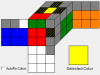
which would be your R U R' setup. With "Add and Solve" you then find maneuvers for this. You can exclude some faces if you want. By changing the locations of the diagonal pattern you can get the other 7 cases, for example

which would be your R U R' setup. With "Add and Solve" you then find maneuvers for this. You can exclude some faces if you want. By changing the locations of the diagonal pattern you can get the other 7 cases, for example
Last edited:

AvGalen
Premium Member
Nice answer to split the problem into 8 sets and have Cube Explorer generate algs for each set. I wouldn't have thought of this approach, but of course mr. Cube Explorer knows best! Interesting to see this answer appearing 7 years laterUsing left-click, right-click and ctrl+left-click you can get
View attachment 9357
which would be your R U R' setup. With "Add and Solve" you then find maneuvers for this. You can exclude some faces if you want. By changing the locations of the diagonal pattern you can get the other 7 cases, for example
View attachment 9360
 . There have been a few other "can I use Cube Explorer to generate algs for situation x" threads lately. Maybe you can have a look there as well?
THERAGINGCYCLOPS
Regular
- Joined
- Mar 27, 2018
- Messages
- 99
That's essentially VHLS. There's no need to generate that because there's all really intuitive algs with sledges
If you want to insert pair and flip edges at the same time, you could use ZBLS but there's a ton of algs
If you want to insert pair and flip edges at the same time, you could use ZBLS but there's a ton of algs

_zoux
Regular
- Joined
- Mar 11, 2018
- Messages
- 101
ZBLS is solving last slot and orienting edgesIf you want to insert pair and flip edges at the same time, you could use ZBLS but there's a ton of algs

For those of you who use Cube Explorer to find algorithms, I have noticed some serious errors in the program that prevent it from finding the optimal algorithms for certain cases. In some cases it doesn't even come close to finding the optimal algorithm. I have attached an image using version 5.13, showing two Waterman/LMCF cases where it fails to find the optimal algorithm, in one of the cases it isn't even close. I have noticed this effect over the last 2 years and I thought the events were just occasional bugs, but after generating hundreds of algorithms I have now found that as much as 1 in 5 cases I can find algorithms by hand that are faster and never found by the program. Please note that sometimes algorithms are obscured by preceding U/U' or M/M' or R/R' L/L' and you need to look further down the list to see these 'hidden' variants with setup moves, but I assure you I have already taken that into account and if you play with the two examples in the image, you'll see what I mean.
If for some reason you can't view the image, try this scramble:
M' D' M' U M D M' U' M2
This is a scramble for Waterman Set 2 where you solve UR+DR while orienting the midges.
The shortest algorithm and fastest was found by hand:
M2 U M D' M' U' M D [8]
If you insist on correcting the centers like cube explorer does, then the solution adds M:
M2 U M D' M' U' M D M [9]
However if you plug this case into cube explorer the shortest algorithms it finds are 10 moves, and at no point will it find the above algorithm. This is one of dozens of such cases. I have been working on the latest revision to the LMCF method and now as many as 20% of the algorithms have been found by hand, since they can't be found by cube explorer. As I understand it this is the utility that most people use to generate algorithms, and it makes me wonder if ZBLL, OLLCP, VLS or any of the big sets are actually optimal, there could be hundreds of amazing algorithms never found. If you know of any utility that can actually find the correct algorithm in the two cases provided, please let me know.
See attached image.
If for some reason you can't view the image, try this scramble:
M' D' M' U M D M' U' M2
This is a scramble for Waterman Set 2 where you solve UR+DR while orienting the midges.
The shortest algorithm and fastest was found by hand:
M2 U M D' M' U' M D [8]
If you insist on correcting the centers like cube explorer does, then the solution adds M:
M2 U M D' M' U' M D M [9]
However if you plug this case into cube explorer the shortest algorithms it finds are 10 moves, and at no point will it find the above algorithm. This is one of dozens of such cases. I have been working on the latest revision to the LMCF method and now as many as 20% of the algorithms have been found by hand, since they can't be found by cube explorer. As I understand it this is the utility that most people use to generate algorithms, and it makes me wonder if ZBLL, OLLCP, VLS or any of the big sets are actually optimal, there could be hundreds of amazing algorithms never found. If you know of any utility that can actually find the correct algorithm in the two cases provided, please let me know.
See attached image.
Attachments


WoowyBaby
Veteran
TL;DR uncheck BDL boxes
This glitch only happens when using slice moves mode
So big alg sets like ZBLL are not hindered in any way
To fix glitch, allow all faces, meaning leave your B, D, and L boxes unchecked, even if you don’t want them. In your screenshot you had them checked, I’m not sure why Cube Explorer acts this way but it just does
If you’re still having issues, it might be caused by the centers so try every center combination (4) and see which yields the best alg
If nothing works, you might have to try other things like downloading it again or something
Hopefully I helped
(this post was edited)
This glitch only happens when using slice moves mode
So big alg sets like ZBLL are not hindered in any way
To fix glitch, allow all faces, meaning leave your B, D, and L boxes unchecked, even if you don’t want them. In your screenshot you had them checked, I’m not sure why Cube Explorer acts this way but it just does
If you’re still having issues, it might be caused by the centers so try every center combination (4) and see which yields the best alg
If nothing works, you might have to try other things like downloading it again or something
Hopefully I helped
(this post was edited)
Last edited:
You have B, D and L moves restricted. I haven't checked the source code (which was actually publicly released somewhat recently!), but my guess is that the internal representation of move sequences consists of just the six single-layer moves, and the "slice" moves are just stored as L2 R2 or whatever, and only converted to M2 x2 for display. The restriction of B, D and L moves applies to the internal representation, not to whatever the alg looks like after the slice moves are written as slice moves. The checkboxes are greyed out when in slice moves mode, so you'll have to go back to the usual mode first, uncheck those boxes, then go back into slice mode.
Also, use ksolve++ or HARCS or something along those lines if you want to generate MUD algs and the like. Cube Explorer is entirely the wrong tool for this task.
Also, use ksolve++ or HARCS or something along those lines if you want to generate MUD algs and the like. Cube Explorer is entirely the wrong tool for this task.

Thom S.
Veteran
- Joined
- Sep 26, 2017
- Messages
- 1,276
In addition on what WoowyBaby and xyzzy have said, I have two things
First, your best Algorithm always moves the centers. CE doesn't like that as it assumes you want your centers to be like this.
Second, CE won't care if the found algorithms are good, it just gives it to you
First, your best Algorithm always moves the centers. CE doesn't like that as it assumes you want your centers to be like this.
Second, CE won't care if the found algorithms are good, it just gives it to you

asacuber
Veteran
CE is close to optimal but not actually optimal right? idk
It searches only for optimal algs when there are any "wildcards" (greyed pieces, pieces with only orientation specified, pieces with only the colours specified).CE is close to optimal but not actually optimal right? idk
If you specify the whole cube state (which is not the case here), it'll search with the non-optimal two-phase algorithm by default, and you can check the "optimal" checkbox to make it find optimal solutions.
Herbert Kociemba
Veteran
- Joined
- Nov 29, 2008
- Messages
- 302
I am not out of the world and if there are some bugs in CE I will try to fix them. I will not add any additional features to the program any more - just fix bugs or eventually improve the user interface if you can convince me that something is seriously confusing or impractical.
Before I upload a fixed version I would like to know if there are other annoying things which could probably be fixed easily.
Edit: In the fixed version you now can also use the exclude feature when using slice moves. If you exclude B moves for example and you solve a cube with the B face turned you get:
F' E2 S2 E2 S z (5s*)
F' M2 S2 M2 S z (5s*)
S M2 S2 M2 F' z (5s*)
S E2 S2 E2 F' z (5s*)
So you can replace a B move by 5 slice moves.
If you exclude B and F you get for example
L' E' M' E R U' S E S' x' z (9s*)
Edit:
The above is wrong. It's always dangerous to change code which you did not see for years.
S' F' z (2s*)
should be the right answer. I will have to revisit the code.
Before I upload a fixed version I would like to know if there are other annoying things which could probably be fixed easily.
Edit: In the fixed version you now can also use the exclude feature when using slice moves. If you exclude B moves for example and you solve a cube with the B face turned you get:
F' E2 S2 E2 S z (5s*)
F' M2 S2 M2 S z (5s*)
S M2 S2 M2 F' z (5s*)
S E2 S2 E2 F' z (5s*)
So you can replace a B move by 5 slice moves.
If you exclude B and F you get for example
L' E' M' E R U' S E S' x' z (9s*)
Edit:
The above is wrong. It's always dangerous to change code which you did not see for years.
S' F' z (2s*)
should be the right answer. I will have to revisit the code.
Last edited:
Herbert Kociemba
Veteran
- Joined
- Nov 29, 2008
- Messages
- 302
I now made version 5.14 of CE in which hopefully the function for incomplete cubes works correctly also if slice moves are used. You now can also exclude S, M or E moves. You can download it from http://kociemba.org/download.htm
Last edited:
paul.edmondson.magician
Regular
- Joined
- Dec 26, 2016
- Messages
- 34
I'm trying to work on this software, for the latest version. Just getting to grips with it and following some tutorials. When I run it, it doesn't return the most optimum solutions. See screenshot.
Sent from my CLT-L09 using Tapatalk
Sent from my CLT-L09 using Tapatalk

shadowslice e
Legend
Screenshot? But for cube explorer, just blank out one of the pieces and it'll generate all solutions of depth n, then n+1 etc. You should probably also specify orientation for that piece since that allows ce to use bigger pruning tables.
paul.edmondson.magician
Regular
- Joined
- Dec 26, 2016
- Messages
- 34
What it seems to be doing is not putting the double turns as R2 but as R R
Sent from my CLT-L09 using Tapatalk
Better image

I figured it out. Was using the qtm file instead of htm
Sent from my CLT-L09 using Tapatalk
Sent from my CLT-L09 using Tapatalk
Better image
I figured it out. Was using the qtm file instead of htm
Sent from my CLT-L09 using Tapatalk
Last edited:
WoowyBaby
Veteran
You have downloaded the qtm version insetead of the htm version, or you changed some settings in it. You should try downloading the other one from Kociemba's site to get the optimal outputs you're looking for.

brododragon
Veteran
The download has both qtm and htm.You have downloaded the qtm version insetead of the htm version, or you changed some settings in it. You should try downloading the other one from Kociemba's site to get the optimal outputs you're looking for.
paul.edmondson.magician
Regular
- Joined
- Dec 26, 2016
- Messages
- 34
Does it throw out M moves?
Sent from my CLT-L09 using Tapatalk
Sent from my CLT-L09 using Tapatalk
Similar threads


- Replies
- 3
- Views
- 754

- Replies
- 4
- Views
- 843


- Replies
- 9
- Views
- 1,493
