• Welcome to SpeedSolving.com — the world’s largest puzzle community!

    You’re currently browsing as a guest, which means you have limited access to discussions, resources, member profiles, and community features.

    Join 50,000+ cubers and puzzle enthusiasts from around the world to ask questions, share solves, improve faster, and be part of the community.

    Registration is free, fast, and easy — create your account today.

    Already a member? Log in here to hide this message and start participating.

Block Keeper: Cross platform desktop timer


I'm so glad uni is going well! I'd still love to contribute to a Patreon if you made one, as I still really love Block Keeper and would love to see more updates :)
A dev log also seems really cool! I plan on going into college as a comp sci major, so It'd be super interesting to me.
And I definitely can keep the requests/ideas coming ;)
Thanks for the update :D
 
During blind practise, I thought of another 2 things.
First, an option to dnf and switch scrambles without pressing control. I always try to find my mistakes by going back and it can become a lot of keyboard spam. I think when the buttons are far enough away from the space bar you will not hit it on accident.
Second, in bld events, a place where it shows you the success rate of the session, maybe right next to the x/n number of solves. (I don't always want to calculate it over and over again)
 
@DalDal it's been about 6 months, how are things going?
Block Keeper is still my go-to timer, and I still love it :)
Obviously your uni and job work are more important than my timer desires, but do you have any updated estimate of if/when you'll be able to return to this project?
I'd still become a Patron if you set that up—no pressure, though!
 
Things are great. University and work are travelling well and I'm very happy to have my bachelors.

As far as Block Keeper is concerned, I have made no plans. It's a change of focus for what I want to do in my spare time.

At the moment I am more interested in learning and experimenting with technologies that I find interesting, particularly around computer graphics and computer architecture. But Block Keeper and similar applications/websites don't use technologies I want to learn more about so I am not so interested in working on them. Building a revamped version of Block Keeper is interesting from a design perspective (both UI and code structure) but not much further. So at this stage, I would rather work on other more technical projects then continue to develop Block Keeper, which I have little to learn from building in comparison to other projects. I like making new features for the community, but I would rather relax and pursue whatever I would like for the time being.

The other thing is other timers have improved and added features I built Block Keeper to fill. CSTimer now has better session management and features which I wanted and is updated very regularly. I've actually started using it exclusively on one of my computers.

I consider Block Keeper on an indefinite hiatus. I'm open if anyone else would like to takeover the project.
 
Things are great. University and work are travelling well and I'm very happy to have my bachelors.

As far as Block Keeper is concerned, I have made no plans. It's a change of focus for what I want to do in my spare time.

At the moment I am more interested in learning and experimenting with technologies that I find interesting, particularly around computer graphics and computer architecture. But Block Keeper and similar applications/websites don't use technologies I want to learn more about so I am not so interested in working on them. Building a revamped version of Block Keeper is interesting from a design perspective (both UI and code structure) but not much further. So at this stage, I would rather work on other more technical projects then continue to develop Block Keeper, which I have little to learn from building in comparison to other projects. I like making new features for the community, but I would rather relax and pursue whatever I would like for the time being.

The other thing is other timers have improved and added features I built Block Keeper to fill. CSTimer now has better session management and features which I wanted and is updated very regularly. I've actually started using it exclusively on one of my computers.

I consider Block Keeper on an indefinite hiatus. I'm open if anyone else would like to takeover the project.
Thanks for the update! I totally understand where you're coming from. I don't know if I would personally continue the project, but if it's okay I'd love to get the source code and take a look! Even if it's too complex for me, I might learn something.
Thanks for everything you've done, and I wish you the best of luck :)
 
Is there a working download link for this app? I had it on my old computer and loved it but have been struggling to get it to download on my new laptop (Windows 10). Thanks in advance!
 
Is there a working download link for this app? I had it on my old computer and loved it but have been struggling to get it to download on my new laptop (Windows 10). Thanks in advance!
As far as I know, his website is the only place to download Block Keeper, and it's down for me too.
 
Wow one of the best timers! Just one question, can I disable the pop up menu where it asks whether its a OK DNF or a +2 during the blind solves? Also is there some way I can time my memo times during BLD?
 
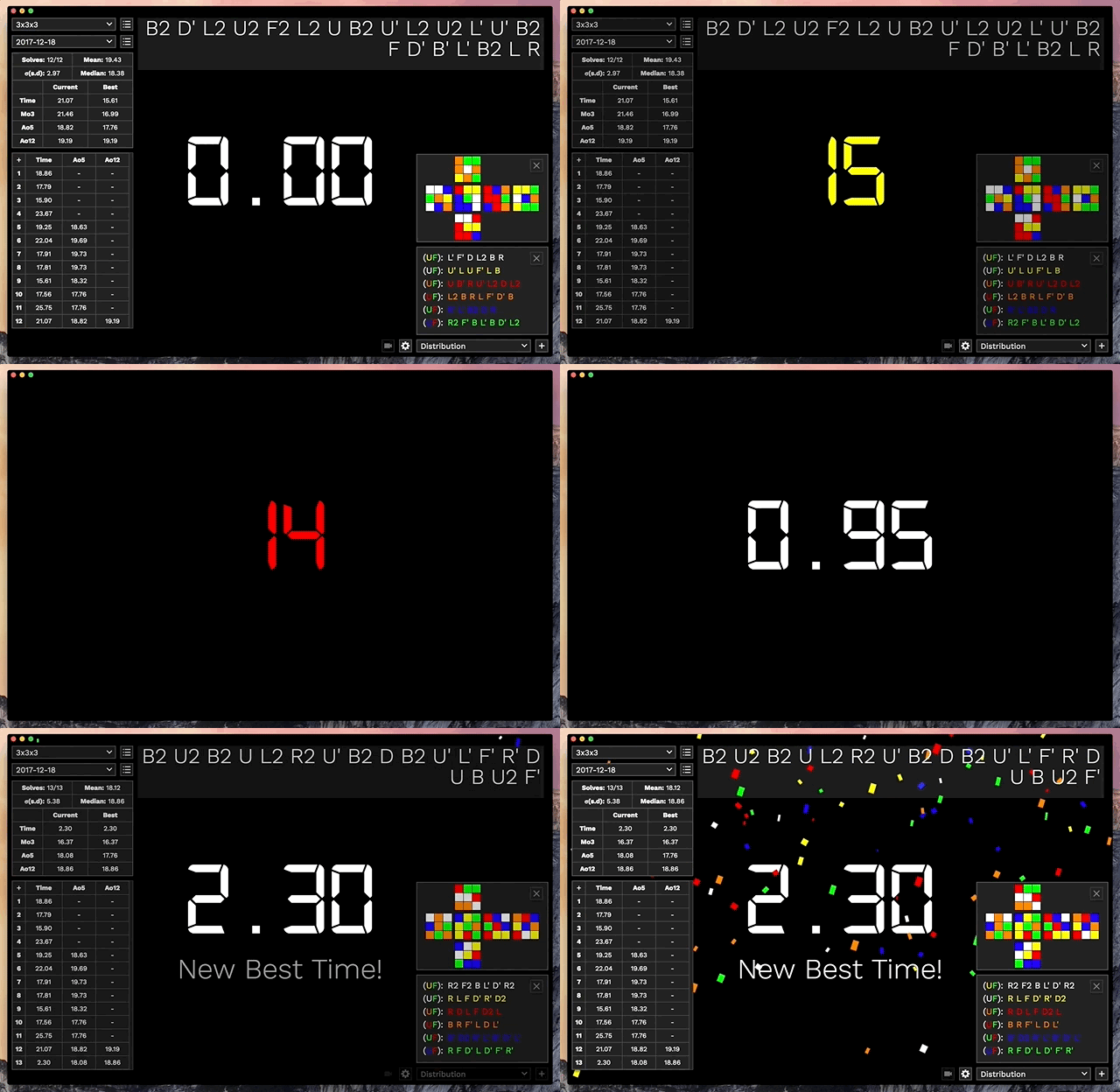
Block Keeper is a standalone, cross platform desktop cubing timer. It provides a simple and clean interface, completely offline, without Java.

Features:
  • Windows, MacOS and Linux support
  • Java not required
  • Completely functional offline, no Internet connection required
  • Event based session organisation
  • Stylish and easy to navigate interface
  • Scramble generation for all WCA puzzles
  • WCA Inspection support with voice announcements
  • Optional split timer controls
  • Multiple interface themes
blockkeeper.gif


I built Block Keeper with session organisation in mind. After selecting which event you will be solving for, the scramble adjusts to it and all newly created sessions will appear only under that event. So only your 3x3 sessions will be shown when you select 3x3 and only your 2x2 sessions will be shown when 2x2 is selected. I don’t know how most people organise their sessions, and I’m sure it’s different for everyone, but this system promotes session organisation across a wide range of events.

Block Keeper uses Github’s Electron, making it incredibly flexible, cross platform with no Java required! Unfortunately the file sizes are much larger than I would like, but Java takes up storage regardless.

Download Here: http://dallasmcneil.com/projects/blockkeeper

A comprehensive user guide is also available. Most of Block Keepers is intuitive to those who have used timers before but there are some neat shortcuts and useful information available if you need it. It also has a roadmap for future development ideas.

User Guide: http://dallasmcneil.com/projects/blockkeeper/guide

Block Keeper is still in development and I’d love some feedback to help make it even better. If you find a bug or want to request a feature let me know. :)

can you make it for iPad
 
Back
Top