Cubeast - a speedcubing timer for Bluetooth cubes with support for all Bluetooth cubes, all timers and all major solving methods

Hey there, been using cubeast on my android tablet (Samsung Tab A7) I installed it via chrome. If I use my gan cubes the animations and times synch pretty well but using my moyu ai the animations take ages to go through, sometimes up to a minute after I finish. When the animation finishes the timer and results page does show the correct time, just a pain having to wait for it to finish before I can carry on... is this likely due to me using cubeast on a tablet??
 
Hey there, been using cubeast on my android tablet (Samsung Tab A7) I installed it via chrome. If I use my gan cubes the animations and times synch pretty well but using my moyu ai the animations take ages to go through, sometimes up to a minute after I finish. When the animation finishes the timer and results page does show the correct time, just a pain having to wait for it to finish before I can carry on... is this likely due to me using cubeast on a tablet??
I've had other users report that as well, I'll be looking into it.
 
Here's a couple more issues I have with Cubeast and I would like to bring to your attention.

1. The video/animation replay feature is great, as I can see where I get bogged down and made mistakes etc. It works fine for normal replays. However, if I rewind and then FF, back and forth a few times, by dragging the blue dot, the slider, sometimes some of the cube pieces displayed would disappear. Maybe their images were not refreshed. See photo attached. Moyu AI Cube and Dell laptop used.

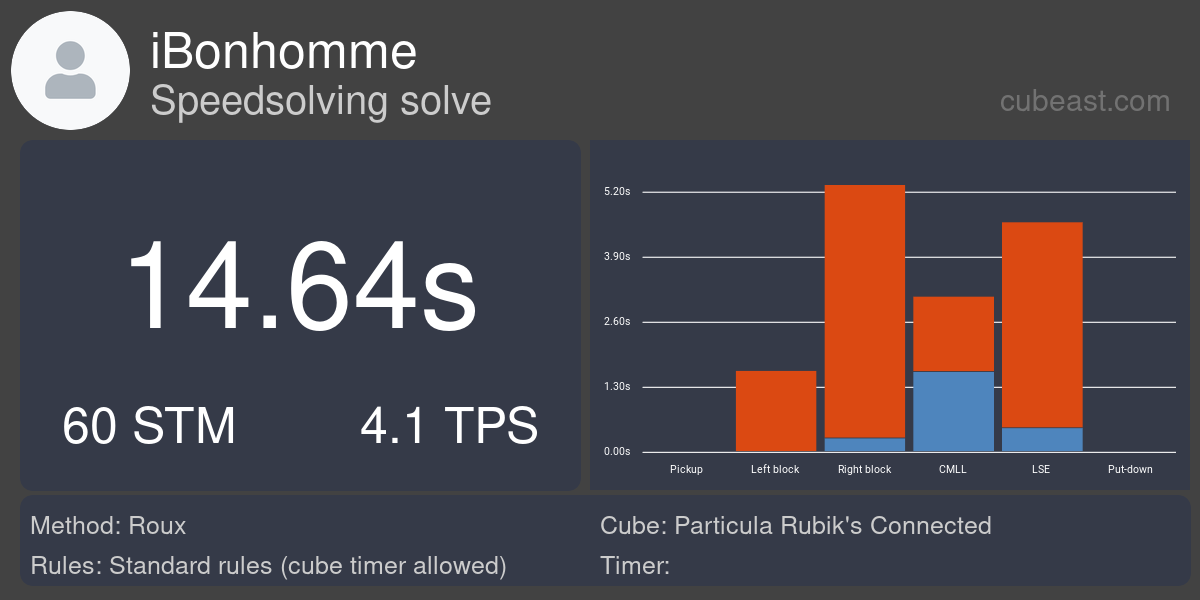
2. This is related to the previous problem I reported about how the step times for Roux block building is inaccurately reported by Cubeast. It happened more than once, and I think I am not the only one experiencing this, as I believe other Roux cubers also do the same thing.

I build a right block on the left and a green one on the right, but often I would ignore the centre pieces of those blocks when building the blocks, since getting them in place would mean more restriction in moves. Then, later, when the blocks are complete except for the blue and green centre pieces, I will do a few easy turns to put those centre pieces in the right place. Of course, being opposite one another, when the blue centre piece is put in the right place, the green centre piece will also be put in at the same time, i.e. both blocks are finished at exactly the same time. Cubeast would put the total time for building both blocks as time used to build the "Left Block". See photo. This looks odd. Also, there is no Recognition time for any of block building steps at all, even though I had lengthy pauses between those execution steps. An easy fix is to give half of the total block building time as the step time for each block, but I am not sure if that is necessary correct and I wonder what your thoughts are if you are already aware of it.

View attachment 16634

View attachment 16635

Thanks for your attention.

Dan

1) I've seen it happen a few times, but don't have a reliable way of reproducing this issue yet. I'll look into it.

2) Cubeast will not support any 'variations' on solving methods for now. Cubeast after each turn checks which parts of the cube are solved and based not that decides if a step is solved or not. This is deeply ingrained into the entire app. What you suggest would introduce a lot more complexity to the entire thing. Cubeast currently supports more than 10 methods. I can't have dedicated, extra logic for each of those as that's just too much work for me.
 
Just one word, like in the video.


It's fixed in the current version. I haven't had the time to record an updated video yet.
I could help this site be a thousand times better. It can become the go-to site for every cuber. Need a couple of things added.
 
Thanks, for your attention. Here's one more:

I wish the selection for Scrambling (Random, Self-Scramble or Recorded Scramble, or Typed In) could be saved for each user, or for each session. I have to select again the same one each time I start Cubeast because it always goes back to "Random Scramble". I like to use Self-Scramble, and also Cube as the timer for normal practise, as it saves much time in setup. My Cube timer selection is kept when I exit, but not my selection for Scrambling. I also wish that the little blue button "The cube is scrambled" could be assigned to the space bar on a PC or a tap on the mobile phone, when the Cube is selected as the timer. Having to click on a small button numerous times in a practise session is not ideal, even for me and I do very little solves compared to most others.
 
Last edited:
I also have problems with the laggy animation in Cubeast, only if I use the new Moyu Ai. Here is an example solve. After OLL I waited until the animation finished. That's why you see a break of ~10 seconds before I finished with a T perm:
 
99% of the time, when I am solving, I am looking at the cube and not at the animation or anything on the screen. I wish it's possible to turn the animation off (and on when needed), and I wonder if that might improve response or the comm between the cube and Cubeast, and hopefully it can save some battery on the phone.
 
Last edited:
I also have problems with the laggy animation in Cubeast, only if I use the new Moyu Ai. Here is an example solve. After OLL I waited until the animation finished. That's why you see a break of ~10 seconds before I finished with a T perm:

Have you tried using the MoYu app? One other user with the same issue experienced the same problem on the MoYu app, which means it probably is a cube issue.
 
Have you tried using the MoYu app? One other user with the same issue experienced the same problem on the MoYu app, which means it probably is a cube issue.
I have the same problem with lag. When I switch to the Moyu app it works well. Go back to cubeast the lag appears again. Everything registers well, but I do have time to put the kettle on.
 
Screenshot from 2021-08-30 09-18-43.png
 
Hi, I just checked it with Moyu Ai. Great now. Thank you so much.

When I tested the new DNF button and chose "continue" during the solve, I solved the cube then completely (both in app and in reality), but I was nevertheless asked if that solve was DNF my fault or if it was desynced. So I lost that solve for nothing. Seems to be a bug in there. 🤔
 
Hi, I just checked it with Moyu Ai. Great now. Thank you so much.

When I tested the new DNF button and chose "continue" during the solve, I solved the cube then completely (both in app and in reality), but I was nevertheless asked if that solve was DNF my fault or if it was desynced. So I lost that solve for nothing. Seems to be a bug in there. 🤔
Thanks! Will fix it soon.
 
Hi, Are there other Roux cubers using Cubeast? I am wondering what your experience has been. I am still having problems because Cubeast report the wrong step times for each of the blocks. This time, the problem is that Cubeast could not detect when the 2 blocks were finished. The time for the completion of the first block (Right Block, or the Green Block) was correct. Cubeast however did not know when I finished the second block. Check the animation below. My Left Block is blue and my Right Block green. The block building finished after 37.17 seconds, about half way into the solve.

https://cbst.link/s/bdaSVhjxByB6QLQFgZ3cvo

This was already reported, but I am just wondering if others also have issues, or whether I am the only one.
 
Last edited:
Thanks. It could be me! I use Moyu Ai Cube. Or, it could because I do things differently. My first block building moves are not always for the Left block. It can be for building the Right Block, as in this case. In fact, I continue to build both blocks at the same time, depending on which colour pieces are more convenient to work on at the time. It's beginner block building. I don't think the cube used is the problem.
 
Looks like a bug. Has not seen that before.
i have had another problem with it guessing down wrong so at least FB had wrong moves.
 
Just in case you haven't tried this when using the animation, there is a very nice feature in Cubeast. The cube's orientation can be moved by clicking on a spot near the cube and dragging it around to rotate it. As a Roux user, holding the cube usually in a fixed position, this feature is very useful, esp for beginners. I drag the cube so that Red is facing me, since that would have the cube's Blue block on the left and Green block on the right. It is necessary to start dragging from different spots near the cube to get it to rotate to the desired position. I also rotate the cube slightly to see the other hidden sides when necessary, after pausing the replay. Pausing, checking visually, resuming, ... that is is a really nice feature to help me to walk through again a solve and see how good or bad I did , much better than looking at U, F' M R etc recorded when analysing or doing re-construction. 👍
 
Back
Top