
uiqoo
Member
1. Defining the imaginary pieces
Long story short, let's see the following expression:
(U+D+1) (R+L+1) (F+B+1) = (URF + URB + ULF + ULB + DRF + DRB + DLF + DLB) + (UR + UL + UF + UB + DR + DL + DF + DB + RF + RB + LF + LB) + (U + D + R + L + F + B) + (1)
Each of this 27 terms describes a single piece of a Rubik's cube, and it can be physically described as following:
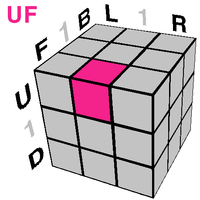
However, we see that there is no such piece like UDR or UDRB piece, as U and D faces are parallel to each other and a single piece cannot belong to both of them.
Let's assume that these pieces exist and call these a "imaginary pieces".
Original pieces of the physically implemented Rubik's cube (aka "real cube") are oppositely called "real pieces".
Originally, U face is parallel to D face. If U face is located in +y axis, then D face is assumed to be located in -y axis.
However, let's assume that U face is orthogonal to D face, as well as other faces. Similarly, R and L faces or F and B faces are orthogonal to each other.
So we have six orthogonal distinguishable axis. Now we see the imaginary pieces.
This "complex Rubik's cube" have 64 different pieces, containing 27 real pieces and 37 imaginary pieces.
Since we have six orthogonal distinguishable axis, we need a 6-dimensional space to physically implement the complex cube.
All the pieces can be obtained from the following expression:
(U+1) (D+1) (R+1) (L+1) (F+1) (B+1)
And similarly with the real cube, we can distinguish the imaginary pieces and form a group of them.
27 real pieces form 4 distinguishable groups:
core piece 1
center piece U, D, R, L, F, B
edge piece UR, UL, UF, UB, DR, DL, DF, DB, RF, RB, LF, LB
corner piece URF, URB, ULF, ULB, DRF, DRB, DLF, DLB
And 37 imaginary pieces for 6 distinguishable groups:
axis piece UD, RL, FB
bridge piece UDR, UDL, UDF, UDB, URL, DRL, RLF, RLB, UFB, DFB, RFB, LFB
cross piece UDRL, UDFB, RLFB
anti-edge piece UDRF, UDRB, UDLF, UDLB, URLF, URLB, URFB, ULFB, DRLF, DRLB, DRFB, DLFB
anti-center piece UDRLF, UDRLB, UDRLB, UDLFB, URLFB, DRLFB
orientation piece UDRLFB
Defining proper turning is easy. For example, see the U turn in real cube.
U turn affects every piece that contains 'U' in its name: U, UR, UL, UF, UD, URF, UBR, UFL, ULB.
Then the pieces change its name with the circulation R → F → L → B → R.
Likewise, the turning affects pieces that contains the turning face in its name, and these are the circulations.
U, D': R → F → L → B → R
U', D: R → B → L → F → R
R, L': U → B → D → F → U
R', L: U → F → D → B → U
F, B': U → R → D → L → U
F', B: U → L → D → R → U
To make life easier, let's just assume that the viewpoint change (x, y, z) is not allowed.
2. Orientation of the imaginary pieces
Orientation of the real pieces can be easily determined from the stickering. (Assume that every piece is in the right position)
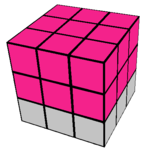
For example, see this piece. The piece is stickered at the marked faces.
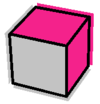
This piece is stickered in U, R and B faces. We can easily know this piece is a corner piece.
This URB corner piece can have 3 orientations: URB, RBU, BUR. Note that UBR orientation is impossible.
It is the same with the imaginary pieces. See this.
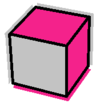
We see that this is UDR piece, and thus a bridge piece.
This UDR bridge piece can have 2 orientations: UDR, DUR. Note that URD or RUD orientations are impossible.
Each of the imaginary piece can have certain number of possible orientations.
axis piece only 1 possible orientation, similar to the center piece.
bridge piece 2 possible orientations
cross piece 8 possible orientations
anti-edge piece 2 possible orientations
anti-center piece 4 possible orientations
orientation piece 24 possible orientations
3. Permutations of the imaginary pieces
First, axis pieces: they cannot move, just like the center pieces.
For example, UD axis piece cannot move. This piece is only affected by U and D turns, but it does not contain any R, L, F, B in its name.
So this is axis pieces' permutation group:

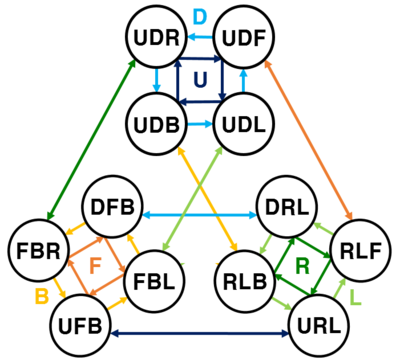
Bridge pieces: this is the tricky part.
This is bridge pieces' permutation group:
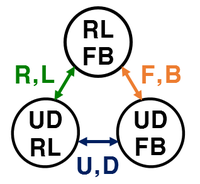
Cross pieces: If you do U turn several times, UDRL cross piece moves like UDRL → UDFB → UDLR. (Note the orientation differed.)
Only seeing the permutations, this is the permutation group of cross pieces:
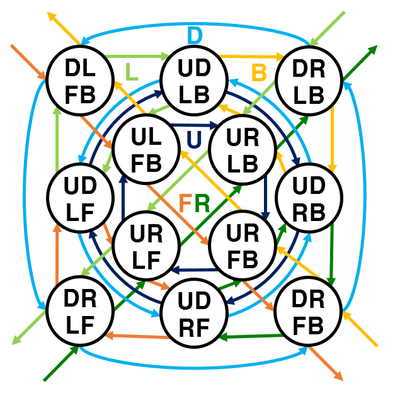
Anti-edge pieces: you'll see the easy explanation from far below.
Besides, the name 'anti-edge' came from the face that UDRF piece is the 'anti' of the LB edge piece.
There are anti-edge ad anti-center pieces, but not anti-corner piece, because anti-corner piece is just an another corner piece.
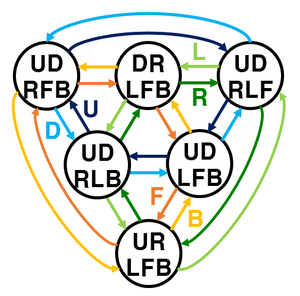
Anti-center pieces:
Finally, orientation piece: the name 'orientation' came from the face that this piece acts like a viewing transformation chaser.
When you do R turn, orientation piece acts like if you did a x turn. Likewise, D turn is same as y' turn for this piece.
Note that the orientation piece is actually an anti-core piece.

4. Visualization of the imaginary pieces
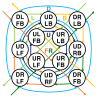
If you collect orientation piece, anti-center piece, anti-edge pice and corner piece, you get an anti cube.
Anti cube is identical to the normal Rubik's cube, beside it only allows 2-layers turn.
The marked pieces are affected by U turn.
And these are 6 anti-center pieces, 12 anti-edge pieces, 8 corner pieces, respectively.
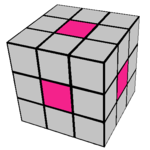
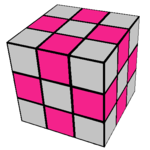
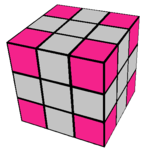
But remember the stickering rule. URLFB anti-center piece should have stickered at U, R, L, F, B faces.
Furthermore, we don't need corner pieces because they are real pieces.
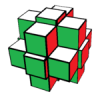
So we redesign the anti cube:
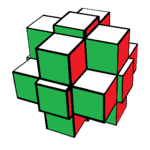
This way we see every pieces are stickered properly.
Note that the orientation piece is located at the core thus blocked from the view.
So we should draw another picture just for the orientation piece.

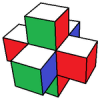
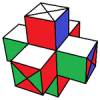
If you collect axis pieces and cross pieces, you get an axis cube.
Marked pieces are affected by U turn.
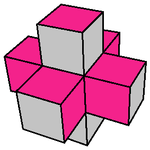
As the picture is quite confusing, see the pictures below. These are 3 axis pieces and 3 cross pieces, respectively.
Note a axis piece behaves like a babyface which is connected with the parallel face's babyface.
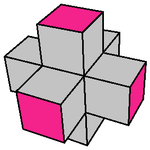
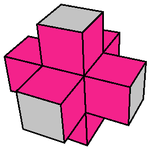
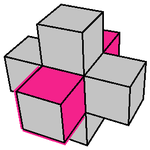
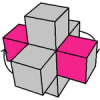
This is a single axis piece, which is UD:
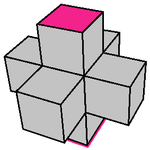
And this is a single center piece, which is UDRL. When U turn is performed, it goes into UDFB position like the picture.
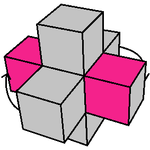
If you collect the bridge pieces, you get a bridge cube. The bridge cube is quite tricky to intuitivly draw.
Marked pices are affected by U turn.
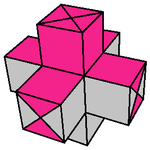
And actually this is a single piece, which is UDF.
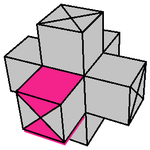
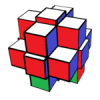
So if you want to draw a complex cube, you need to draw a real cube, an anti cube, an orientation piece, an axis cube, and a bridge piece at once, respectively.
This is the U state of a complex cube.
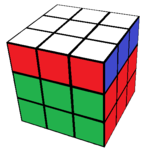
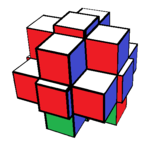

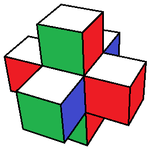
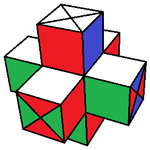
I think there are 23519574460066360882981533103137584478224061038592000000000 = 2.35×10^58 possible states that complex cube can have, but I'm not quite sure.
Long story short, let's see the following expression:
(U+D+1) (R+L+1) (F+B+1) = (URF + URB + ULF + ULB + DRF + DRB + DLF + DLB) + (UR + UL + UF + UB + DR + DL + DF + DB + RF + RB + LF + LB) + (U + D + R + L + F + B) + (1)
Each of this 27 terms describes a single piece of a Rubik's cube, and it can be physically described as following:
However, we see that there is no such piece like UDR or UDRB piece, as U and D faces are parallel to each other and a single piece cannot belong to both of them.
Let's assume that these pieces exist and call these a "imaginary pieces".
Original pieces of the physically implemented Rubik's cube (aka "real cube") are oppositely called "real pieces".
Originally, U face is parallel to D face. If U face is located in +y axis, then D face is assumed to be located in -y axis.
However, let's assume that U face is orthogonal to D face, as well as other faces. Similarly, R and L faces or F and B faces are orthogonal to each other.
So we have six orthogonal distinguishable axis. Now we see the imaginary pieces.
This "complex Rubik's cube" have 64 different pieces, containing 27 real pieces and 37 imaginary pieces.
Since we have six orthogonal distinguishable axis, we need a 6-dimensional space to physically implement the complex cube.
All the pieces can be obtained from the following expression:
(U+1) (D+1) (R+1) (L+1) (F+1) (B+1)
And similarly with the real cube, we can distinguish the imaginary pieces and form a group of them.
27 real pieces form 4 distinguishable groups:
core piece 1
center piece U, D, R, L, F, B
edge piece UR, UL, UF, UB, DR, DL, DF, DB, RF, RB, LF, LB
corner piece URF, URB, ULF, ULB, DRF, DRB, DLF, DLB
And 37 imaginary pieces for 6 distinguishable groups:
axis piece UD, RL, FB
bridge piece UDR, UDL, UDF, UDB, URL, DRL, RLF, RLB, UFB, DFB, RFB, LFB
cross piece UDRL, UDFB, RLFB
anti-edge piece UDRF, UDRB, UDLF, UDLB, URLF, URLB, URFB, ULFB, DRLF, DRLB, DRFB, DLFB
anti-center piece UDRLF, UDRLB, UDRLB, UDLFB, URLFB, DRLFB
orientation piece UDRLFB
Defining proper turning is easy. For example, see the U turn in real cube.
U turn affects every piece that contains 'U' in its name: U, UR, UL, UF, UD, URF, UBR, UFL, ULB.
Then the pieces change its name with the circulation R → F → L → B → R.
Likewise, the turning affects pieces that contains the turning face in its name, and these are the circulations.
U, D': R → F → L → B → R
U', D: R → B → L → F → R
R, L': U → B → D → F → U
R', L: U → F → D → B → U
F, B': U → R → D → L → U
F', B: U → L → D → R → U
To make life easier, let's just assume that the viewpoint change (x, y, z) is not allowed.
2. Orientation of the imaginary pieces
Orientation of the real pieces can be easily determined from the stickering. (Assume that every piece is in the right position)
For example, see this piece. The piece is stickered at the marked faces.
This piece is stickered in U, R and B faces. We can easily know this piece is a corner piece.
This URB corner piece can have 3 orientations: URB, RBU, BUR. Note that UBR orientation is impossible.
It is the same with the imaginary pieces. See this.
We see that this is UDR piece, and thus a bridge piece.
This UDR bridge piece can have 2 orientations: UDR, DUR. Note that URD or RUD orientations are impossible.
Each of the imaginary piece can have certain number of possible orientations.
axis piece only 1 possible orientation, similar to the center piece.
bridge piece 2 possible orientations
cross piece 8 possible orientations
anti-edge piece 2 possible orientations
anti-center piece 4 possible orientations
orientation piece 24 possible orientations
3. Permutations of the imaginary pieces
First, axis pieces: they cannot move, just like the center pieces.
For example, UD axis piece cannot move. This piece is only affected by U and D turns, but it does not contain any R, L, F, B in its name.
So this is axis pieces' permutation group:
Bridge pieces: this is the tricky part.
This is bridge pieces' permutation group:
Cross pieces: If you do U turn several times, UDRL cross piece moves like UDRL → UDFB → UDLR. (Note the orientation differed.)
Only seeing the permutations, this is the permutation group of cross pieces:
Anti-edge pieces: you'll see the easy explanation from far below.
Besides, the name 'anti-edge' came from the face that UDRF piece is the 'anti' of the LB edge piece.
There are anti-edge ad anti-center pieces, but not anti-corner piece, because anti-corner piece is just an another corner piece.
Anti-center pieces:
Finally, orientation piece: the name 'orientation' came from the face that this piece acts like a viewing transformation chaser.
When you do R turn, orientation piece acts like if you did a x turn. Likewise, D turn is same as y' turn for this piece.
Note that the orientation piece is actually an anti-core piece.
4. Visualization of the imaginary pieces
If you collect orientation piece, anti-center piece, anti-edge pice and corner piece, you get an anti cube.
Anti cube is identical to the normal Rubik's cube, beside it only allows 2-layers turn.
The marked pieces are affected by U turn.
And these are 6 anti-center pieces, 12 anti-edge pieces, 8 corner pieces, respectively.
But remember the stickering rule. URLFB anti-center piece should have stickered at U, R, L, F, B faces.
Furthermore, we don't need corner pieces because they are real pieces.
So we redesign the anti cube:
This way we see every pieces are stickered properly.
Note that the orientation piece is located at the core thus blocked from the view.
So we should draw another picture just for the orientation piece.
If you collect axis pieces and cross pieces, you get an axis cube.
Marked pieces are affected by U turn.
As the picture is quite confusing, see the pictures below. These are 3 axis pieces and 3 cross pieces, respectively.
Note a axis piece behaves like a babyface which is connected with the parallel face's babyface.
This is a single axis piece, which is UD:
And this is a single center piece, which is UDRL. When U turn is performed, it goes into UDFB position like the picture.
If you collect the bridge pieces, you get a bridge cube. The bridge cube is quite tricky to intuitivly draw.
Marked pices are affected by U turn.
And actually this is a single piece, which is UDF.
So if you want to draw a complex cube, you need to draw a real cube, an anti cube, an orientation piece, an axis cube, and a bridge piece at once, respectively.
This is the U state of a complex cube.
I think there are 23519574460066360882981533103137584478224061038592000000000 = 2.35×10^58 possible states that complex cube can have, but I'm not quite sure.
Attachments
-
 ??.png24.9 KB · Views: 151
 -
 ??.png5.4 KB · Views: 150
 -
 ??.png5.6 KB · Views: 151
 -
 ??.png7.2 KB · Views: 151
 -
 ??.png64.9 KB · Views: 150
 -
 ??.png20.5 KB · Views: 146
 -
 ??.png121.7 KB · Views: 148
 -
 ??.png66.1 KB · Views: 145
 -
 ??.png4.5 KB · Views: 147
 -
 ??.png16.1 KB · Views: 143
 -
 ??.png13.5 KB · Views: 145
 -
 ??.png16.6 KB · Views: 144
 -
 ??.png16.5 KB · Views: 146
 -
 ??.png15.7 KB · Views: 143
 -
 ??.png3.4 KB · Views: 145
 -
 ??.png17.2 KB · Views: 142
 -
 ??.png14.9 KB · Views: 147
 -
 ??.png17.1 KB · Views: 141
 -
 ??.png13.8 KB · Views: 148
 -
 ??.png15.8 KB · Views: 141
 -
 ??.png15.9 KB · Views: 142
 -
 ??.png19.9 KB · Views: 146
 -
 ??.png17.1 KB · Views: 147
 -
 ??.png15.6 KB · Views: 143
 -
 ??.png15.8 KB · Views: 146
 -
 ??.png3.4 KB · Views: 149
 -
 ??.png16.9 KB · Views: 145
 -
 ??.png19.6 KB · Views: 143
Last edited:


