
Indeed, it's crazy. I was surprised when I saw that 100 mb too hahaha.This means that it is the JS engine making the app weight 100MB? That's larger than Whatsapp. I was kinda suspicious when I downloaded it the first time ngl

Navigation
Install the app
How to install the app on iOS
Follow along with the video below to see how to install our site as a web app on your home screen.
Note: This feature may not be available in some browsers.
More options
Style variation
You are using an out of date browser. It may not display this or other websites correctly.
You should upgrade or use an alternative browser.
You should upgrade or use an alternative browser.
 New Update!
Just pushed some fresh improvements:
- New sound effects for actions across the app
- Public profiles redesign
- Free-Play mode redesign
- Fixed the order of inspection voice cues
- Sync data alert changed (8s auto-dismiss).
- Overall translations improved with cubing context. (ai)

Kami
Premium Member
They finally banned this site from my school’s provided devices.
Back to qqtimer I guess.
Back to qqtimer I guess.
You still can try use it offline the app. Just need install it.They finally banned this site from my school’s provided devices.
Back to qqtimer I guess.
Kami
Premium Member
Perhaps theres an html file I could run? I'm not very knowledgeable on this, so sorry if it's common knowledgeYou still can try use it offline the app. Just need install it.

Can you access GitHub? If that's the case I think @rednaxela could also deploy it on Github Pages as a backup.Perhaps theres an html file I could run? I'm not very knowledgeable on this, so sorry if it's common knowledge
Installing the app depends on your device.Perhaps theres an html file I could run? I'm not very knowledgeable on this, so sorry if it's common knowledge
For mobile, the option is in the browser menu (the three dots). It should say “Add to Home Screen” or something similar. Sometimes, a popup will automatically appear recommending the installation.
For desktop, the option is here

CrossPetrus
Veteran
May just be me, but I thought that this section was your pbs, but I never got an 18.55, and it’s not showing a 20.03 ao12 it did this morning. Am I misunderstanding what this section is, and if so, then how would I see my pb averages?
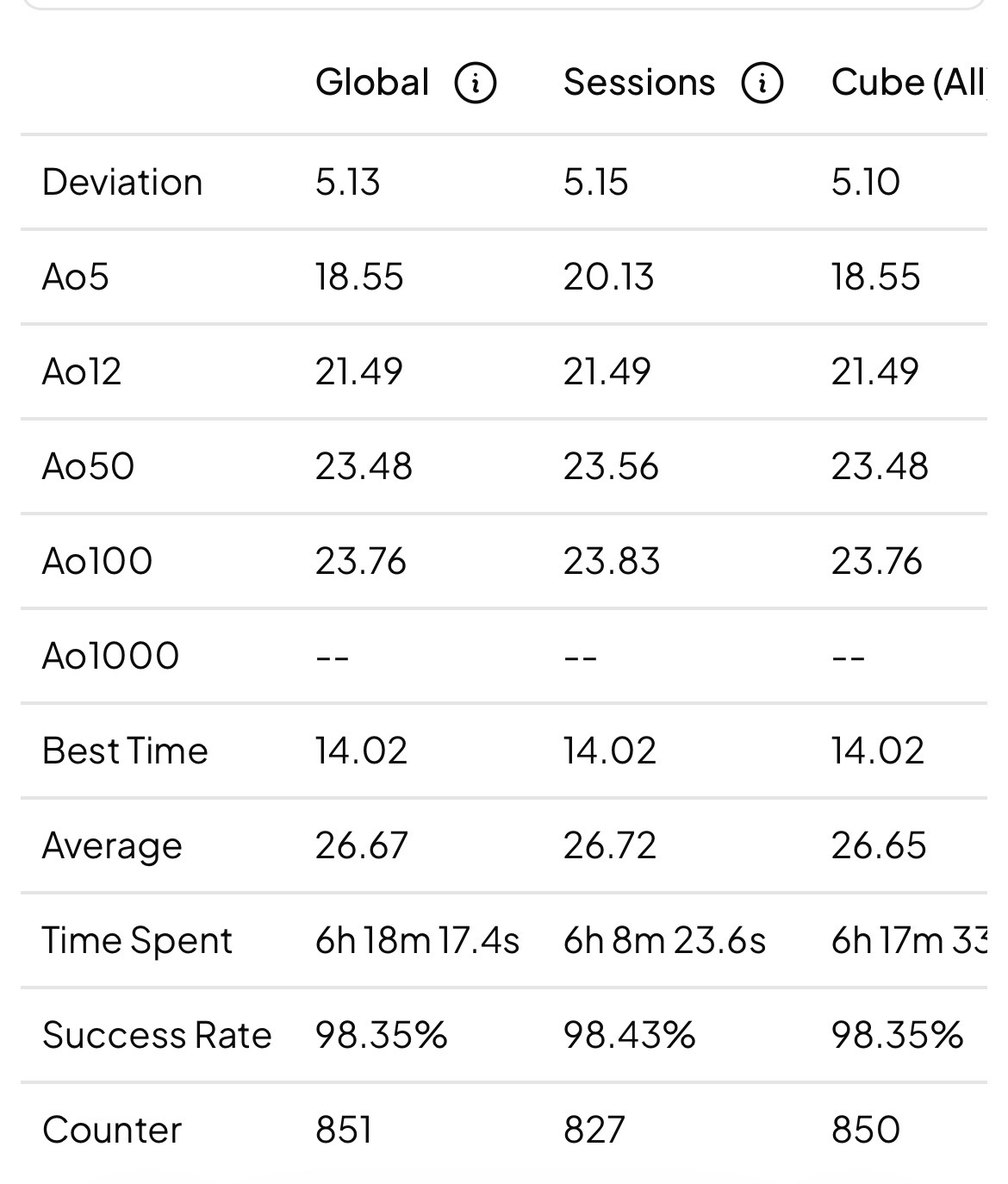

its yr current avgMay just be me, but I thought that this section was your pbs, but I never got an 18.55, and it’s not showing a 20.03 ao12 it did this morning. Am I misunderstanding what this section is, and if so, then how would I see my pb averages?View attachment 46639

Caleb Valenzuela
Legend
He said he never got an 18.55 average though…its yr current avg
May just be me, but I thought that this section was your pbs, but I never got an 18.55, and it’s not showing a 20.03 ao12 it did this morning. Am I misunderstanding what this section is, and if so, then how would I see my pb averages?
I am not sure how you got that I can't see your data, but I already reviewed the math behind it. And everything looks good to me. Also, importing from other timers coincides with the statistics. Furthermore, if there are some unusual solves, they must be for sure at the beginning of your data. Because you have 24 solves in the "history" tab. Your other 827 solves are in session, and the session statistics are not so high, so it's a good signal of where to search.
I added to the graph the possibility to see the current ao of each solve.
I hope it helps.
CrossPetrus
Veteran
What does the merge feature do? Because I thought it like saved your solves across different devices or something, but I just pressed it and it deleted all of the solves I did today. Is there a way to get my solves back?
What does the merge feature do? Because I thought it like saved your solves across different devices or something, but I just pressed it and it deleted all of the solves I did today. Is there a way to get my solves back?
Merge combines your backup data with the data stored locally on your current device. You should not lose solves in normal circumstances.
If you clicked “Merge” on a new device, it’s possible that your previous device did not save the latest solves (for example, today’s solves) uploaded to the backup. In that case, the new device would not have access to those solves.
When switching devices, make sure to save a backup first manually (account/save path). If you don’t, nothing will be deleted, but the new device won’t include your most recent solves until they are backed up and merged properly next time. You can always recover them doesnt matter the order save/download backups.
New Update!Just pushed some fresh improvements:
- Reimplemented the Stackmat module with improved compatibility
- Launched a new landing page
- Added animations for icons and loading screens
- Automatic language detection on first visit
- Several under the hood improvements and bug fixes
Free Play mode (multiplayer):
- Redesigned rooms for better visibility of your opponent, their times are now displayed on the same screen
- Rounds now track a winner, with a counter for each player
- Solves are tracked sequentially: if a player leaves mid-match and returns (e.g., after 2 rounds), those rounds are recorded as empty times instead of being ignored, ensuring averages stay consistent with the current match progression
Happy cubing

Last edited:
dude can u make private racing rooms and stackmat connection for them
Just pushed some fresh improvements:
- Reimplemented the Stackmat module with improved compatibility
- Launched a new landing page
- Revamped UI across key sections of the app, especially profile, algorithms, account settings.
- Added animations for icons and loading screens
- Automatic language detection on first visit
- Several under the hood improvements and bug fixes
Free Play mode (multiplayer):
- Redesigned room design for better visibility of your opponent, their times are now displayed on the same screen
- Rounds now track a winner, with a counter for each player
- Solves are tracked sequentially: if a player leaves mid-match and returns (e.g., after 2 rounds), those rounds are recorded as empty times instead of being ignored, ensuring averages stay consistent with the current match progression
Happy cubing
dude can u make private racing rooms and stackmat connection for them
Nice idea, just added it today
- Private rooms
- Stackmat support
- Optional inspection mode
omg thanksNice idea, just added it today
- Private rooms
- Stackmat support
- Optional inspection mode
View attachment 47681View attachment 47682
New Update!Just a summary of some improvements over the last few weeks:
- Revamped the UI across the entire app
- Added Smart Cube support
- Added solve analysis for CFOP and Roux
- Added time splits for Cross, each F2L pair, OLL, and PLL
- Added Smart Cube support for algorithm training
- Added new statistics for your algorithm execution averages
- Added known algorithms to your profile
lets go
Hi everyone! Here’s a summary of everything we added in the last three months.
Friends and chat
Friends and chat
- Add other cubers as friends and send them private messages.
- See who is online in realtime.
- You can now decide who can see your stats, and you can block anyone.
- Show a short bio, your country, the cubing method you use, and links to your WCA or Instagram.
- A calendar shows the days you practiced.
- Share your profile with a link, or compare your times with another cuber.
- Crop your photo when you upload it (thanks to Nokx1z for this one!).
- Scrambles follow TNoodle, the program the WCA uses at official competitions.
- The timer can show you suggestions for cross / xcross for any color.
- New focus mode hides everything except the scramble and the time.
- After each solve, you see if you were faster or slower than the one before.
- When you beat your best time, a card pops up so you can celebrate and share it.
- New set of fonts and customizable size of the timer.
- The screen no longer turns off while you practice.
- With a smart cube (one that connects over Bluetooth), you see how long each step took.
- New algorithm sets, including:
- 5x5
- Megaminx
- Square-1
- OH-OLL
- ZBLS
- Algorithms are easier to read because common triggers, like the sexy move (R U R’ U’), are highlighted as a group.
- A full redesign with 22 color themes, and you can use your own background image.
- Works better without internet and can be installed like an app on your phone.
- Faster loading, available in 17 languages.
Similar threads


- Replies
- 1
- Views
- 716

