Hello! I am here because I need help with my cube, i need 2 edge pieces switched on them. Only 2 of them need to switch but the other sides are all finished.

Navigation
Install the app
How to install the app on iOS
Follow along with the video below to see how to install our site as a web app on your home screen.
Note: This feature may not be available in some browsers.
More options
Style variation
You are using an out of date browser. It may not display this or other websites correctly.
You should upgrade or use an alternative browser.
You should upgrade or use an alternative browser.
[Help Thread] Impossible Puzzle State
- Thread starter SapphireSong
- Start date
-
- Tags
- unsolvable unsolveable


ProStar
Legend
You have an impossible state, you probably took apart your cube at some point. To solve it just physically take the pieces out of the cube and swap them

Username: Username:
Veteran
That's impossible, you need to swap the pieces by taking them out.Hello! I am here because I need help with my cube, i need 2 edge pieces switched on them. Only 2 of them need to switch but the other sides are all finished.

Kaneki Uchiha
Veteran
But if u want to swap two edges u can do a term (if u dont care about anything else) or do m' U2m

But why would he, all he wants to do is make the cube solved, not solve part of it only for it to reappearBut if u want to swap two edges u can do a term (if u dont care about anything else) or do m' U2m

Graaaby
Member
- Joined
- May 31, 2020
- Messages
- 16
like white is on top but green is facing red and red is facing green and etc.
ProStar
Legend
Your centers are flipped. With white on top and green in front, the colors should be Green(front) Red(right) Blue(back) Orange(left). If you ever get confused, you can look at a 3x3 or any other solved cube. To fix the centers, do Rw2 F2 B2 Rw2. Then just do 3x3 stage again
I’ve been solving my cube with no issues for a long time, but today I was playing with it and suddenly this yellow piece appeared to be out of place when I’m about complete the yellow side. I tried scrambling and solving it again around 10 times and it doesn’t seem to go back to normal, what should I do? Thanks!
Attachments

Micah Morrison
Veteran
You have an unsolvable cube because of a corner twist. The only way to make it solvable is to twist the corner back so that yellow is solved.I’ve been solving my cube with no issues for a long time, but today I was playing with it and suddenly this yellow piece appeared to be out of place when I’m about complete the yellow side. I tried scrambling and solving it again around 10 times and it doesn’t seem to go back to normal, what should I do? Thanks!
Yeah, it happens more on some cubes than it does on otherOh, I didn’t know that could happen. Thank you

Waffles
Veteran
So my friend gave me a megaminx and I kind of know how to solve it so I’m just checking if he pranked me cause this has happened before lol
Yes I’m know some of the tiles have peeled off but I was just going to use a pen or something
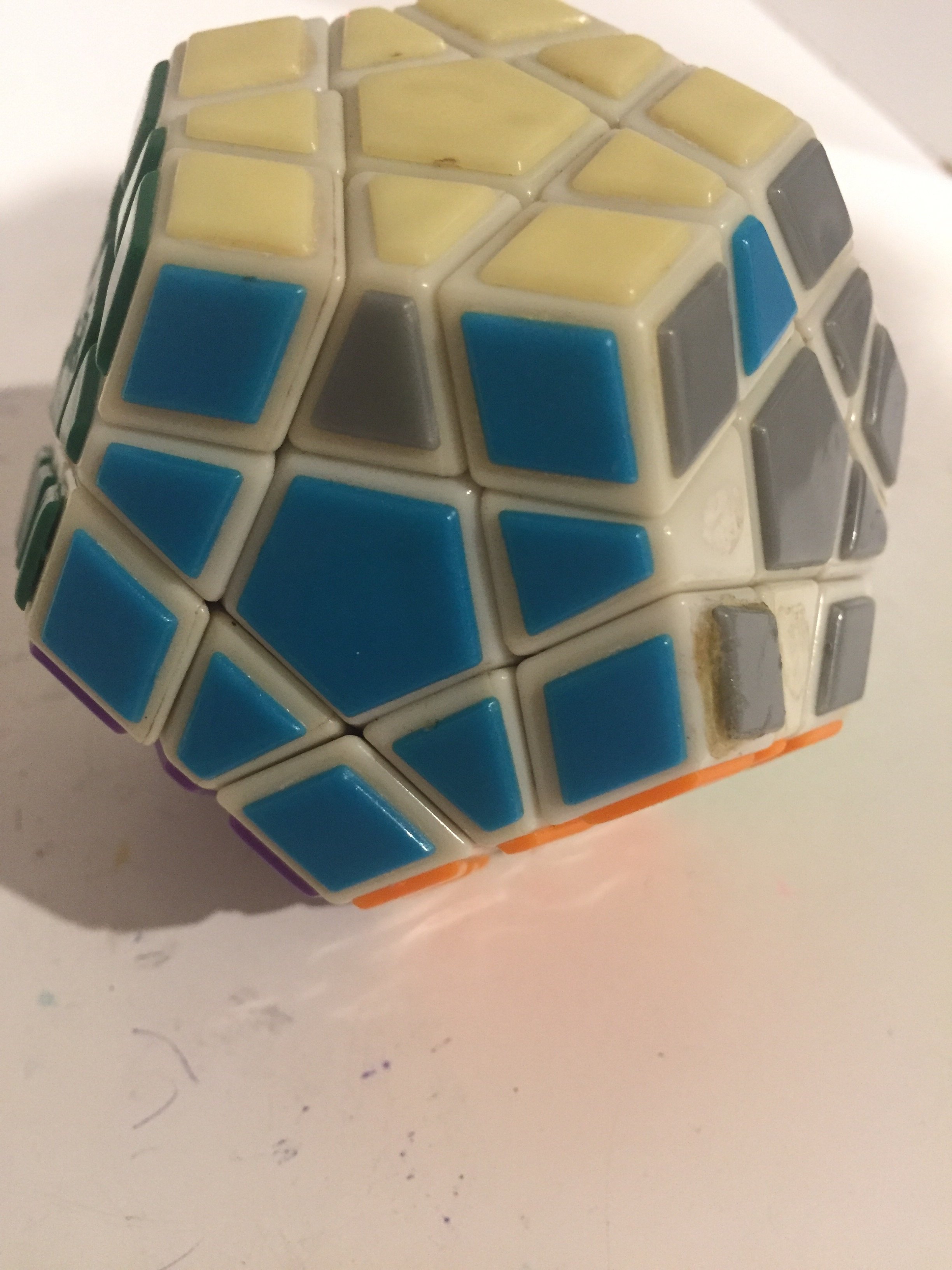
The grey and blue edges are swapped but I don’t think it’s legit soo I’m just checking with some more experienced peoples
Yes I’m know some of the tiles have peeled off but I was just going to use a pen or something
The grey and blue edges are swapped but I don’t think it’s legit soo I’m just checking with some more experienced peoples

DGCubes
Veteran
You can't have just two edges swapped on a Megaminx. Although, if certain tiles are missing on the other sides, it's possible that you've swapped two other edges without knowing. (Imagine if the blue-orange edge was missing the orange tile; then you wouldn't know whether the blue-grey edge and blue-orange edge are in the right places or not. You can solve it if there are two sets of two swapped edges.) If that's not the case, you'll just need to take the pieces out to solve this case.
Hello, I'm new to cubing.
I bought a new cube and was able to solve it with some tutorials.
However, I made a wrong movement, so that one edge came out. I think, I put it wrong together, because I'm not able to solve the cube anymore. When I try to solve my cube, I get the following error:
This is my cube. As you can see, I can't solve the last layer anymore:
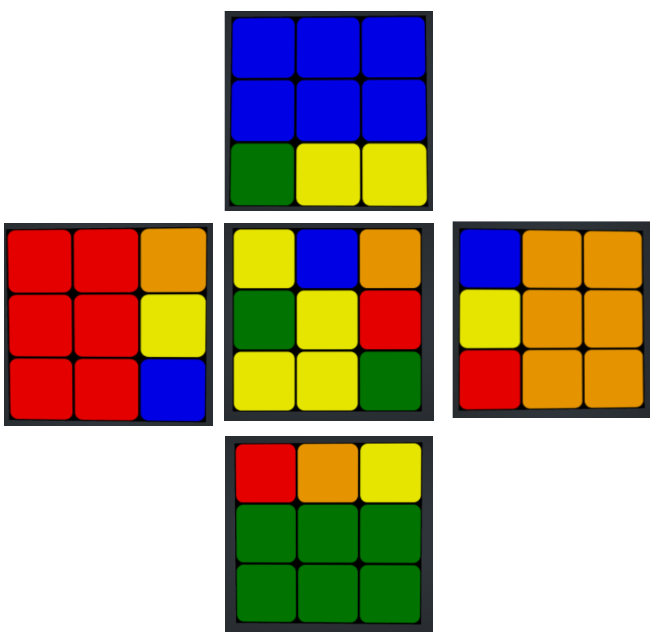
Is it possible to find out, which piece is wrongly assembled?
I bought a new cube and was able to solve it with some tutorials.
However, I made a wrong movement, so that one edge came out. I think, I put it wrong together, because I'm not able to solve the cube anymore. When I try to solve my cube, I get the following error:
This configuration of the cube is not solvable, please check that you've entered all pieces correctly.
This is my cube. As you can see, I can't solve the last layer anymore:
Is it possible to find out, which piece is wrongly assembled?
Hi! I just started cubing yesterday and I've solved my cube by following the guide a few times already and have memorized/understood the first layer and parts of the second. My issue is with the last layer and particularly an unbranded cube I was gifted after someone won it at an arcade. I can't figure out how to complete the yellow cross without messing everything else up and the algorithms I've tried just put me in a loop. I have a yellow in the top layer on the side and I can't get it on U without messing something for the life of me. Any suggestions/help are appreciated. Thank you.
Attachments


theos
Regular
Assuming your first two layers are fully done, then you do have an impossible case. After the first two layers step, you will always have 0, 2 or 4 edge pieces of the last layer correctly oriented (yellow side up in your case). With exactly 3 edges oriented you'll be stuck between having 1 and 3 edges oriented. This means one of your edges has been flipped (either physically removed from the cube and replaced upside down, or its stickers were swapped). This isn't something you can really do accidentally, so maybe was done by the person from whom you got the cube. You'll need to pop out one of the edges, flip it over and reinsert it.Hi! I just started cubing yesterday and I've solved my cube by following the guide a few times already and have memorized/understood the first layer and parts of the second. My issue is with the last layer and particularly an unbranded cube I was gifted after someone won it at an arcade. I can't figure out how to complete the yellow cross without messing everything else up and the algorithms I've tried just put me in a loop. I have a yellow in the top layer on the side and I can't get it on U without messing something for the life of me. Any suggestions/help are appreciated. Thank you.
Thank youAssuming your first two layers are fully done, then you do have an impossible case. After the first two layers step, you will always have 0, 2 or 4 edge pieces of the last layer correctly oriented (yellow side up in your case). With exactly 3 edges oriented you'll be stuck between having 1 and 3 edges oriented. This means one of your edges has been flipped (either physically removed from the cube and replaced upside down, or its stickers were swapped). This isn't something you can really do accidentally, so maybe was done by the person from whom you got the cube. You'll need to pop out one of the edges, flip it over and reinsert it.
D
Deleted member 36445
Guest
I know it's a late response, but...Hello, I'm new to cubing.
I bought a new cube and was able to solve it with some tutorials.
However, I made a wrong movement, so that one edge came out. I think, I put it wrong together, because I'm not able to solve the cube anymore. When I try to solve my cube, I get the following error:
This is my cube. As you can see, I can't solve the last layer anymore:
View attachment 18436
Is it possible to find out, which piece is wrongly assembled?
you just have to flip an edge then you can solve it normally
Last edited by a moderator:
beniolenio
Member
Single 90 degree center twist on ghost cube
I'm very confused. As far as I know, this situation should be impossible, but I seem to have a single 90 degree center twist on a ghost cube. I've never had this problem before, and am unable to twist or remove and replace the center piece. What am I supposed to do about this?


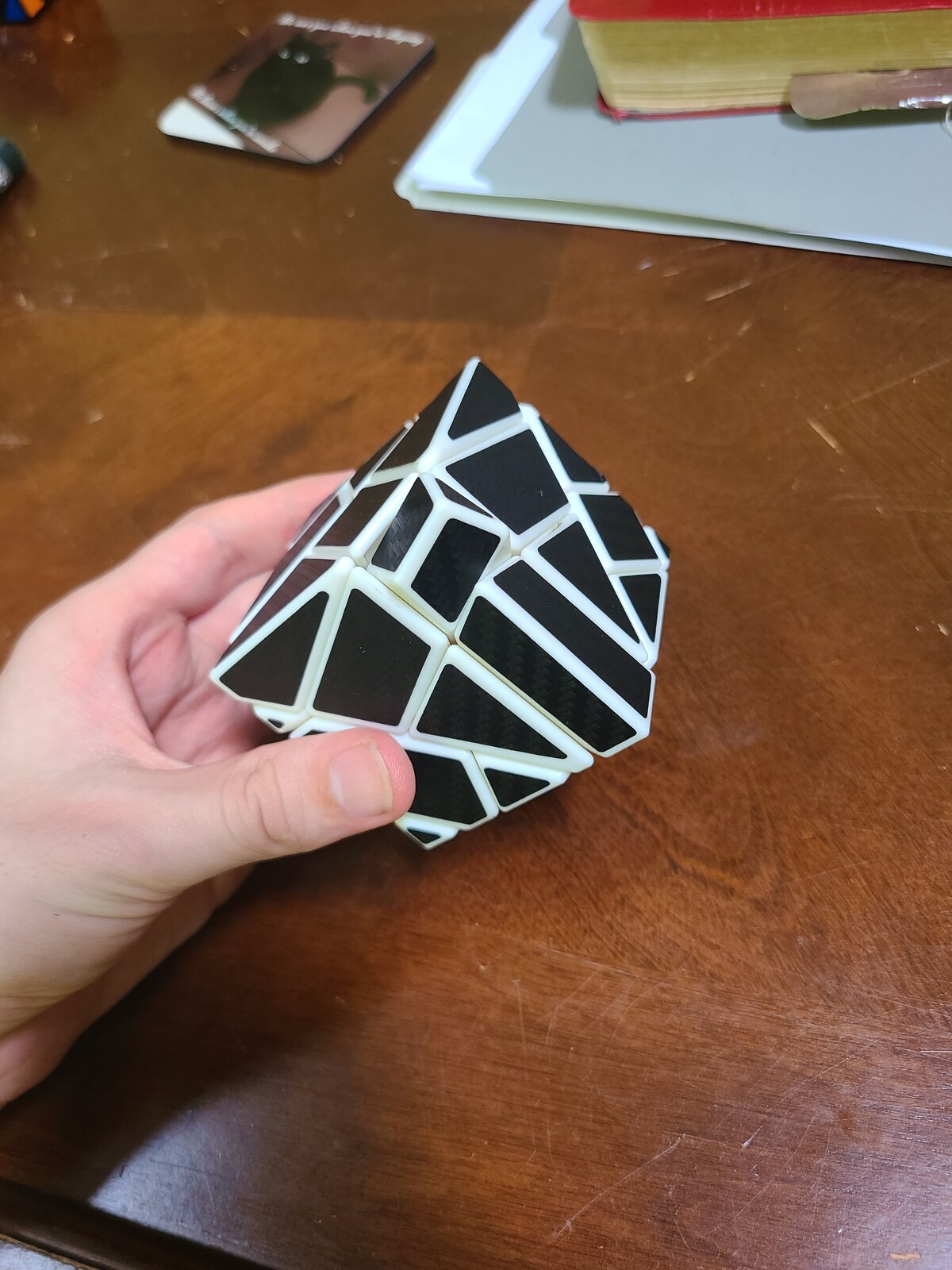
I'm very confused. As far as I know, this situation should be impossible, but I seem to have a single 90 degree center twist on a ghost cube. I've never had this problem before, and am unable to twist or remove and replace the center piece. What am I supposed to do about this?
Similar threads


- Replies
- 1
- Views
- 742


- Replies
- 40
- Views
- 6,421

- Replies
- 0
- Views
- 548
