Corner Cutting Help

Stefan

Legend
Joined
May 7, 2006
Messages
7,286
WCA ID
2003POCH01
YouTube
Visit Channel
O... M... G... this has got to be one of the most moronic issues is cubing. Some examples:

http://www.youtube.com/watch?v=blcAdeLeRMo#t=1m47
Claims 45 degrees but clearly shows how more than about 37 locks up.

http://www.youtube.com/watch?v=GVB__eOJr2g#t=5m52
Honest double facepalm. Claims above 45 degrees and shows how he does it - by first turning the first layer. WTF, how worthless is that?! Then claims 45 the normal way but shows he has trouble even doing just 20 degrees.

http://www.youtube.com/watch?v=m_Rer2_2gjA#t=2m40
Shows about 35 degrees and calls it 45.

http://www.speedsolving.com/forum/showthread.php?p=105890
Claims "almost 45 degrees", later admits it's only 27.18 degrees.

So... I propose this standard procedure and look-up picture. I'll probably put it in the wiki, but I'd like to get some comments first, especially about the procedure.
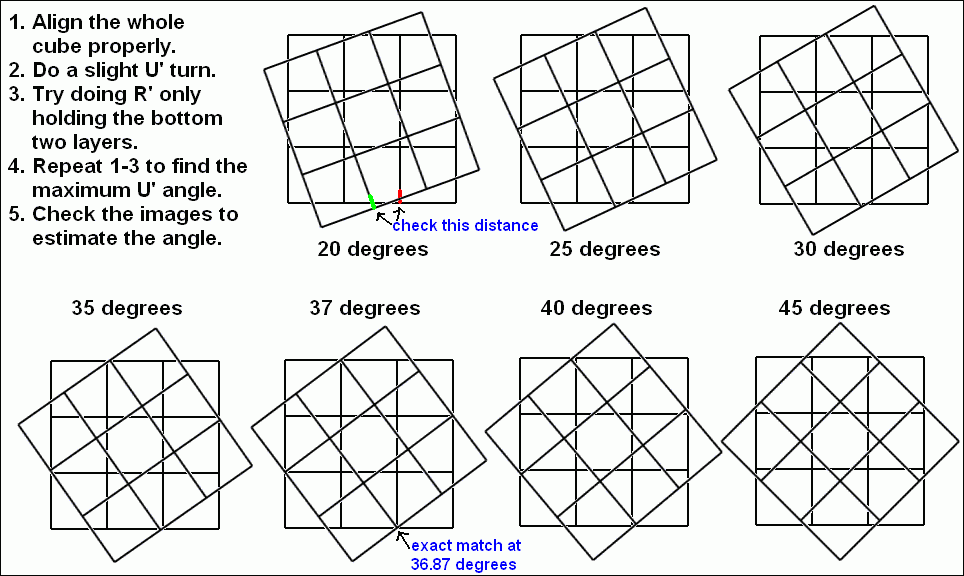
corner_cutting_angle.png
 
Thanks and yeah, I sure hope so. More ideas I just had:

- Cover other puzzles like 2x2x2, 4x4x4, megaminx, Square-1. Otherwise I fear people would falsely apply the 3x3x3 images to the other puzzles.

- Applet showing a 3D cube where one can turn the top layer and the angle is shown. That would be more realistic, accurate, and not require several images and thus use less space.

- Adding something like "The R' must turn effortlessly". I find this hard to describe, though, plus this is really something where I need other people's opinion.
 
I really don't think that cubes should have their cutting ability measured in terms of angle. I think it should be how much of a piece it cuts. A 7x7 couldn't physically cut 40 degrees like my 3x3, but it can cut an entire piece which my 3x3 can't. Does this mean the 3x3 cuts better than a 7x7?
 
i agree with musli, its a lot more understandable in terms of pieces, if someone said to me there cube can cut 35 degress, id be like 'is that good'
but if they say it cuts like almost a whole piece, then id know...
but its a good idea, looks like alot of thought went into it...
 
I really don't think that cubes should have their cutting ability measured in terms of angle. I think it should be how much of a piece it cuts.

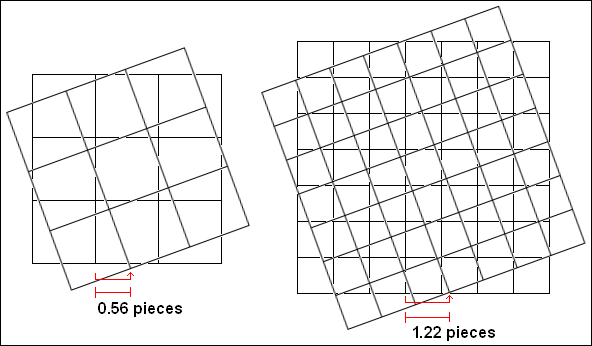
Nice idea. Haven't seen or thought of that before. Seems more natural, might be easier to do and allow better general assessment covering different puzzles. For this idea, I propose to use the same procedure as above but measure the gap shift of the middle gaps like this:

corner_cutting_pieces.png


Is this how you meant it? I chose the middle gap rather than the outside gaps or even the puzzle edges (the layer corners) because the middle gaps move close to the puzzle surface and thus the measuring isn't affected much by an improper viewing angle.

Large natural numbers like in "37 degrees" sound nicer than small fractions like "0.37 pieces". How about something like "37%" (of a piece) instead? Better suggestions?
 
Last edited:
Hmm... actually it's probably better to measure the gap shift right where the R' turn is done, because:

1. The gaps shifts do differ, for example the third from left U gap moved 1.22 pieces to the right, but the sixth from left U gap moved only 1.06 pieces to the right (it moved 1.06 pieces to the back as well).

2. There are different R' turns one might be interested in concerning cutting: R', Rw', etc. And their cutting abilities might differ, e.g., maybe there's an angle where Rw' is possible but R' isn't.
 
Last edited:
I like the idea of not measuring in angle...BUT for the 3x3x3 it is just much more simple to measure in angle. In reference to Muskli's comment, i don't think its approiate to compare how different SIZED puzzles cut corners.

Like stephan said people already have a hard time determining how much the cube cuts corners...using a gap size will only make it more difficult i believe (for 3x3x3).
 
Actually, after staring at my cube and "measuring" its corner cutting abilities, i agree the gap size is much easier. The hard part will be changing what is the "standard" method of measuring. So many people already estimate angles, it will be difficult to to change so we all can communicate with one method.
 
Well I don't insist on or expect that change. Most importantly I want to prevent further ridiculously false claims. So I'm thinking of adding the wiki page with *both* measuring versions. Angles for those who like that better so that they at least get it right (hopefully), and shifts as alternative and possible replacement.
 
The wiki would be a good place. Unfortunately lots of people do need help in determining the correct "amount" a cube can cut corners at...I think this would be helpful.
 
Hmm, sounds like a very good idea!! Maybe we could use a combination of angles and pieces...just an idea.
 
Great idea Stefan! That always bugs me when people say "Oh, it easily cuts 45 degrees. Sometimes more!" Isn't impossible to do a 45 degree turn (or anything bigger)?


EDIT: I've taken apart a cube, and looked at the way it reacts. It is impossible (with a regular mech) to do a 45 degree or bigger turn. It interferes with the mechanism and some cubies aren't even touching the R layer. If you COULD do it, it would create a huge lockup with the Corner (on the U layer, By the B side).

Correct me if i'm wrong.


EDIT2: This is my 500th post! Thanks for all of the good times so far guys!
 
Last edited:
Screw/Spring and Corner Cutting

I noticed a lot of people saying screw/spring mechanisms allow for cubes to cut corners more. Just wanted to ask how Screw/Spring mechanisms allow for better corner cutting in cubes. Is it just because they allow you to loosen the cube?
 
Because the spring will hold the center piece to the core/kernel without actually being screwed in all the way. While 'corner cutting,' the spring compresses and lets the center piece sort of be lifted up temporarily, and after the turn the spring will push the center back down to the core/kernel.
 
45 Degree Cutters.

I'm interested in which cubes have the ability to cut at a 45 degree angle, while still being a manageable speedcube. I did my best to show an example of this, done with my white edison cube.
Please post if you have a cube that can do this as well.
 
Last edited by a moderator:
Back
Top