color scheme research

I did not like the red/green combination because they look similar to each other (could be due to my color blindness or my monitor though). However the yellow/blue looks really nice to me
 
I did not like the red/green combination because they look similar to each other (could be due to my color blindness or my monitor though). However the yellow/blue looks really nice to me

This idea of opposing colours may potentially work well for dealing with colour-blind cubers. I'm no expert on this, but I believe that biological theory has it that there are three light sensing capabilities in the eye. One which differentiates between green and red, one which separates blue and yellow, and a third one which determines brightness or intensity. Colour blindness I think usually involves a deficiency in ability to differentiate in one of the two colour differentiating cell types. So it is either difficult to differentiate red/green or blue/yellow. Based on this, either of these schemes may be useful to colour blind cubers:

visualcube.php
visualcube.php


Both of these cubes use the one remaining colour range, and variance in colour intensity to achieve 6 different shades, so should (in theory) allow a colour-blind eye to differentiate between them..

@luisgepeto do either of these look any good to you?
 
I use white opposite neon yellow, orange opposite fuchsia, and neon green opposite purple. The only problems I've had with that is the white and yellow can look the same. I will definitely experiment with some of the proposed ideas, like white opposite gray or black....
 
Last edited:
I like the fact that opposite colors are of "similar" types. Red opposite bright orange, blue opposite bright green.
I have black opposite white. Black instead of yellow gives me more distinct colors which I have found to be good for me.
 
I'm impressed. This is exactly what I have studied last week and what I was thinking about. The best color scheme I came out with, without changing the classic one is VERY similar to the one showed on wikipedia. I came to the conclusion that the best would be:

U - Yellow
F - Bright Red
L - Bright Blue
R - Bright Green
D - White
B - Black (black on black is not illegal :) )

So basically just substitute the orange with black.

White-black are opposite
Red-green are opposite
Blue - yellow almost (the opposite of yellow is purple), but I guess bright blue is ok too.

Oh, and don't place the opposite colors on opposite faces! Place the on adjacent ones. It makes the contrast more easy to recognize. My future cube will use this color scheme.
 
visualcube.php


Both of these cubes use the one remaining colour range, and variance in colour intensity to achieve 6 different shades, so should (in theory) allow a colour-blind eye to differentiate between them..

@luisgepeto do either of these look any good to you?
Yeah, I prefer the first one. I think Are you using gray instead of black to contrast white? I may prefer black actually, but I do not think that is a huge problem to people. But I may actually try this color scheme, too bad that cubesmith selection is rather small.
 
Does this color scheme make sense? It's a (possibly) optimized variant of the Japanese one, which seems to me to be really good for non-CN solving since one side (bottom/top) is much lighter than the rest and the other is much darker.

I think having two green values makes a lot of sense, actually, since green is much more visible to our eyes than most other colors. But any two similar values on the cube ought to have one light and one dark (here red/orange and green/green).

visualcube.php
 
Does this color scheme make sense? It's a (possibly) optimized variant of the Japanese one, which seems to me to be really good for non-CN solving since one side (bottom/top) is much lighter than the rest and the other is much darker.

I think having two green values makes a lot of sense, actually, since green is much more visible to our eyes than most other colors. But any two similar values on the cube ought to have one light and one dark (here red/orange and green/green).

visualcube.php

Yellow and yellow is too similar...
 
Does this color scheme make sense? It's a (possibly) optimized variant of the Japanese one, which seems to me to be really good for non-CN solving since one side (bottom/top) is much lighter than the rest and the other is much darker.

I think having two green values makes a lot of sense, actually, since green is much more visible to our eyes than most other colors. But any two similar values on the cube ought to have one light and one dark (here red/orange and green/green).

visualcube.php

Yellow and yellow is too similar...
totally
 
I'm just looking at these schemes on a different computer screen, and its amazing how different they look. This red from the original set of cubes looks closer to pink/purple than red from this screen.

Does this colour scheme make sense? It's what I use :p

visualcube.php

Yup it looks pretty nice. All the colours seem to contrast quite well. I think the only thing that would confuse me is white/purple not being 'similar' for PLL/COLL/ZBLL recognition, but it would only have an effect if I were fully colour neutral - which I'm not :)

I think I'm going to try out this kind of scheme, but with grey instead of purple. Grey on white ftw ;)
 
The big problem with white is that it doesn't necessarily stick out so much. It kind of disappears more. I think this is because we are used to seeing white as a natural background colour. Just think about how many things in the world use white as the background colour.

I think without a doubt bright colours are going to stick out more. However another thing to bear in mind is that you don't want any colour to be too overwhelming. It might be very hard to find the "perfect" balance...


The full bright scheme helped my recognition a lot.

The theory that white "disappears" is interesting. Shiny Black really pops making my cross and f2l faster. If you combine that with white opposite it might get even faster. (You want to ignore the color opposite the cross). I will be trying that.

In the middle layers I personally find red green then orange blue make sense to me. The complimentary order made it easier to learn the color scheme
 
This idea of opposing colours may potentially work well for dealing with colour-blind cubers. I'm no expert on this, but I believe that biological theory has it that there are three light sensing capabilities in the eye. One which differentiates between green and red, one which separates blue and yellow, and a third one which determines brightness or intensity. Colour blindness I think usually involves a deficiency in ability to differentiate in one of the two colour differentiating cell types. So it is either difficult to differentiate red/green or blue/yellow. Based on this, either of these schemes may be useful to colour blind cubers:

visualcube.php
visualcube.php


Both of these cubes use the one remaining colour range, and variance in colour intensity to achieve 6 different shades, so should (in theory) allow a colour-blind eye to differentiate between them..

@luisgepeto do either of these look any good to you?

Wow, this is such an elegant solution, Cride! And from what I've read, you're right on with the biological description of color blindness.

Here's a crazy idea, what if there existed a color eye exam for cubers. Kind of like how eye doctors test your vision with a battery of exercises, this will help you select your individualized cube color scheme. For example, it may show you a blue color tile and place a couple hues of red on either side. It would ask which of the two reddish tiles looks more similar to the blue, and eliminate that tile since it is a weaker match, i.e. less distinct.

It could also use Ishihara color tests, or the like, to find out what color combinations offer the best contrast.
220px-Ishihara_compare_1.jpg


The system would learn how you see color, account for any deficiencies, accommodate for aesthetic preferences, and identify where each color should go on the cube. Any grad students out there looking for a thesis topic? ;)


Anyway, I've stickered some cubes base on the comments here. Could someone tell me how to insert thumbnail images that can click through to full size. I've seen it done! ...if nothing else I suppose I can resize.
 
Here's a crazy idea, what if there existed a color eye exam for cubers. Kind of like how eye doctors test your vision with a battery of exercises, this will help you select your individualized cube color scheme. For example, it may show you a blue color tile and place a couple hues of red on either side. It would ask which of the two reddish tiles looks more similar to the blue, and eliminate that tile since it is a weaker match, i.e. less distinct.

It could also use Ishihara color tests, or the like, to find out what color combinations offer the best contrast.
220px-Ishihara_compare_1.jpg


The system would learn how you see color, account for any deficiencies, accommodate for aesthetic preferences, and identify where each color should go on the cube. Any grad students out there looking for a thesis topic? ;)

Sounds like a great idea. Cubers are constantly searching for new ways to gain the upper hand: modding/lubing cubes, optimising methods/fingertricks, and with something like this - optimising recognition speed ... maybe we could get cubesmith to fund the research ;)


Anyway, I've stickered some cubes base on the comments here. Could someone tell me how to insert thumbnail images that can click through to full size. I've seen it done! ...if nothing else I suppose I can resize.

When you click on reply, go into advanced mode and down below, under "Additional Options" there is a box for attaching files with a button "Manage Attachments". Use that to upload your images and they will appear as a thumbnail. I don't really use that myself because the upload quota is so small. I find dropbox better.
 
I tried this colour scheme on hi-games and I like it :D
visualcube.php

The yellow on your video looks much more like orange than yellow :D

I also don't like the red/purple edge on your cube (or at least the picture, never saw your actual cube)

I found the pink cube I mentioned before: http://www.cinoto.com.br/website/images/stories/cubos/cubo13b.jpg

Now that is the ultimate color scheme!

EDIT

I had to do a video with this color scheme:

First few solves were like 40+. But I suck at computer cubes anyway...best avg12 on jfly's is like 17
 
Last edited by a moderator:
Haha, I accidentally just posted this in another thread I was reading! Probably confused the hell out of those 5x5 edge pairing kids...don't worry, I deleted it.

Well, I seem to have miss placed my camera (just one of those days) where there are more photos, but I managed to uploaded these last night.

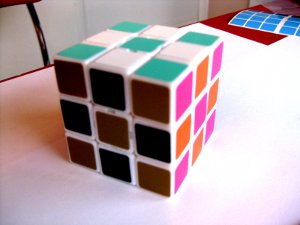
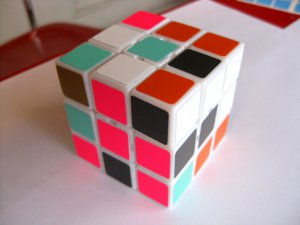
This whole thing started when I got cubes for my roommates' birthdays and let them pick out the colors that they wanted. None of them are cubers so they were just choosing fun color combinations. Here is one of the three:
IMG_1716.JPG
IMG_1718.JPG

This is aqua, white, dark grey, copper, orange and florescent pink (which for some reason looks purplish on the left). The color scheme will hence forth be known as Fall of '85; that's what Kelly named her cube :D

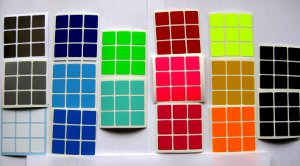
Then here is the pallet I was working with, selecting colors based on opponent process theory in combination with your suggestions.
IMG_1710.JPG

Starting from the left and going down each column we have chrome, silver, white, blue, light blue, bright blue, florescent green, agua, red, florescent pink, fuchsia, florescent yellow, yellow, bright orange, dark grey, and black.

So I have two more roomie cubes to show, as well as two experimental speed cubes. The camera has got to be around here somewhere...
 
Last edited:
Back
Top