color scheme research

nickvu2

Veteran
Joined
Sep 5, 2009
Messages
278
Location
Seattle
WCA ID
2007VUNI01
In an effort to get my cubesmith order up to $15 to qualify for free shipping, I got a sheet of nearly every color offered. I've been laying out different combinations and considering untraditional color schemes, for maximized recognition and also for aesthetics. I was looking for color theory research in hopes of identifying the 4 (sides only) or 6 (whole cube) most contrasting colors.

It turns out that there is a field of study know as opponent process theory that is a part of color psychology. Conveniently there are 6 base colors. One could argue that these are the most distinct/contrasting colors based on the biology of the human eye.

The contrast might then be exaggerated if you start playing with brightness, reflectiveness, etc.

I'd like to hear you thoughts, as well as about experiences with alternative color schemes.
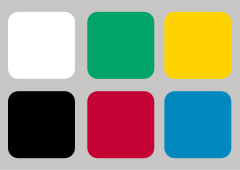
240px-Opponent_colors.svg.png
 
The big problem with white is that it doesn't necessarily stick out so much. It kind of disappears more. I think this is because we are used to seeing white as a natural background colour. Just think about how many things in the world use white as the background colour.

I think without a doubt bright colours are going to stick out more. However another thing to bear in mind is that you don't want any colour to be too overwhelming. It might be very hard to find the "perfect" balance...
 
that scheme seems pretty good, however, the green and blue look kinda similar, all the other colors are distinct and stand out, but the blue and green might merge slightly like the red and orange on a diansheng
 
Interesting stuff. I think you would have to consider the color of the cube itself too, thus it would be nice to see what they think the 7th most contrasting color is in that set.
 
I'm maybe considering switching to such a colour scheme, because it sounds like fun! Also, it'll give me an excuse to start over, and become colour neutral. I'll wait for more research to be done, though.
 
You probably also want the colours to still look different even under yellowish indoor lighting. In that respect the traditional differ-by-yellow scheme is quite good.
 
Woohoo, it's Jaap Scherphuis! Nice to see you on the forums
 
Interesting post!

Here is an example of a cube with the colours defined in the color opponency at opposite ends.
visualcube.php


... and with a random scramble:
visualcube.php


There are a couple problems. The first one is in using black and white when the cube plastic is also black or white. It means that one group of stickers almost appears as a 'non-sticker' because there's no contrast with the rest of the cube.

The second problem is that it is advantageous to have similar colours opposite each other, and adjacent colours contrasting. This helps a lot in recognition of PLLs or COLLs using 'hyperorientations' or blocks or pieces with opposite colours.

Using these ideas it could be changed to the following:
visualcube.php


... and with a random scramble:
visualcube.php


I think the criteria for cube colours are slightly more complex than simply contrast between opposite colours. Contrast between adjacent colours is probably more important, while it is desirable for 'similarity' of opposite colours. While contrast among stickers is important, attention should also be made to contrast with the cube plastic colour. It would certainly be interesting to see some experimental research on alternative colour schemes.


EDIT: Here are some examples based on maximising separation in hue value, while maintaining brightness for contrast with the black cube plastic.

visualcube.php

Hue evenly divided into 6

visualcube.php

Hue evenly divided into 5 + white (starting at red)

visualcube.php

Hue evenly divided into 5 + white (starting at orange)

None of them seem as good as the original colour scheme though. Probably because hue value in the HSV colour model is purley based on colour frequency, rather than the response of our eyes to these colours.
 
Last edited:
Agreed with the ones who mentioned that green and blue are too similar on your first one.

I think standard color scheme is good enough. Some people use bright orange or green or blue, but I don't think that's a must.

You can get fast no matter what color scheme you use, it's just a matter of getting used (Sarah has an awkward one).
 
Yeah, for me this cube:
visualcube.php

had the best combination of contrast of adjacent colours, contrast with the cube and 'similarity' of opposite colours. But I would agree that the green/blue combination are too similar. I like the idea of removing yellow to allow for a brighter orange though, and replacing it with grey. I might try out a cube with this scheme. If I tweak the cube above to make green slightly lighter and the blue slightly darker then it looks like this:
visualcube.php


The equivalent cubesmith stickers would be:
http://cubesmith.com/3x3 white.jpg
http://cubesmith.com/3x3 Grey.jpg
http://cubesmith.com/3x3 red.jpg
http://cubesmith.com/3x3x3brightorange.JPG
http://cubesmith.com/3x3 blue.jpg
http://cubesmith.com/3x3 light green.jpg

Switching to a white cube would be as simple as swapping white for black, as all the rest look like they contrast pretty well with a white background.
 
Last edited:
Uh oh, this gives me an excuse to buy a whole bunch of the same cube... I have a feeling I will be buying a bunch of F-IIs and testing out a lot of these different color schemes, they look so cool.

Has anyone found a place to special order specific colored stickers? Actually wait, that might be taking things too far.
 
Uh oh, this gives me an excuse to buy a whole bunch of the same cube... I have a feeling I will be buying a bunch of F-IIs and testing out a lot of these different color schemes, they look so cool.

Has anyone found a place to special order specific colored stickers? Actually wait, that might be taking things too far.

honestly what colors do you need that cubesmith does not offer lol.
 
Just ordered some cubesmith stickers for the grey/white + bright orange/green colour scheme. Will upload photos when they arrive...
 
visualcube.php

Hue evenly divided into 6

That looks so nice! :eek:
The next time I'm ordering stickers I definitely want to try that colour scheme out.

You can get fast no matter what color scheme you use, it's just a matter of getting used (Sarah has an awkward one).
Replacing orange with yellow is really easy to get used to imo. It took me literally 5 solves to get used to it. It took a bit longer (~50 solves?) to get used to the purple though.
 
Last edited:
visualcube.php

Hue evenly divided into 6

That looks so nice! :eek:
The next time I'm ordering stickers I definitely want to try that colour scheme out.

You can get fast no matter what color scheme you use, it's just a matter of getting used (Sarah has an awkward one).
Replacing orange with yellow is really easy to get used to imo. It took me literally 5 solves to get used to it. It took a bit longer (~50 solves?) to get used to the purple though.
I would love to try out that color scheme. 0.0
 
Yeah, for me this cube:
visualcube.php

had the best combination of contrast of adjacent colours, contrast with the cube and 'similarity' of opposite colours. But I would agree that the green/blue combination are too similar. I like the idea of removing yellow to allow for a brighter orange though, and replacing it with grey. I might try out a cube with this scheme. If I tweak the cube above to make green slightly lighter and the blue slightly darker then it looks like this:
visualcube.php


The equivalent cubesmith stickers would be:
http://cubesmith.com/3x3 white.jpg
http://cubesmith.com/3x3 Grey.jpg
http://cubesmith.com/3x3 red.jpg
http://cubesmith.com/3x3x3brightorange.JPG
http://cubesmith.com/3x3 blue.jpg
http://cubesmith.com/3x3 light green.jpg

Switching to a white cube would be as simple as swapping white for black, as all the rest look like they contrast pretty well with a white background.

Do you really like the white/grey contrast? It may be my computer screen, but they look too close to me...

Also, that doesn't look like red to me. At least not the red I have on my cubes. I'd say that one is http://www.cubesmith.com/3x3 fuschia.jpg (it's not that light as it may look from the picture...)

Let me see if I can find a picture of a "girl cube" I made once (not for me, for my ex-gf)

http://img507.imageshack.us/img507/4626/dsc00140ahc.jpg
http://img517.imageshack.us/img517/2142/dsc00139iik.jpg
http://img218.imageshack.us/img218/9997/dsc00138p.jpg
http://img507.imageshack.us/img507/1881/dsc00137mhu.jpg

Yeah, the fuschia is actually light...maybe purple would be a better fit for your image.

On a side note: At our last competition, there was this girl with a pink-plastic cube and every stickers was a shade of pink...seriously, it was scary...lol
I'll see if I can get any pics
 
Last edited:
Cride5 said:

Do you really like the white/grey contrast? It may be my computer screen, but they look too close to me...

If you convert the cube to greyscale the contrast between the grey/white side, is about the same as the greyscale contrast between the other opposite colours. I guess if it's not enough it's always possible to use a darker grey. I don't think it would be necessary to go all the way to black to achieve good enough contrast with white. I actually ordered two shades of grey from cubesmith to compare. Will post images for you..

Just as an example, here is a cube with a darker grey:
visualcube.php
 
wow, that's really interest me..
I think that the Japanese color scheme is a little bit better, because of the adjacent colors recognition.
 
Back
Top