
Navigation
Install the app
How to install the app on iOS
Follow along with the video below to see how to install our site as a web app on your home screen.
Note: This feature may not be available in some browsers.
More options
Style variation
You are using an out of date browser. It may not display this or other websites correctly.
You should upgrade or use an alternative browser.
You should upgrade or use an alternative browser.
Help needed to readproof a beginner's method memento/reminder
- Thread starter Cristobal
- Start date



AndyK
Premium Member
- Joined
- Apr 5, 2009
- Messages
- 173
I love the look of this. Would you tell me which colors you are using in visualcube?
Would you consider adding a notation guide?
Here are a few opinions:
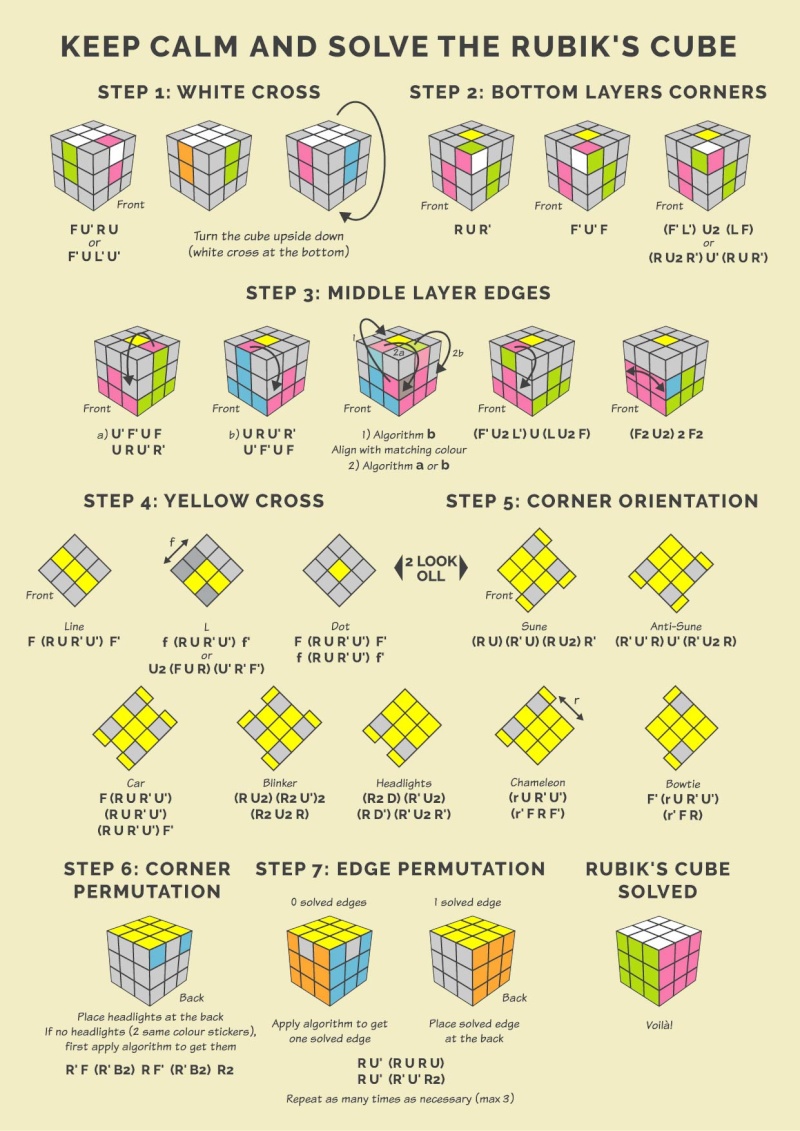
1. I think it is confusing whenever you label a side as 'back' when the layout of the picture shows it being the side traditionally labeled as 'right'. Basically I'm referring to the second to last image and others like it. I get what you are trying to do, but it is somewhat confusing.
2. I don't think that the 3rd and 4th images in Step 3 add anything. Or maybe I don't understand what you are trying to communicate. I would get rid of them.
3. I think that most great beginner's guides use the smallest number of algorithms. Because of this, I like the previous Step 5 where it only required Sune multiple times. (Same goes for Step 4, you can go from the dot case to L case to line case all by repeating F RUR'U' F' multiple times)
4. The way you explain 'f' via diagram in step 4 is nontraditional and may confuse people
5. For Step 2, I much prefer R U2 R' U' (RUR') to the other alg. You could even simplfy that step into R U2 R' U' (then refer to other case)
Really looks beautiful and professional. Well done.
Would you consider adding a notation guide?
Here are a few opinions:
1. I think it is confusing whenever you label a side as 'back' when the layout of the picture shows it being the side traditionally labeled as 'right'. Basically I'm referring to the second to last image and others like it. I get what you are trying to do, but it is somewhat confusing.
2. I don't think that the 3rd and 4th images in Step 3 add anything. Or maybe I don't understand what you are trying to communicate. I would get rid of them.
3. I think that most great beginner's guides use the smallest number of algorithms. Because of this, I like the previous Step 5 where it only required Sune multiple times. (Same goes for Step 4, you can go from the dot case to L case to line case all by repeating F RUR'U' F' multiple times)
4. The way you explain 'f' via diagram in step 4 is nontraditional and may confuse people
5. For Step 2, I much prefer R U2 R' U' (RUR') to the other alg. You could even simplfy that step into R U2 R' U' (then refer to other case)
Really looks beautiful and professional. Well done.
I love the look of this. Would you tell me which colors you are using in visualcube?
I used an old version of Illustrator (the 10th):
Green: Focoltone 1160
Pink: Pantone 212C at 74% (the intensity, from the actual color to white, not the transparency)
Grey: C: 18.82% M: 12.94% J: 10.2% N: 1,18%
Blue: Pantone 298C at 85%
Yellow: Pantone Process Yellow C
Orange: Pantone 138 C 80%
Background colour: Pantone DS 9-8 C at 100%
I tried to recreate the colours (with contrast) of my stickerless Guanlong/Yulong cubes. Moreover, I'm slightly colorblind...
Would you consider adding a notation guide?
No (I don't think so at the moment, but I thought about it), here is why: this little memento is primarily for my personal use, so I needed just the essential. When I started cubing, I found all the guides (web, pdf file or picture) very hard to understand (or maybe I'm just too stupid...
 ) ; anyway, it was so abstruse that I needed to make my own visual guide, mainly from Badmephisto's Youtube video at first, then his pdf guide available on his website. Since the goal of my memento is to be stored in my Phablet/mobile phone, I wanted all the diagrams to fit in one page (A4, in case I needed to print it). The job is done, so I might as well share it on the forum.
However, maybe one day, I'll work on a more comprehensive guide (two pages).
Here are a few opinions:
1. I think it is confusing whenever you label a side as 'back' when the layout of the picture shows it being the side traditionally labeled as 'right'. Basically I'm referring to the second to last image and others like it. I get what you are trying to do, but it is somewhat confusing.
I understand what you mean, but the only way to show the back of an object in 2D (especially if I want to keep the same 3D representation of the cube), is to turn it, so the "back" would become either the regular "front" or the "right". There isn't a lot of options here.
2. I don't think that the 3rd and 4th images in Step 3 add anything. Or maybe I don't understand what you are trying to communicate. I would get rid of them.
Yes, the 3rd image in step 3 could or should be divided in 2 images (showing each edge at the wrong place on top layer), that can be a bit confusing, but confronted to these cases while cubing, it becomes more obvious (when you see it for real).
The 4th and the 5th are just some new algorithms that I discovered in a German guide, they are of course optional, and I added them in order for me to learn and to try them.
3. I think that most great beginner's guides use the smallest number of algorithms. Because of this, I like the previous Step 5 where it only required Sune multiple times. (Same goes for Step 4, you can go from the dot case to L case to line case all by repeating F RUR'U' F' multiple times)
Yes, you're right, this last version is intended for people like me, who know already the basic beginner's method and need to access to the next level. If you plan to use this visual guide to teach someone, take one of the previous versions without the OLL's.
4. The way you explain 'f' via diagram in step 4 is nontraditional and may confuse people
Actually, since I know already the notation, I should get rid of the "f", but it's just a little reminder (an arrow and an alphabet letter) and the simplest way I can think of.
5. For Step 2, I much prefer R U2 R' U' (RUR') to the other alg. You could even simplfy that step into R U2 R' U' (then refer to other case)
It's just a matter of preference I guess, that's why I left both algorithms. F'L'U2LF is somehow faster for me...
Really looks beautiful and professional. Well done.
Thank you, particularly for your constructive input.

It helps me to know/understand the perception of different people, unfortunately even if I try to do it as simple as possible, one thing obvious to someone might seem difficult to another so...
Last edited:
I love the look of this. Would you tell me which colors you are using in visualcube?
Would you consider adding a notation guide?
Ok, so since you've asked, I gave it some thoughts. Hence, the new drawing I've begun in Sketchup:

I'm planing to find the apt isometric view and then to process it graphically in Illustrator. It means likely a complete visual guide (notation, basic beginner's method and OLL, maybe PLL) on the long run, fitting in a A3 (or 2 A4) sized paper.
AndyK
Premium Member
- Joined
- Apr 5, 2009
- Messages
- 173
You are awesome. I love it! Keep up the SketchUp!

AndyK
Premium Member
- Joined
- Apr 5, 2009
- Messages
- 173
This is my favorite notation guide yet. Really great stuff.

Christopher Mowla
Premium Member
Really nice guide.
A few comments:
[1] Since you wrote other algs compactly, why not write the alg for the "car" corner orientation case compactly as
F (R U R' U')3 F'?
[2] I borrowed some algs from your guide and put them in my guide.
[3] What do you think about the process for permuting the edges and corners on the last page (page 8) of my guide? I think the maximum number of algorithms (which includes repetitions) with "my" approach is 8, but yours is 5. I would of course prefer to use yours, because it's fewer steps, but do you think "my" permutation approach is easier for first timers to follow?
A few comments:
[1] Since you wrote other algs compactly, why not write the alg for the "car" corner orientation case compactly as
F (R U R' U')3 F'?
[2] I borrowed some algs from your guide and put them in my guide.
[3] What do you think about the process for permuting the edges and corners on the last page (page 8) of my guide? I think the maximum number of algorithms (which includes repetitions) with "my" approach is 8, but yours is 5. I would of course prefer to use yours, because it's fewer steps, but do you think "my" permutation approach is easier for first timers to follow?
Last edited:
Really nice guide.
A few comments:
[1] Since you wrote other algs compactly, why not write the alg for the "car" corner orientation case compactly as
F (R U R' U')3 F'?
Very relevant, I realized that too two days ago.
[2] I borrowed some algs from your guide and put them in my guide.
I think approach is very ambitious, and find a bit nerdy (in the good way; English is not my mother tongue, so pardon me if I sometimes use words in the wrong way) in the sense that the graphical manner you use to represent the algorithms, reminds me a bit the binary watch
... Anyway, if I can make an observation: how efficient is your representation of the algorithms, regarding their memorization?[3] What do you think about the process for permuting the edges and corners on the last page (page 8) of my guide? I think the maximum number of algorithms (which includes repetitions) with "my" approach is 8, but yours is 5. I would of course prefer to use yours, because it's fewer steps, but do you think "my" permutation approach is easier for first timers to follow?
No idea mate, I'm just a beginner and my knowledge is limited to this memento I shared. I guess the best algorithm is the one you execute at the fastest speed or the one you know better...
Christopher Mowla
Premium Member
Thanks. I never thought of it that way, but maybe I'm a bit of a nerd.Very relevant, I realized that too two days ago.
I think approach is very ambitious, and find a bit nerdy (in the good way; English is not my mother tongue, so pardon me if I sometimes use words in the wrong way) in the sense that the graphical manner you use to represent the algorithms, reminds me a bit the binary watch
I actually designed this guide to be a "first timer"/"dummy proof" type of guide, where I just teach those who have never seen a cube solution before "cube common sense".... Anyway, if I can make an observation: how efficient is your representation of the algorithms, regarding their memorization?
I have never seen such a comprehensive set of algorithms to complete the first layer cross like in my guide. I think the reason most (if not all) guides besides mine do not have all these cases listed is because they think people should "figure it out" for themselves, but my guide is for those who don't want to figure it out for themselves as well as those that just want to gain the confidence that they can follow directions.
I highly doubt it's good for memorization, and I don't think it's efficient.
Maybe the reason why I'm not concerned about memorization is because I exploited the Niklas commutator in 2009 and made this guide. (See Step 3 and onward.) Maybe I should make a video tutorial on this very method that I still use to this day to solve the cube? (I average about 45 seconds with it. I got lucky once and got a 28 second solve, and occasionally I get in the high 30s.)
Conrad's method could be the easiest to memorize (I think my commutator guide is equally as easy) as well.
Oh, okay. Don't get me wrong. Your guide is pretty nice. I also like Lucas Garron's because he reuses easy-to-memorize algorithms throughout, and it's pretty compact as well.No idea mate, I'm just a beginner and my knowledge is limited to this memento I shared. I guess the best algorithm is the one you execute at the fastest speed or the one you know better...
Last edited:
@Christopher Mowla
Thank for update guide, and the links you provided look very interesting ; I will have to spend some time to figure out the commutators though.
**********************
Otherwise, a French fellow cuber asked to make a synthetic diagram regrouping the moves he needed, from my basic one. It's still at sketch stage (monochrome, not correctly labeled), but that gives a good idea.

However, playing and drawing with Sketchup makes me think that designing a whole visual guide with SU and then Layout (the inner layout utility) might be a clever idea or means to create an efficient guide. The rendering might not be as nice, or graphical as Illustrator, but it's worth a try, I will therefore think about it.
Thank for update guide, and the links you provided look very interesting ; I will have to spend some time to figure out the commutators though.
**********************
Otherwise, a French fellow cuber asked to make a synthetic diagram regrouping the moves he needed, from my basic one. It's still at sketch stage (monochrome, not correctly labeled), but that gives a good idea.
However, playing and drawing with Sketchup makes me think that designing a whole visual guide with SU and then Layout (the inner layout utility) might be a clever idea or means to create an efficient guide. The rendering might not be as nice, or graphical as Illustrator, but it's worth a try, I will therefore think about it.


Ok. Keep doing my visual guide by adding the 2 look OLL and 2 look PLL (on the right side) to the beginner's method (on the left side of the page). Once you know the basic, you go to the next level by learning the additional algs.Still in progress.

Last edited:
@AndyK
Here are some attempts to represent the back side:

I started from the E actually, finally I might favor the A, the A and C might be a good compromise (still a compromise though), but if it is easier to comprehend and respects the convention...
Here are some attempts to represent the back side:
I started from the E actually, finally I might favor the A, the A and C might be a good compromise (still a compromise though), but if it is easier to comprehend and respects the convention...


Similar threads

- Replies
- 6
- Views
- 212


- Replies
- 9
- Views
- 463

- Replies
- 3
- Views
- 466


