• Welcome to SpeedSolving.com — the world’s largest puzzle community!

    You’re currently browsing as a guest, which means you have limited access to discussions, resources, member profiles, and community features.

    Join 50,000+ cubers and puzzle enthusiasts from around the world to ask questions, share solves, improve faster, and be part of the community.

    Registration is free, fast, and easy — create your account today.

    Already a member? Log in here to hide this message and start participating.

[Help Thread] Speed Stacks Gen 4 Timer Glitch

Joined
Feb 21, 2019
Messages
1
So, whenever I manage to connect my gen 4 timer to my computer, about half of the time it glitches out and stops at 0.005 seconds (or somewhere around that time) when I start it. I tried changing the batteries, but that didn't work. I also tried messing around with the settings on my computer, but that didn't work either. Anyone know how to fix this?
 
I hooked up my Stackmat as an input to audacity. It just shows clipping all over the place, maybe this has something to do with it?

I tried changing my audio input levels and it didn't seem to help very much though.
 
This is likely due to the fact that many Mac computers will have an Aux port that is wired to both Headphones and a Microphone. Your Aux port has to be made specifically for a microphone

I am using an HP laptop which doesn't have both so I have to use a usb adapter that has both inputs and I plug the wire into the microphone slot. This is what I use: https://www.amazon.com/Plugable-Headphone-Microphone-Aluminum-Compatible/dp/B00NMXY2MO

This is likely true and an actual PC with a dedicated microphone port may fix it but I'm not buying one anytime soon. Maybe it's the adapter?


So this is a problem with the timer itself? Because i was considerimg buying the cable on TheCubicle after one from ebay didn't work

I don't think it is the timer itself because it works perfectly fine if I use it without the wire and enter the times manually. I know now that its not the wire either, because I tried multiple and the problem was the same.


I hooked up my Stackmat as an input to audacity. It just shows clipping all over the place, maybe this has something to do with it?

I tried changing my audio input levels and it didn't seem to help very much though.

I just tried this too but I'm honestly not sure what It's supposed to sound/look like. I can't find much information about this anywhere.


I'm entering times in manually until I can figure this out like the monkey league participants apparently have.
 
This is likely due to the fact that many Mac computers will have an Aux port that is wired to both Headphones and a Microphone. Your Aux port has to be made specifically for a microphone
I myself run an old windows 10 laptop for keeping track of times. But, I post on a mac. I don't plugin directly through an audio port because I was not blessed with a separate aux in. So, I ended up using a USB audio converter dongle + a random 2.5 mm to 3.5mm cable.

I have the same problem too and am wondering the same thing.
 
I myself run an old windows 10 laptop for keeping track of times. But, I post on a mac. I don't plugin directly through an audio port because I was not blessed with a separate aux in. So, I ended up using a USB audio converter dongle + a random 2.5 mm to 3.5mm cable.

I have the same problem too and am wondering the same thing.

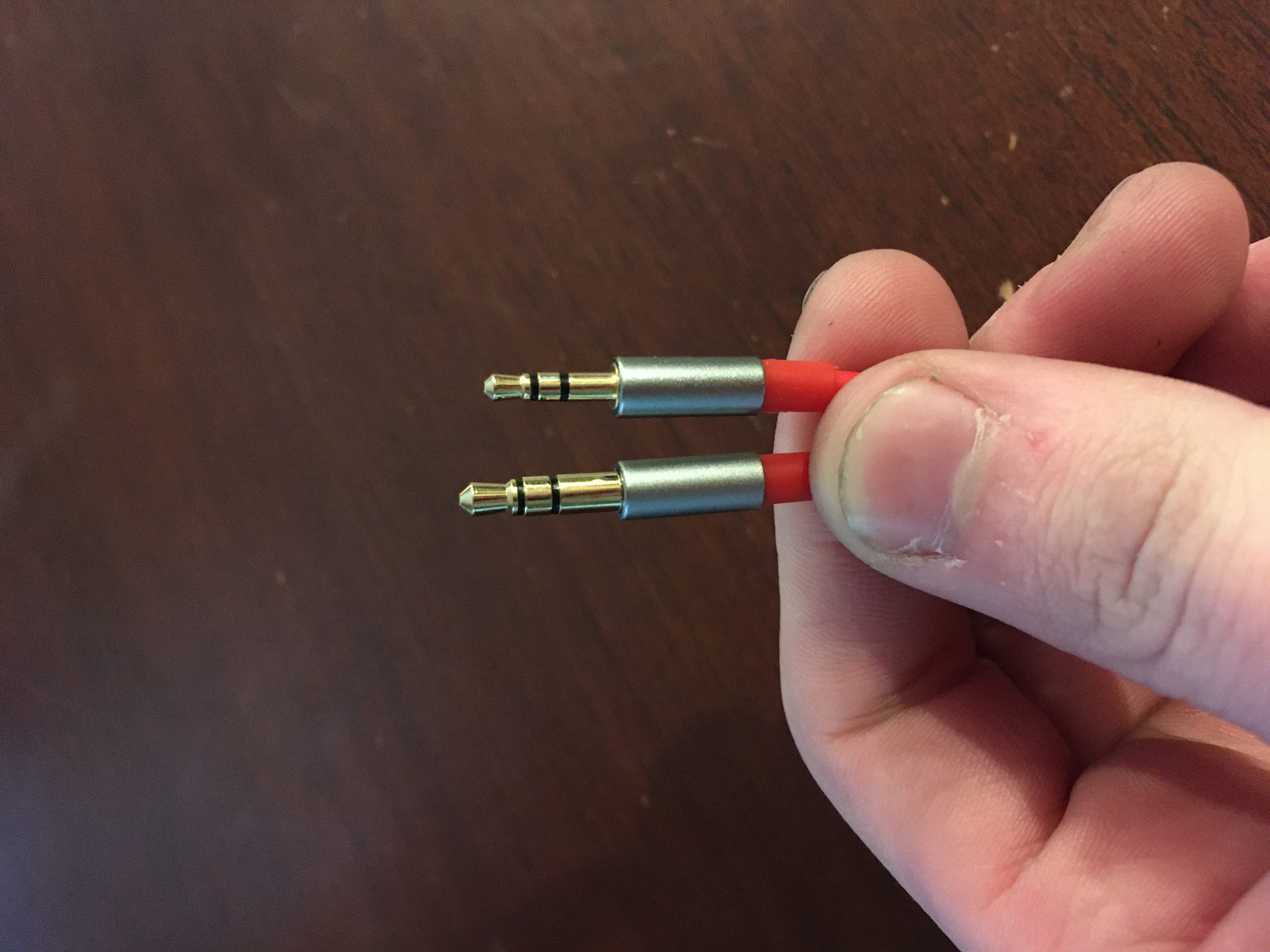
Check out the output cable(the part plugged into the timer), there should be 2 silver bands around it. If there's 3, that cable won't work
 
Check out the output cable(the part plugged into the timer), there should be 2 silver bands around it. If there's 3, that cable won't work
You mean TRS and TRRS?

IMG0441.jpg

Is this what you mean?
 
Last edited:
Back
Top