

Automatic F2L Pair Analysis for solver solutions
I've just released a new feature for my RubiksSolverDemo: automatic pair analysis for solver solutions.
The solver can now analyze the intermediate state of the F2L slots while generating solutions, and attach labels to solutions based on the pair structures found along the way.
For each F2L slot, the analysis considers the corner together with its three corresponding F2L edges: one E-edge in the middle layer and the two D-layer edges on either side.
There are two basic states:
Likewise, a Free Pair Block only means that the two pieces can become such a block with one move. It does not mean that the resulting pair is necessarily in a usable F2L position.
The labels also record when a state is established and whether it is subsequently preserved:
When a Pair Block or Free Pair Block is already present before the solution starts, no move number is attached. The move number indicates the point at which the state is established during the solution.
The labels can contain the three relevant edges for a slot. For example:
BR[E: M5]
M5]
BL[DB:M5, E: M6, DL: End]
BR[DR:M8, DB: End]
FR[E: End]
End]
FL[DL:, E: End, DF: End]
The badge colors provide another level of information. They are not simply "Pair Block found / not found":
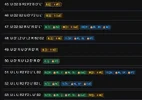
The analysis is available for all non-pseudo solvers and trainers in the project, including Cross, XCross, XXCross, XXXCross, and the other corresponding stages.
The same analysis is available in the trainers. The labels are attached to the generated solutions, so the same information can be inspected while working with different training stages.
The trainers intentionally color only the pieces relevant to the corresponding stage. For example, the Cross trainer highlights the Cross pieces and relevant centers rather than the entire cube. This is by design.
If you want to inspect the movement of the other pieces, each solution panel also provides links to external tools such as Twizzle, alg.cubing.net, and cubedb.net, allowing the complete cube state and solution to be viewed there.
The pair-analysis labels are descriptive only. They are generated mechanically from the cube state and solution, and are not used to rank or score the solutions.
The latest version is available here: https://or18.github.io/RubiksSolverDemo/
I've just released a new feature for my RubiksSolverDemo: automatic pair analysis for solver solutions.
The solver can now analyze the intermediate state of the F2L slots while generating solutions, and attach labels to solutions based on the pair structures found along the way.
For each F2L slot, the analysis considers the corner together with its three corresponding F2L edges: one E-edge in the middle layer and the two D-layer edges on either side.
There are two basic states:
- Pair Block — the corner and an edge are connected as a 1x1x2 or 2x1x1 block.
- Free Pair Block — the corner and an edge can become a Pair Block with a single move.
Likewise, a Free Pair Block only means that the two pieces can become such a block with one move. It does not mean that the resulting pair is necessarily in a usable F2L position.
The labels also record when a state is established and whether it is subsequently preserved:
- — Pair Block is already present before the solution starts and remains preserved
- M5 — Pair Block is established at move 5 and remains preserved afterward
- End — Pair Block is established at the final move
- — Free Pair Block is already present before the solution starts and remains preserved
- M5 — Free Pair Block is established at move 5 and remains preserved afterward
- End — Free Pair Block is established at the final move
When a Pair Block or Free Pair Block is already present before the solution starts, no move number is attached. The move number indicates the point at which the state is established during the solution.
The labels can contain the three relevant edges for a slot. For example:
BR[E:
M5]BL[DB:
M5, E: M6, DL: End]BR[DR:
M8, DB: End]FR[E:
End]FL[DL:
, E: End, DF: End]The badge colors provide another level of information. They are not simply "Pair Block found / not found":
- Green — the E-edge forms a Pair Block with the corner. The D-edge states do not change this classification.
- Yellow — the E-edge forms a Free Pair Block, but not a Pair Block. This remains yellow even if the two D-edges form Pair Blocks with the corner, producing a 2x2x1 structure.
- Blue — the E-edge is not even a Free Pair Block, while the two D-edges form Pair Blocks on both sides, producing a 2x2x1 structure.
The analysis is available for all non-pseudo solvers and trainers in the project, including Cross, XCross, XXCross, XXXCross, and the other corresponding stages.
The same analysis is available in the trainers. The labels are attached to the generated solutions, so the same information can be inspected while working with different training stages.
The trainers intentionally color only the pieces relevant to the corresponding stage. For example, the Cross trainer highlights the Cross pieces and relevant centers rather than the entire cube. This is by design.
If you want to inspect the movement of the other pieces, each solution panel also provides links to external tools such as Twizzle, alg.cubing.net, and cubedb.net, allowing the complete cube state and solution to be viewed there.
The pair-analysis labels are descriptive only. They are generated mechanically from the cube state and solution, and are not used to rank or score the solutions.
The latest version is available here: https://or18.github.io/RubiksSolverDemo/


