Stackmat CStimer Issues

CUBER1265

Member
Joined
Jan 28, 2021
Messages
21
Hi, I have a stackmat G4, and all the necessary parts to connect to CStimer, and it works just fine. (I have the jack spitter and the 3.5 to 2.5 mm cable). It has been working just fine ever since I got it, and randomly it just stopped cooperating with CStimer. It works perfectly when not connected, but when it is connected, It will not start. I've tried starting it, then connecting it, and it won't turn off. Any tips? Thanks!
 
How do I contact CSTIMER people to get them to make the timer work with just the GAN timer alone (Not with the smart cubes), seems weird this hasn't already been done...

I think FF hasn't done bluetooth but Chrome and Edge have the capacity I believe!?

Thanks,

:)
 
I have everything, but the problem that I have is that it works inconstantly, when it doesn't work, the input on the mic is maxed out, and changing the mic input doesn't change anything. has anyone else seen this?
 
I too have had issues with the stackmat timer porting to computer for a while. I have tried 2 cables of 3.5-2.5 AUX cable but they just have too much noise inside their transmission. No idea on how to get a working stackmat data import into my laptop.
 
I just found a solution, the record rate was not correct.
I too have had issues with the stackmat timer porting to computer for a while. I have tried 2 cables of 3.5-2.5 AUX cable but they just have too much noise inside their transmission. No idea on how to get a working stackmat data import into my laptop.
Note that in sound settings and advanced, and change the record rate to 44100 hz as shown in the screenshot
 

Attachments

  • Screenshot 2021-08-31 212922.png
    Screenshot 2021-08-31 212922.png
    12.3 KB · Views: 22
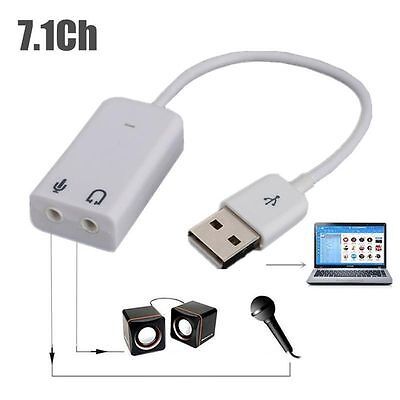
I had issues trying to connect a stackmat to my laptop and even my desktop. Easy solution was to purchase an external USB audio card, probably cost about $2. Works perfectly with no issues connecting the stackmat to cstimer now.

Something like this ...
 
Back
Top