Python Cube Project

That seems like it would take a lot of CPU. Also, what do you mean by AI?
Artificial intelligence. Say I could make a program that you give a scramble, and it tries to block build with a neural network. Then I could look at its solutions for block building and see how I can use that to improve my own. Also it'd be really cool if there was an AI that simulated a human solving a cube, with limited vision, recog time, fingertricks etc
 
Artificial intelligence. Say I could make a program that you give a scramble, and it tries to block build with a neural network. Then I could look at its solutions for block building and see how I can use that to improve my own. Also it'd be really cool if there was an AI that simulated a human solving a cube, with limited vision, recog time, fingertricks etc
Ok. I know what Deep Learning and AI and Machine Learning and all that stuff is I was just wondering what you were going to do with it. About the blockbuilding: If you just want to have the AI solve a cube step by step that's pretty simple. You just make a seperately neural network for every step. The problem comes in when you want it to take advantage of luck. For example, if you instruct the AI to build a cross, it's perfectly good until it messes up an XCross. Maybe you could run one AI that looks for each cross (X, XX, XXX, F2L skip) and finishes the solve with each of them and sees which one has the lowest move-count? Of course, you would have a sort of tree as you compare each steps' different move-count depending on in which order you do things (like which order to solve F2L in). Of course, CFOP isn't the best example as it's human-optmized instead of computer-optimized. I dunno, maybe there's a simpler way to do it, that's just my two cents. As for human emulation, that should be pretty simple, just have the input only be what it can see, and have an AI take the output, find the fastest finger tricks, and add time between each one. The only hard one seemed to be recognition.


WOW that was a lot more than text I thought.
 
Ok. I know what Deep Learning and AI and Machine Learning and all that stuff is I was just wondering what you were going to do with it. About the blockbuilding: If you just want to have the AI solve a cube step by step that's pretty simple. You just make a seperately neural network for every step. The problem comes in when you want it to take advantage of luck. For example, if you instruct the AI to build a cross, it's perfectly good until it messes up an XCross. Maybe you could run one AI that looks for each cross (X, XX, XXX, F2L skip) and finishes the solve with each of them and sees which one has the lowest move-count? Of course, you would have a sort of tree as you compare each steps' different move-count depending on in which order you do things (like which order to solve F2L in). Of course, CFOP isn't the best example as it's human-optmized instead of computer-optimized. I dunno, maybe there's a simpler way to do it, that's just my two cents. As for human emulation, that should be pretty simple, just have the input only be what it can see, and have an AI take the output, find the fastest finger tricks, and add time between each one. The only hard one seemed to be recognition.
I don't really want it to try and solve the cube really, I just want it to make blocks efficiently so I can analyze it. Then it'd be easy to give the AI a 'score' of how well it's doing so the network can adapt, I would just use some function of the size of the block. Then I would probably just look to see what interesting strategies it comes up with. So hopefully the network will see the best options from past experience, it wouldn't break an XCross because it was trying to make a cross, because it would just be trying to make the biggest blocks possible, not a set goal. Although it probably would sacrifice a OLL skip or something because it wouldn't see it as a useful block, but I don't really care about that. Should I upload my full code again and a little guide explaining how to use it so if you guys want to fiddle with it or make suggestions you can?
 
I don't really want it to try and solve the cube really, I just want it to make blocks efficiently so I can analyze it. Then it'd be easy to give the AI a 'score' of how well it's doing so the network can adapt, I would just use some function of the size of the block. Then I would probably just look to see what interesting strategies it comes up with. So hopefully the network will see the best options from past experience, it wouldn't break an XCross because it was trying to make a cross, because it would just be trying to make the biggest blocks possible, not a set goal. Although it probably would sacrifice a OLL skip or something because it wouldn't see it as a useful block, but I don't really care about that. Should I upload my full code again and a little guide explaining how to use it so if you guys want to fiddle with it or make suggestions you can?
So it's just purely trying to build big blocks, no other instructions?
 
That's a good question, I don't really know. Maybe either when it solves the cube, or I guess I could make it give up if it spends too much time without making any progress.
Maybe you could make a few specifications like: All corners must touch 2-3 edges, all edges must touch 1-2 corners, no more than x pieces can be under these conditions, and all pieces can only touch 3-5 centers.
 
I'm a python noob, but why not?
Ok, I might just remove undo and redo for now cause itll take a while to debug, and I don't want to keep you waiting.

Python:
SOLVED = ['w', 'w', 'w', 'w', 'w', 'w', 'w', 'w', 'w', 'y', 'y', 'y', 'y', 'y', 'y', 'y', 'y', 'y', 'g', 'g', 'g', 'g',
          'g', 'g', 'g', 'g', 'g', 'r', 'r', 'r', 'r', 'r', 'r', 'r', 'r', 'r', 'b', 'b', 'b', 'b', 'b', 'b', 'b', 'b',
          'b', 'o', 'o', 'o', 'o', 'o', 'o', 'o', 'o', 'o']


class Move:
    def __init__(self, indices):
        self.indices = indices

    def inverted(self):
        inverted = []
        for item in self.indices: inverted.append((item[1], item[0]))
        return Move(inverted)


class Cube:
    def __init__(self, state=SOLVED):
        self.state = state[:]

    def move(self, move):  # Function which applies a move to the cube object, takes a move object as its parameter
        cube = self.state[:]
        indices = move.indices[:]
        next_cube = cube[:]
        for item in indices:
            next_cube[item[1]] = cube[item[0]]
        self.state = next_cube[:]

    def sequence(self, sequence):
        for move in sequence:
            self.move(move)

    def is_state(self, state_args):
        for arg in state_args:
            if self.state[arg[1]] != arg[0]: return False
        return True


def move_from_sequence(sequence):  # Turns a list of move objects into a single move object
    cube = Cube()
    cycle = 0
    new_indices = []

    item = ()
    for sticker in cube.state:
        cube.state[cycle] = (sticker, cycle)
        cycle += 1
    cube.sequence(sequence)
    cycle = 0
    for sticker in cube.state:
        item = cube.state[cycle]
        if cycle != item[1]:
            new_indices.append((item[1], cycle))
        cycle += 1
    cube.state = SOLVED[:]

    return Move(new_indices)


def cy(targets):  # Makes manually coding moves easier by automating cycles of stickers, so you don't have to code
    # every swap by hand
    out = []
    for i in range(len(targets)): out.append((targets[i], targets[(i + 1) % len(targets)]))
    return out


# Manually coded moves:
R = Move(
    [(8, 36), (5, 39), (2, 42), (36, 17), (39, 14), (42, 11), (17, 26), (14, 23), (11, 20), (26, 8), (23, 5), (20, 2),
     (27, 29), (29, 35), (35, 33), (33, 27), (28, 32), (32, 34), (34, 30), (30, 28)])

y = Move(
    [(0, 2), (2, 8), (8, 6), (6, 0), (1, 5), (5, 7), (7, 3), (3, 1), (9, 15), (15, 17), (17, 11), (11, 9), (10, 12),
     (12, 16), (16, 14), (14, 10), (20, 47), (19, 46), (18, 45), (47, 38), (46, 37), (45, 36), (38, 29), (37, 28),
     (36, 27), (29, 20), (28, 19), (27, 18), (23, 50), (22, 49), (21, 48), (50, 41), (49, 40), (48, 39), (41, 32),
     (40, 31), (39, 30), (32, 23), (31, 22), (30, 21), (26, 53), (25, 52), (24, 51), (53, 44), (52, 43), (51, 42),
     (41, 32), (43, 34), (44, 35), (42, 33), (35, 26), (34, 25), (33, 24)])

x = Move(
    cy([20, 2, 42, 11]) + cy([19, 1, 43, 10]) + cy([18, 0, 44, 9]) + cy([23, 5, 39, 14]) + cy([22, 4, 40, 13]) + cy(
        [21, 3, 41, 12]) + cy([27, 29, 35, 33]) + cy([28, 32, 34, 30]) + cy([45, 51, 53, 47]) + cy(
        [46, 48, 52, 50]) + cy([26, 8, 36, 17]) + cy([25, 7, 37, 16]) + cy([24, 6, 38, 15]))

# Other moves out of the manually coded moves:

# x move setup
x2 = move_from_sequence([x, x])
x_ = x.inverted()

# R move setup
R_ = R.inverted()
R2 = move_from_sequence([R, R])

# y move setup
y2 = move_from_sequence([y, y])
y_ = y.inverted()

# L move setup
L = move_from_sequence([y2, R, y2])
L_ = L.inverted()
L2 = move_from_sequence([L, L])

# F move setup
F = move_from_sequence([y_, R, y])
F2 = move_from_sequence([F, F])
F_ = F.inverted()

# B move setup
B = move_from_sequence([y, R, y_])
B_ = B.inverted()
B2 = move_from_sequence([B, B])

# U move setup
U = move_from_sequence([x_, y_, R, y, x])  # The code breaks down when I start using x moves, I don't know why.
U_ = U.inverted()
U2 = move_from_sequence([U, U])

# D move setup
D = move_from_sequence([x2, U, x2])
D_ = D.inverted()
D2 = move_from_sequence([D, D])

# M move setup
M = move_from_sequence([R, L_, x_])
M_ = M.inverted()
M2 = move_from_sequence([M, M])

z = move_from_sequence([x, y, x_])
z_ = z.inverted()
z2 = move_from_sequence([z, z])
Copy pate that into a new python file, and then name it something. Then make a new file and do import whateveryounamedthefile
(I'm just gonna use e as the file name for simplicity)
Then, the first thing you'd probably want to do is make a Cube object, so you can do stuff.
like: cube= e.Cube()

then, to apply algs onto that cube, you do
cube.sequence([list of moves])
The moves would be things like e.R, e.R2 because they come from the 'e' file
if you want to check if the cube is in a certain state, you can do cube.is_state(listofstuff)
In the list you have tuples with a string with a letter for the color to check for, and a number of where to check for that color. So if you added ('g',34) to the list, it would check to see if there was a green sticker in position 34. You can add as many tuples as you want, and it will only return true if all of the stickers were in the right place. For any inverse move, say R', you do R_ instead because you can't use apostrophes in variable names. If you have other questions ask me.
 
well done...

Python:
def cubeFromString(moves_string):
    moves_dict = dict(zip("R,R',R2,L,L',L2,U,U',U2,D,D',D2,B,B',B2,F,F',F2,x,x',x2,y,y',y2,z,z',z2,M,M',M2".split(','),
    [R,R_,R2,L,L_,L2,U,U_,U2,D,D_,D2,B,B_,B2,F,F_,F2,x,x_,x2,y,y_,y2,z,z_,z2,M,M_,M2]))
    move_from_sequence([moves_dict.get(move) for move in moves_string.split()])
   
cube = cubeFromString("R U R' U'")

Now you need to implement S, E, wide moves and a way to view the cube
 
well done...

Python:
def cubeFromString(moves_string):
    moves_dict = dict(zip("R,R',R2,L,L',L2,U,U',U2,D,D',D2,B,B',B2,F,F',F2,x,x',x2,y,y',y2,z,z',z2,M,M',M2".split(','),
    [R,R_,R2,L,L_,L2,U,U_,U2,D,D_,D2,B,B_,B2,F,F_,F2,x,x_,x2,y,y_,y2,z,z_,z2,M,M_,M2]))
    move_from_sequence([moves_dict.get(move) for move in moves_string.split()])
  
cube = cubeFromString("R U R' U'")

Now you need to implement S, E, wide moves and a way to view the cube
Ooohh nice, I might use that if its k with you. For viewing I'll probably do 2d like Brodo said and use turtle cause I have no clue how to use any other graphics stuff with python.
 
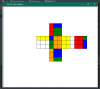
I got a visuals thingy now =D
The below image was from doing R2 U
 

Attachments

  • pictuure.png
    pictuure.png
    15.3 KB · Views: 7
Back
Top