

Lucas Garron
Premium Member
Download: HeiseSimulatorKeyboardLayout_v1_1.zip
I was using Ukulele to create a mapping for my new QBF keyboard layout, when I realized that the state system for entering accents was essentially a DFA which could be hacked to create a reasonable Heise Sim keyboard.
It essentially uses the keymapping below, but it can also move-cancel moves of the same type. Therefore, if you type F F U' L R' F' F' L' R U' F' F' , it will cancel to F2 U' L R' F2' L' R U' as you type.
Unfortunately, I don't think this is possible on Windows without some special program, which wouldn't feel as integrated. But if you know the Heise layout and have access to a Mac, I highly recommend you try it. It feels really cool.

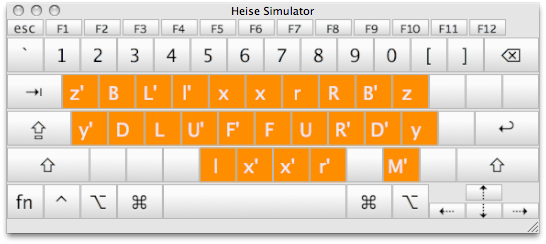
readme.txt said:Heise Simulator Keyboard Layout for Typing Rubik's Cube Algs.
Idea and Implementation by Lucas Garron, March 7, 2010
Version 1.1
--------------------------------
ABOUT
--------------------------------
This Mac OSX "keyboard layout" allows you to type Rubik's Cube algs using the fabulous controls invented by Ryan Heise and popularized at http://www.ryanheise.com/cube/speed.html
Cmd-Shortcuts will work as normal.
Made with Ukulele: http://scripts.sil.org/cms/scripts/page.php?site_id=nrsi&item_id=ukelele
--------------------------------
INSTALLATION
--------------------------------
Install the layout by copying "HeiseSimulator.keylayout" and "HeiseSimulator.icns" to Library/Keyboard Layouts or to ~/Library/Keyboard Layouts (create one of them if they don't exist).
You may need to log out of OS X and log in again before it will be available; then use System Preferences / Language & Tools / Input Sources to enable it. It should now be an option from the keyboard layout icon in the upper right of the screen. Please note the layout may not work on currently running programs until they are relaunched.
Last edited by a moderator:


