

yellowdumpstet
Member
Hello, Cubers!
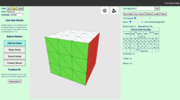
I've recently published virtual-cube.net, an online rubiks that allows you to learn and practice your cubing skills virtually. I used Antoine Gaubert’s cube for the basic animation but coded the mouse and keyboard movements to support many more features.

Base features
Cubes
I made this cube because I wanted an easy way to practice cubing online. Hope you find this fun/useful! Let me know if you have any suggestions.
I've recently published virtual-cube.net, an online rubiks that allows you to learn and practice your cubing skills virtually. I used Antoine Gaubert’s cube for the basic animation but coded the mouse and keyboard movements to support many more features.
Base features
- You can input an algorithm into the algorithm bar and the cube will perform it.
- The Auto-Solve feature is my best attempt at making the cube solve using the CFOP method. You can adjust the turn speed to make it solve faster or slower.
- There are undo and redo buttons in case you misturn.
Cubes
- Basic 2x2 and 3x3.
- Shape/Color mods (e.g. Sandwich Cube, Christmas Cube).
- Bandaged mods.
- The keyboard and button turning works with any cube. You can select between the default keyboard (which has the CS Timer keybinding) and a more beginner-friendly alternative keyboard.
- The mouse turning works on any non-shape/color mod.
- For keyboard turning, you can give yourself restrictions, such as double turns only or making the cube turn like a 3x3x2. You can give yourself similar restrictions with the scrambling, such as making it only scramble the last layer.
- Press Settings to see all the keyboard hotkeys.
- For the custom shape, you can adjust the color of a side and the appearance of a cuby.
- For the custom bandaging, you can even create bandage cubies that usually cannot be physically bandaged. For example, you can bandage 2 corners together.
- See, analyze, and delete your times.
- You are given 4 challenges, and your time is the sum of the times it takes to complete the 4 challenges. This is a good way to practice OLL/PLL.
- Bot Racing: Race against the Auto-Solver with your own physical cube! You can adjust how fast the Auto-Solver solves, and it simulates a race.
- Given a short scramble, you must figure out an efficient way to solve it.
- Every valid position is marked with an text-based ID. You can copy the ID and save it somewhere in case you want to get back to the same position.
- ID generator: Use this to generate an ID for your real cube. The program will use the webcam to calibrate the colors and then take a picture of all the faces to generate it. If the camera incorrectly detects a color, you can press the detected color to manually adjust it.
- You can even fool it to generate impossible positions!
- You can technically use this to solve your own cube if you don’t know how to do it. Generate the corresponding position in the virtual cube and follow the Auto-Solver’s steps. You might want to add a bit of delay to make it easy to follow.
I made this cube because I wanted an easy way to practice cubing online. Hope you find this fun/useful! Let me know if you have any suggestions.


