qq280833822
Regular
Roger that. I've just implemented it in beta version.Can you add "draw scramble" for megaminx when you use carrot notation?

Follow along with the video below to see how to install our site as a web app on your home screen.
Note: This feature may not be available in some browsers.

Roger that. I've just implemented it in beta version.Can you add "draw scramble" for megaminx when you use carrot notation?

There is already helicopter's scramble, is it not the same as curvy copter's?could you add a curvy copter scrambler?
Well the notation doesnt seem the same so i thought it was differentThere is already helicopter's scramble, is it not the same as curvy copter's?


Late reply lol but curvy copter can also reach other states via jumbling. There is a thread on the notation called SALOW notation.There is already helicopter's scramble, is it not the same as curvy copter's?


SetDoes anyone know how to remove this thing that is next to my time?
Thanks!
Option -> Global -> Show Difference Label to None.

With 13. the gestures are turning on after I finish my solve like after I finish my solve the +2 and dnf functions are being triggeredUpdates after 2023.11.24
Scramble
1. Add random state scramble for subgroups such as <U2,R2,F2,D2,L2,B2>, <U,R2,F2,D,L2,L2>, <U,R,F> etc. Moves in scrambles will not be limited to the subgroup.
2. Add 4x4x4 random state scramble for some partial-solved state, including some stages of yau method and hoya method, center-solved scramble, edge-only scramble (keeping center and corner solved), center-only scramble (keeping corner and edge solved), last layer scramble, etc.
3. Add sramble for helicopter, curvycopter and corner 2x2 helicopter.
4. Add color-neutral mode for some training scrambles. (It can also be set to double-color, which is U and D). In the color-neutral mode, the scrambled state will use a random color as the first layer. Currently, only some training scrambles are supported (such as oll, pll, zbll, etc.).
Tools/Solvers
5. Add thistlethwaite solver in the tool, and support NISS solution at each stage.
6. A button has been added to the bld helper to switch scramble type with one click.
7. Add a calculation tool for 3x3x3 pattern. For a specific pattern (for example, I want the white surface to be a specific color combination, or the white and green surfaces to be a specific combination, etc.), you can calculate the number of states that meet the conditions and generate the corresponding pattern with one click just like the bld helper. This function can be used to calculate the generation algorithm for a specific state.
8. The 3x3x3 general solver now also displays the index of the subgroup corresponding to the pattern.
9. Add scramble image for helicopter, curvycopter, 2x2helicopter, carrot style minx scrambles.
Virtual/Bluetooth Cube
10. Improved user interface of the scramble area when using a smart cube, from underline to a more friendly style.
11. Fixed some recognition in reconstruction tool.
12. Add partial support for Gan i Carry 2.
Control
13. For touch screens, gesture control has been added. Now you can set OK/+2/DNF, switch previous/next scrambling, etc. through gestures. For non-touch screens, you can also use the mouse to trigger this function (you need to turn on the mouse timer option).
14. Default behavior of clicking the scramble area is changed to scramble algorithm copying.
15. When the title of the statistics area (that is, the session selection) is hidden, clicking any non-clickable part of the statistics area will redisplay it.
Other
16. Fixed the rounding error issue of the difference label.
17. The WCA inspection countdown can also be displayed as countup.
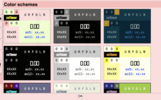
18. Many commonly used color schemes are displayed through previews in "about" (by clicking the logo of csTimer), and can be set with one click.
19. It will prompt you to backup every 100 solves by default.
What browser are you using? I tried it. The current design is that the touch that ends the timer will not trigger the gesture action. If you want to set +2/DNF, you need to release the screen and slide again.With 13. the gestures are turning on after I finish my solve like after I finish my solve the +2 and dnf functions are being triggered
SafariWhat browser are you using? I tried it. The current design is that the touch that ends the timer will not trigger the gesture action. If you want to set +2/DNF, you need to release the screen and slide again.

I tried Safari, but I still can't reproduce your problem. Anyway, I just added an option to turn this feature off.Safari
It's not implemented and not planned to enable time editing.I dont know if this has been added and i suggested to edit times. is this added or is it being added, i suggested this months ago

If you really want to, you can use Chrome’s extension called “CsTimer+”, which I think enables editing times.I dont know if this has been added and i suggested to edit times. is this added or is it being added, i suggested this months ago
I use the cstimer web app on ios 12 lol ig my old phone just ain’t workin rightI tried Safari, but I still can't reproduce your problem. Anyway, I just added an option to turn this feature off.
I already use this and i cant edit.If you really want to, you can use Chrome’s extension called “CsTimer+”, which I think enables editing times.
Well, I remember seeing people editing times somehow.I already use this and i cant edit.
iOS 12 isn’t that old though, it should work fine.I use the cstimer web app on ios 12 lol ig my old phone just ain’t workin right