CFOP Special cube for Master Yoda

Tito_H

Veteran
Joined
May 23, 2024
Messages
257
Location
Japan
Master Yoda likes cubing very much. He is using a 2x2 model every day for his fingers’ exercise. As you may know, he has only 3 fingers, so it is his favorite and most suitable for him.

Of course, he also plays with a 3x3 or other models, but in that case he uses the Force to turn the slices. He is now challenging with a 1000x1000 model.

One day, he said to me, “Pretty old now I am. Recently poor eyesight I have, and getting to color blind I am.”

I showed him a cube with 2 colors, and asked him if he could distinguish these 2 colors and play it.

He replied yes, and quickly took it from me and faded away.

Several days later, he suddenly appeared and said to me, “It was too easy to solve. Can you make it more difficult?”

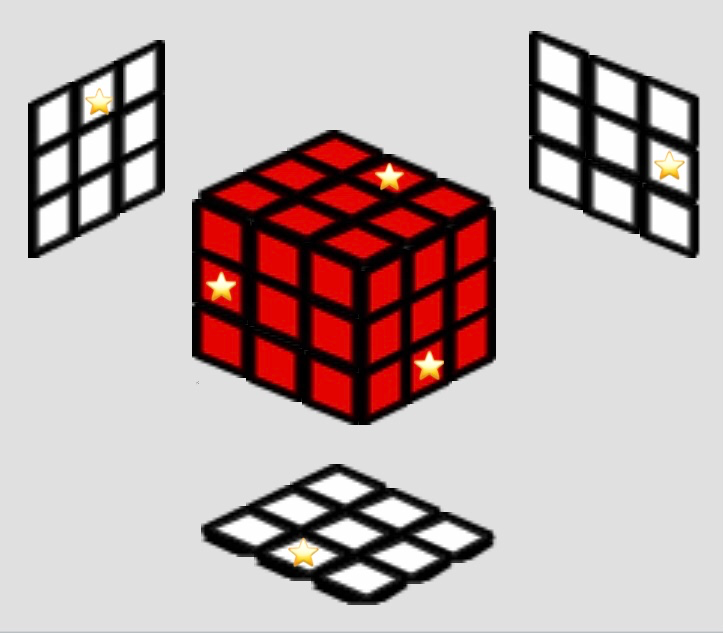
I thought a little and presented the advanced version. It had 6 star marks on 6 edges.

(Image)
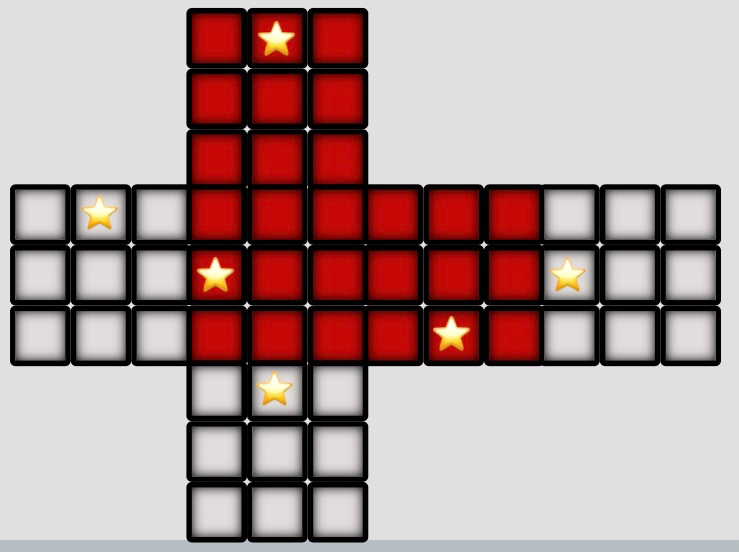
Image.jpeg


Image_1.jpeg

(Source: https://ruwix.com/online-rubiks-cube-solver-program/)

The rule is as follows.
  1. When a center piece is sandwiched between 2 star marks, the colors of those 2 edges change from red face to white and from white face to red. The star marks also move to the another faces.
  2. This change does not occur when the 2 edges are “passing”. For example, 2 star-marked edges are in FR and UL. When R2 is executed, the first edge goes from FR -> UR -> BR, and the sandwich happens in the U face. But as this is a “passing” case, the color change dos not occur.
  3. Chain reaction of the change does not occur, either. One change at one sandwich.
Just before I finished to explain the rule to him, he quickly took it from me and faded away with a happy face.

To this day he has not appeared yet…

Is this cube playable?
What do you think is the difficulty to solve it?
 
Last edited:
I can't prove it exactly, but I think it's functional. The reason is as follows.

I don't have a two-color cube, so I tried it with a regular six-color cube.

First, I put "marks" in six specific positions on the cube (see the photo below).

5E544CDE-908A-45D0-AFEE-F55DBEC57064.jpeg

Image.jpeg


Then, I tried to solve it by preventing the marks from becoming "sandwiched," and I was able to solve it three times out of three times.

I will try the case where a “sandwich” occurs and two EPs are flipped at a later date and let you know the results. Since it simply involves two edges flipping over, I think it should also be solvable.
 
Today I also tried it with a "sandwich" case where the 2 Red-White edges flip. The results were, as expected, successful in solving all three times out of three times. If it was functional when tested with 6-color cube, I think it would be the same with a 2-color cube.

Mission completed!
 
heyy I liked the challenge.

I used my cube simulator and quickly adapted to make the yoda cube, please check this out... it can help finding good insights in this challenge

https://filipeteixeira.com.br/yodacube/

Better viewed in Desktop, 1920 x 1080

(It should be easy to adapt to make it work with bluetooth cubes, I have something ready here)

(other pictures cubes should be easy to adapt too, I just need to keep rotations in mind, this features is not implemented yet)
 
Last edited by a moderator:
Wow!
That is amazing!
Thanks for your challenging.

(The only my wish would be that it would be greater if I could see the blind-side 3 faces, because I needed to know if “sandwich” had occurred there.)
 
Wow!
That is amazing!
Thanks for your challenging.

(The only my wish would be that it would be greater if I could see the blind-side 3 faces, because I needed to know if “sandwich” had occurred there.)
ごめん、英語ちょっと難しかったわ 日本語で送ってくれる?その方がお互いわかやすいと思う!ありがとう!
 
=Japanes=
下手な英語ですみません。
星マークが付けれるなんて、素晴らしいシュミレーターですね。

左・後・下面が見えると、星マークがサンドイッチになったかどうか確認できて便利だと思ったんです。⇩こんな感じです。
1764118363515.png

(Program source: https://ruwix.com/online-rubiks-cube-solver-program/)

無理だとは思いますが、ご参考までです。
 
Thanks!

=In Japanes=
すみません。もう一つ問題があります。
私は、iPhoneを使用していますが、下の通り、キューブが画面からはみ出て、切れてしまいます。どうしようもないと思いますが、何か手があればいいのですが。
1764175558062.png

1764175577404.png
 
Thanks!

=In Japanes=
すみません。もう一つ問題があります。
私は、iPhoneを使用していますが、下の通り、キューブが画面からはみ出て、切れてしまいます。どうしようもないと思いますが、何か手があればいいのですが。

yes there is you can use a computer😂
Better viewed in Desktop, 1920 x 1080
👆👆👆👆👆👆👆👆👆👆👆👆👆👆👆👆👆👆
 
yes there is you can use a computer😂

👆👆👆👆👆👆👆👆👆👆👆👆👆👆👆👆👆👆

I started to use your simulator (⇩) for mobile.
https://filipeteixeira.com.br/new/picturecube/

I could get a Red-White cube, putting the following sentence to the “Custom Textures”, but don’t know how to add 6 “star marks” on edges.

{
"mode": "face_textures",
"textures": {
"U": {"background": "#c41e3a"},
"L": {"background": "#ffffff"},
"F": {"background": "#c41e3a"},
"R": {"background": "#c41e3a"},
"B": {"background": "#ffffff"},
"D": {"background": "#ffffff"}
}
}

Could you tell me what to do when you have time? Thanks.
 
I started to use your simulator (⇩) for mobile.
https://filipeteixeira.com.br/new/picturecube/

I could get a Red-White cube, putting the following sentence to the “Custom Textures”, but don’t know how to add 6 “star marks” on edges.

{
"mode": "face_textures",
"textures": {
"U": {"background": "#c41e3a"},
"L": {"background": "#ffffff"},
"F": {"background": "#c41e3a"},
"R": {"background": "#c41e3a"},
"B": {"background": "#ffffff"},
"D": {"background": "#ffffff"}
}
}

Could you tell me what to do when you have time? Thanks.
hey sorry I just saw your message.

I'm happy to announce I commited some changed today. I'm making the json parser more useful

You can use this now:
JSON:
{
  "textures": {
    "red": "#c41e3a",
    "white": "#eee",
    "star": {
      "background": "url('data:image/svg+xml;utf8,<svg xmlns=\"http://www.w3.org/2000/svg\" viewBox=\"0 0 24 24\"><path fill=\"%23ffd700\" d=\"M12 2l3.09 6.26L22 9.27l-5 4.87 1.18 6.88L12 17.77l-6.18 3.25L7 14.14 2 9.27l6.91-1.01L12 2z\"/></svg>')",
      "backgroundSize": "90%",
      "backgroundPosition": "center",
      "backgroundRepeat": "no-repeat"
    }
  },
  "cube": {
    "U": "red",
    "F": "red",
    "R": "red",
    "L": "white",
    "B": "white",
    "D": "white",

    "U1": "star",
    "L1": "star",
    "D1": "star",
    "F3": "star",
    "R7": "star",
    "B3": "star"
  }
}

the example is already up, load it as option 6, starcube

1764622166052.png


Can you check the function of S/S' and E/E' buttons?
It seems to me they are moving at the contrary.
 
thanks for pointing up! already updated

please, if the app doesnt work, just load another example temporarily. I changed a few things that might break with old navigator cache
 
Back
Top