
Dancing Jules
Regular
Is there the possibility for WCA clock notation. I can't read the old one.

Follow along with the video below to see how to install our site as a web app on your home screen.
Note: This feature may not be available in some browsers.


The scrambler library currently uses the legacy clock method. I'm a bit unfamiliar with the puzzle but I could write a basic scrambler with the current WCA format. However, it couldn't be drawn until more work was put into it. Its a trade off but what do you think?Is there the possibility for WCA clock notation. I can't read the old one.
Sure, I rarely check the drawn scramble anyway. AFAIK a clock scrambler is really easy. You just put a random number between -5 and +6 after ever letter/letter-combination.The scrambler library currently uses the legacy clock method. I'm a bit unfamiliar with the puzzle but I could write a basic scrambler with the current WCA format. However, it couldn't be drawn until more work was put into it. Its a trade off but what do you think?
Exactly. It won't be random state, but if it's long enough, it's ok for something like clock.Sure, I rarely check the drawn scramble anyway. AFAIK a clock scrambler is really easy. You just put a random number between -5 and +6 after ever letter/letter-combination.

Exactly. It won't be random state, but if it's long enough, it's ok for something like clock.

Clock notation is the only reason why it's not my main timer anymore. I'd love to see it being added.Is there the possibility for WCA clock notation. I can't read the old one.

The format did change over time, yes; I don't remember the specifics.
The TNoodle code is freely available for you to look at:
https://github.com/thewca/tnoodle/blob/v0.13.2/scrambles/src/puzzle/ClockPuzzle.java

If you are on Windows or Linux, the sound files are stored in 'resources/app/sounds'. You can replace the male or female files with whatever sounds you would like. If you are on Mac, right click on the app and 'Show Package contents' and go to 'Contents/Resources/app/sounds' for sound files. Hope this helps.How can I change the voice of the inspections announcements? I would like to put my own voices and not the predetermined ones. Thanks
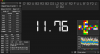
How did you add the time? This will help me address the issue. In the mean time, if it doesn't change press CTRL + S to re-scramble.I have a problem with my timer, the scramble isn't correctly associated with the time, the scramble shown for the last time is the scramble for the current time.

Do you have any information surrounding the time, like what you did or anything different? I have seen this issue before but I thought I resolved it in version 1.3.2. Thanks for finding these bugs


