Algorithm analyzer / simulator

Cynthia Moore

Regular
Joined
Jul 12, 2014
Messages
26
Has anyone written a program that will analyze an algorithm to determine which pieces were moved and to where?

I think it would be very instructive in learning how the puzzle works and what the various methods actually do.

For example, how are the pieces positioned after executing algorithms like these?

Code:
F' U L' U'
U R U' R' U' F' U F
R L F2 B2 L' R' U R L B2 F2 L' R'

Alternatively, is there a list somewhere that provides this information for some set of algorithms?

And, reaching for the moon, has anyone written a program that will generate an algorithm to move a piece from one location (including the orientation) to another location with another orientation? Optionally, I could indicate which pieces must be preserved.

For example, I would specify that I need to move the piece in the upper right hand corner to the upper left hand corner such that its Right face becomes its Up face and that I need to preserve the other top layer pieces.

Thanks
 
Last edited:
1) Why don't you just take a cube and apply the algorithms?

Well, uh, yes, of course, I do do that. But there are at least two problems:


  1. I make mistakes. A simulator would be handy to ensure that an algorithm is doing what I think it is.
  2. It is very difficult, for me at least, to keep track of where all 20 pieces were before the algorithm was run. In order to properly evaluate an algorithm, I need to know both where the target piece (or pieces) go as well as whether any other pieces were disturbed.

Alternative you can use any sim (like alg.cubing.net).

2) Cube Explorer has such an option. You can specify the fixed pieces, and just leave the other pieces grey. (http://kociemba.org/cube.htm)

I'll look into these. Thanks
 
http://alg.cubing.net/?alg=R_L_F2_B2_L-_R-_U_R_L_B2_F2_L-_R-

Try changing "3x3x3 Full Moves" to "3x3x3 Full Algorithm" or press the "Invert" button.

It doesn't seem to be working correctly for me. It often stops before the last move (or the first when reversing).

Let me know if you have requests/ideas for alg.cubing.net features.

I would love to be able to enter an algorithm, such as [R' D R] and have the program tell me which pieces moved, to where, and with what orientation after each move.

We'd need some notation that would uniquely identify every piece on the cube both before and after the moves. We'd also need a way to specify the orientation. Edge pieces have two possible orientations and corner pieces have three.

Thanks
 
It doesn't seem to be working correctly for me. It often stops before the last move (or the first when reversing).

The algorithm doesn't end with the solved state. Does that mean the last R' move doesn't animate for you?
If so, I've never seenthat error; could you let me know your OS/browser? (Screenshot/cap would also be convincing, as well as console output if you know how to get it.)


I would love to be able to enter an algorithm, such as [R' D R] and have the program tell me which pieces moved, to where, and with what orientation after each move.

We'd need some notation that would uniquely identify every piece on the cube both before and after the moves. We'd also need a way to specify the orientation. Edge pieces have two possible orientations and corner pieces have three.

Thanks

We do have cycle notation, and it's easy to annotate with orientation. Randelshofer's applets do that. I want to support it some time, but it's not a priority. I'll think about supporting it when I rewrite the permutation system, though.
 
It doesn't seem to be working correctly for me. It often stops before the last move (or the first when reversing).

The algorithm doesn't end with the solved state. Does that mean the last R' move doesn't animate for you?
If so, I've never seenthat error; could you let me know your OS/browser? (Screenshot/cap would also be convincing, as well as console output if you know how to get it.)


I would love to be able to enter an algorithm, such as [R' D R] and have the program tell me which pieces moved, to where, and with what orientation after each move.

We'd need some notation that would uniquely identify every piece on the cube both before and after the moves. We'd also need a way to specify the orientation. Edge pieces have two possible orientations and corner pieces have three.

Thanks

We do have cycle notation, and it's easy to annotate with orientation. Randelshofer's applets do that. I want to support it some time, but it's not a priority. I'll think about supporting it when I rewrite the permutation system, though.
 
The algorithm doesn't end with the solved state. Does that mean the last R' move doesn't animate for you?
If so, I've never seen that error; could you let me know your OS/browser? (Screenshot/cap would also be convincing, as well as console output if you know how to get it.)

I'm using Firefox 30.0 on a Win XP system.

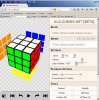
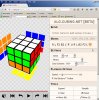
I've attached 2 screen shots. The first shows the screen just after startup. The second shows the results of the Play button after pasting the algorithm. It did not do the last R'. I get the same if I jump to the end (>>|) or step through it one move at a time.

I don't know how to capture the console output, but if you can tell me how, I'll try to get it.
 

Attachments

  • alg.cubing.net 20140723 2330 Initial screen.jpg
    alg.cubing.net 20140723 2330 Initial screen.jpg
    189.8 KB · Views: 24
  • alg.cubing.net 20140723 2332 After play.jpg
    alg.cubing.net 20140723 2332 After play.jpg
    196.5 KB · Views: 19
I've attached 2 screen shots. The first shows the screen just after startup. The second shows the results of the Play button after pasting the algorithm. It did not do the last R'. I get the same if I jump to the end (>>|) or step through it one move at a time..

The output looks correct to me.

Are you aware that the algorithm intentionally doesn't restore the cube to solved / did you try it on a cube?
 
The output looks correct to me.

My mistake. I thought that algorithm was a NOP, leaving the cube unaltered. I see that I was missing a final D'. Here's the correct algorithm (I think).

R L F2 B2 L' R' U R L B2 F2 L' R' D’

I could have sworn that it failed to undo the first move when reversing, but I can't make it do that now.
 
Last edited:
We do have cycle notation, and it's easy to annotate with orientation. Randelshofer's applets do that. I want to support it some time, but it's not a priority. I'll think about supporting it when I rewrite the permutation system, though.

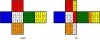
I think it would be enormously helpful to be able to see the total effect of an algorithm. I've attached an image showing a way to display it in 2D.


attachment.php
 

Attachments

  • Change Map R' 1x.jpg
    Change Map R' 1x.jpg
    82 KB · Views: 16
I would love to be able to enter an algorithm, such as [R' D R] and have the program tell me which pieces moved, to where, and with what orientation after each move.

We'd need some notation that would uniquely identify every piece on the cube both before and after the moves. We'd also need a way to specify the orientation. Edge pieces have two possible orientations and corner pieces have three.

Not sure this is helpful, but it does pretty much everything you said:
http://ideone.com/Ux1eWN
(look at the output on the bottom)

Edit: Oops, I didn't see your "after each move". I could change it, but I guess this way of displaying things is too inconvenient anyway...
 
Last edited:
Not sure this is helpful, but it does pretty much everything you said:
http://ideone.com/Ux1eWN
(look at the output on the bottom)

This looks very promising, but I can't figure out the notation. Can you explain it? The 12 2-character codes (UF UR UB UL DF DR DB DL FR FL BR BL) must be the 12 edge pieces and the 8 3-character codes (UFR URB UBL ULF DRF DFL DLB DBR) must be the 8 corner pieces, but I guess I'm too dense to work it out.

Is that all of the code needed to process any algorithm?

Edit: Oops, I didn't see your "after each move". I could change it, but I guess this way of displaying things is too inconvenient anyway...

The "after each move" is not critical, because I can always use a shorter algorithm.
 
This looks very promising, but I can't figure out the notation.

"UFR moved to RFD" means the corner that was at up-front-right moved to right-front-down. Note that this also tells you the orientation.

Is that all of the code needed to process any algorithm?

For basic notation with just UDLRFB moves, yes. Not for other stuff, though.
 
"UFR moved to RFD" means the corner that was at up-front-right moved to right-front-down.

I finally worked it out. The UFR notation seems to me to be with respect to the Up face. I have been working with algorithms that are relative to the Front face, so it threw me for awhile.

How about a Cartesian coordinate notation. UFR => 331, RFD => 311, etc.? This is from the perspective of the Front face. This seems much more intuitive to me.


Note that this also tells you the orientation.

How so? Can't a corner piece be twisted into three different orientations?

For basic notation with just UDLRFB moves, yes. Not for other stuff, though.

If I download a Python interpreter, will I be able to generate that move list with just the code you show? If so, Python has to be the most compact language since APL.

PS: Is there any way to generate these multiple quotes other than cutting and pasting the markup?
 
How about a Cartesian coordinate notation. UFR => 331, RFD => 311, etc.? This is from the perspective of the Front face. This seems much more intuitive to me.

needlessly overcomplicating things

How so? Can't a corner piece be twisted into three different orientations?

URF and RFU and FUR are 3 orientations

if URF moves to DFR that tells you that the U sticker moved to the D face so you know the orientation
 
Not sure this is helpful, but it does pretty much everything you said:
http://ideone.com/Ux1eWN
(look at the output on the bottom)

Stefan,

Can I edit the string on line 3 [alg = "R' D R"] to enter a different algorithm and rerun the program?

I tried editing it and clicking the Run button, but it took me to a different page.

Thanks

URF and RFU and FUR are 3 orientations

if URF moves to DFR that tells you that the U sticker moved to the D face so you know the orientation

Are these three "results" equivalent?


  • URF moves to DRF
  • RFU moves to RFD
  • FUR moves to FDR
 
Last edited by a moderator:
Are these three "results" equivalent?


  • URF moves to DRF
  • RFU moves to RFD
  • FUR moves to FDR

no if URF moves to DFR (i think reading the faces of a corner clockwise is standard) then the U sticker moves to the D face, but if RFU moves to RDF then the U sticker moves to the F face and if FUR moves to FRD then the U sticker moves to the R face
 
no if URF moves to DFR (i think reading the faces of a corner clockwise is standard) then the U sticker moves to the D face,

...and the R sticker moves to the F face and the F sticker moves to the R face, right?

but if RFU moves to RDF then the U sticker moves to the F face and if FUR moves to FRD then the U sticker moves to the R face

But that's not what I said. I said:


  • URF moves to DRF
  • RFU moves to RFD (not RDF)
  • FUR moves to FDR (not FRD)

Unless I am completely daft, all of these designations are clockwise and all have the U sticker in the same relative position as the D sticker. It's the first letter in the first example, the third in the second, and the second in the third.

No?

Or am I missing something?
 
Back
Top