

You can now display your YouTube channel in your profile.
To do so, go to your UserCP >> Edit Profile >> Scroll to the bottom, and under category "YouTube Channel", add your YouTube username.
You can also edit your profile by clicking on "Quick Links" (on right side of the navigation bar), and then clicking "Edit Profile".
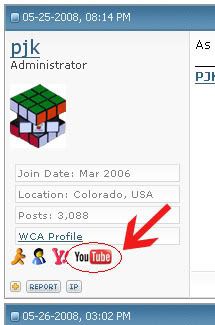
Your channel will be displayed under your Avatar to the right of the Chat icons. If you have entered in your YouTube username into your profile, the YouTube icon will appear. When clicked, the user's YouTube channel will open in a new window:
A link to your channel is also displayed in your public profile, under Contact Info.
If you have any questions, or experience any problems, please let me know.
To do so, go to your UserCP >> Edit Profile >> Scroll to the bottom, and under category "YouTube Channel", add your YouTube username.
You can also edit your profile by clicking on "Quick Links" (on right side of the navigation bar), and then clicking "Edit Profile".
Your channel will be displayed under your Avatar to the right of the Chat icons. If you have entered in your YouTube username into your profile, the YouTube icon will appear. When clicked, the user's YouTube channel will open in a new window:
A link to your channel is also displayed in your public profile, under Contact Info.
If you have any questions, or experience any problems, please let me know.


