

This is a continuation of my post 3x3 Special cube for Master Yoda (Zebra cube).
Under the same concept, I designed a 1x1x1 model of 'Stripes cube'.
(Image, 1x1x1)
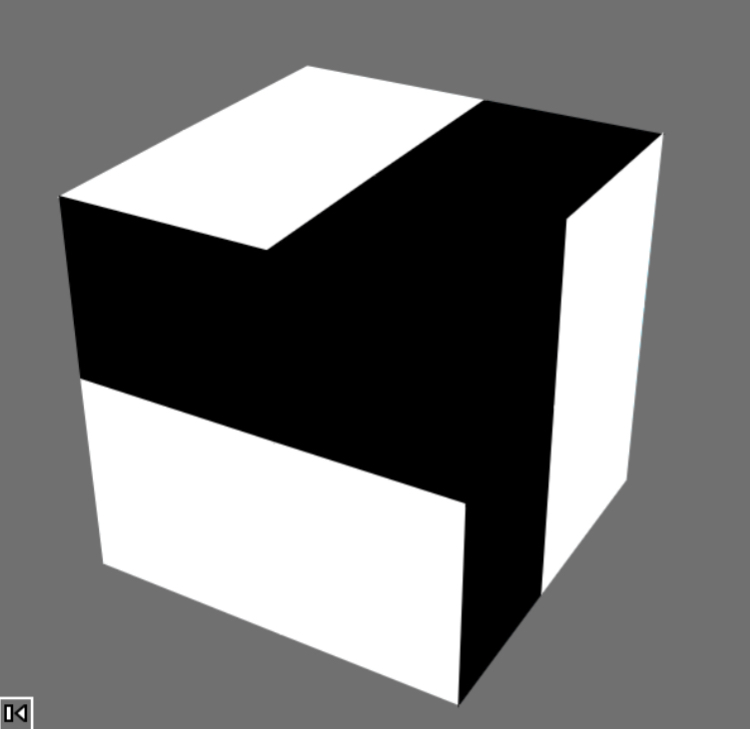
(Stripes cube, 1x1x1)
How to change the pattern of the faces?
One idea came up to me. It is to apply the concept of '1x1 Indiana Jones' Special Dice cube'.
The faces are touchscreens, and when you lightly swipe your finger, the cube appears to rotate 90 degrees on the X, Y, and Z axes. It doesn't physically rotate; instead, the light indicators on each face change, creating the illusion of rotation.
When the cube rotates 90 degrees, the pattern on the 4 faces you moved change, based on the following rule:
Rule:
1. Each face of the cube is imaginarily divided into 4 squares.
2. The original patterns on each face become the original pattern + the newly added pattern by rotation.
3. A black square changes to a white square when a white square is added by rotation. No change occurs if not this case.
So, black squares on the faces will disappear gradually while rotating the cube. And lastly all the faces will be white.
For example, if you rotate the cube from the initial arrangement by x → y → z → x → y, each face changes as shown below, and finally, to the white cube.
(Initial arrangement)
⇩Then rotated in x direction...
⇩Then rotated in y direction...
⇩Then rotated in z direction...
⇩Then rotated in x direction...
⇩Then rotated in y direction...
It takes 5 rotations to become the white cube in above example. Then, Is there any way to rotate the cube from the initial arrangement to the white cube with less than 5 rotations?
Under the same concept, I designed a 1x1x1 model of 'Stripes cube'.
(Image, 1x1x1)
(Stripes cube, 1x1x1)
How to change the pattern of the faces?
One idea came up to me. It is to apply the concept of '1x1 Indiana Jones' Special Dice cube'.
The faces are touchscreens, and when you lightly swipe your finger, the cube appears to rotate 90 degrees on the X, Y, and Z axes. It doesn't physically rotate; instead, the light indicators on each face change, creating the illusion of rotation.
When the cube rotates 90 degrees, the pattern on the 4 faces you moved change, based on the following rule:
Rule:
1. Each face of the cube is imaginarily divided into 4 squares.
2. The original patterns on each face become the original pattern + the newly added pattern by rotation.
3. A black square changes to a white square when a white square is added by rotation. No change occurs if not this case.
So, black squares on the faces will disappear gradually while rotating the cube. And lastly all the faces will be white.
For example, if you rotate the cube from the initial arrangement by x → y → z → x → y, each face changes as shown below, and finally, to the white cube.
(Initial arrangement)
⇩Then rotated in x direction...
⇩Then rotated in y direction...
⇩Then rotated in z direction...
⇩Then rotated in x direction...
⇩Then rotated in y direction...
It takes 5 rotations to become the white cube in above example. Then, Is there any way to rotate the cube from the initial arrangement to the white cube with less than 5 rotations?
Last edited:


