5 X 5 rare error

TonyBHChew

Member
Joined
Oct 27, 2009
Messages
13
Hello All master,

I'm new here, wish to learn from all the master here.

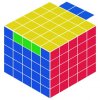
I found a problem in 5X5 cube. After complete everything, there's remaining top layer 3 center cube swap with the opposite side, and it's swap only 2 side. This error is easily solve if it happen in 4X4, but I can't find any guide or tutorial teach the algorithm to solve this error in 5X5. Please refer to attached photo of the error I encounter.

If any one of the master in this forum know know or found the algorithm, please kindly share it. That will be very much appreciated.

Thank you very much.
 

Attachments

  • 5X5X5 error.jpg
    5X5X5 error.jpg
    55.1 KB · Views: 70
I can't believe it when I first saw this error and I can't find any tutorial teach the algorithm for this error either.

I found this error last month. There's no way I can solve it. What I did was, I scramble it and start solving it from very first step. The problem still remain until the last part when I solving the last layer using 3X3 method. I purposely swap the center 2 cube to the opposite site, then treat it as unsolved pair and solve it using the very basic way, one site at a time. The problem accidentally solved. Now I can't even recreate the error again. I believe the error was created during pairing and I'm very clear and sure that nobody ever tampered it before and after.

Any master able to help? Please?

Thank you so much.
 
That's a parity. The algorithm is :
r - second slice from the right. ( the one you can move up and down vertically)
u - second slice from the top. ( the one you can move side to side horizontally)
U - The top face (the one you can move side to side horizontally)
r2 U2 r2 U2, u2, r2, u2
 
Thanks MichaelP, r2 U2 r2 U2, u2, r2, u2 is the algorithm to solved same error in 4X4, but it doesn't work in 5X5.

In 4X4, this error is easily happen. But in 5X5, I found it 3 times in a row, after solved it for the last time, I can't even recreate the same error again. That's the reason why this error scare me.

Thank you very much.
 
U paired wrongly... maybe you mistook 1 colour for another, so there was another incorrect pair elsewhere but you didn't see it... like red and orange, I tend to confuse them sometimes...
 
Oh, and i forgot to mention, it's also the reason why you can't reproduce it again, cos you didn't see the colours wrongly again... I mean, you don't make such mistakes that often right? =)
 
Oh, and i forgot to mention, it's also the reason why you can't reproduce it again, cos you didn't see the colours wrongly again... I mean, you don't make such mistakes that often right? =)

Nope, I can't solve it in the first time. What I did was, I scramble it and start it all over again. The problem still happen when reach the final step of solving the last layer using 3X3 method. I then scramble it again, start all over again and yet the error still remain. And the funny thing is that, every time I try, I use different color as the base and the error happen in different pair. Finally, I purposely swap the center 2 side cube leaving the center cube to make it look like a unsolved pair, then solved pairing with the very basic method, one side at a time, then start the 3X3 method again.... The error finally gone. That's the reasons why I believe that this is something that can be create during pairing.

I'll continue trying to recreate the error.

Thank you very much.
 
If your cube looks like the picture you posted, and no other pieces anywhere else on the cube are swapped, then it is in an impossible state. You can only fix that case by disassembling and reassembling the cube.

Are you sure no other pieces are swapped on the cube? Did you or possibly one of your friends take your cube apart at any point recently?

Chris
 
You popped the cube and accidentally swapped the most inner edges. Same as on 3x3

... and I accidentally popped it back to the correct location after 3 times trying? No, I'm very sure it happen during pairing. You won't notice until you reach the final step when solving the final top layer.

I really wish that some body could find a way to solved this error, or else, I don't feel like the algorithm to solve 5X5 is complete.

Thank you everybody.
 
... and I accidentally popped it back to the correct location after 3 times trying? No, I'm very sure it happen during pairing.

If your cube has only those 6 pieces out of place, two centralmost edges, and four wing edges, then this absolutely did not happen during edge pairing. It happened by your cube being disassembled and reassembled incorrectly.

Are you absolutely positive that you do not have two other central edges swapped somewhere else on the cube?

Chris
 
If your cube looks like the picture you posted, and no other pieces anywhere else on the cube are swapped, then it is in an impossible state. You can only fix that case by disassembling and reassembling the cube.

Are you sure no other pieces are swapped on the cube? Did you or possibly one of your friends take your cube apart at any point recently?

Chris

Dear Chris,

I'm very sure, nothing was remove from the cube. And I did solved the error with pairing method. The problem is that, I can't recall the step I did. I only remember I purpose swap the center 2 cube to the opposite site, make the swap pair look like 2 unsolved pair with incorrect center piece, then solved it with the very basic one side at a time method, other completed pair was scrambled during that time, but I solved it one by one, and finally, the error gone. But I can't recreate the error after then. :confused:

Thank you so much.
 
Great first two posts by dinosaurking. You just ignore KwS Pall's post and assume you're right?

Great answer by MichaelP. Why do you guys give the wrong answer? This is no exam, you don't have to post anything if you don't know the answer.

Just as KwS Pall says. If you disregard the X-centres,+-centres and the wings you're left with fixed centres, edges and corners, just as a 3x3.
 
Great first two posts by dinosaurking. You just ignore KwS Pall's post and assume you're right?

Great answer by MichaelP. Why do you guys give the wrong answer? This is no exam, you don't have to post anything if you don't know the answer.

Just as KwS Pall says. If you disregard the X-centres,+-centres and the wings you're left with fixed centres, edges and corners, just as a 3x3.

Yes, I did. I notice the error after I solved the top 4 corner. In fact, it's the final step already. Then only I realize, 2 opposite color swap. Like what everybody understand, this is not suppose to happen in 5X5 or 3X3. But it happen. I can't find any tutorial or video showing how to solve this error....

Please help....

Thank you very much.

Tony
 
I thought you couldn't get parity like this on odd number cubes? You had to have switched the centers manually for this to happen.
I don't get why you don't take out the 2 edges, and swap them manually. I bet that would fix your problem forever.
 
USE THIS ALG:
(rl) (U2 l2 U2) (l' U2 l U2 l' U2) (r'l2) (U2 l U2 l' U2 l)

after that apply the mirror and your problem will be reduces to 2 single cubies being swapped, the UF and UB M-slice edges. but tbh im pretty sure that this cannot be solved.

EDIT: same notation as in this post:
That's a parity. The algorithm is :
r - second slice from the right. ( the one you can move up and down vertically)
u - second slice from the top. ( the one you can move side to side horizontally)
U - The top face (the one you can move side to side horizontally)
 
Last edited:
Yes, I did. I notice the error after I solved the top 4 corner. In fact, it's the final step already. Then only I realize, 2 opposite color swap. Like what everybody understand, this is not suppose to happen in 5X5 or 3X3. But it happen. I can't find any tutorial or video showing how to solve this error....

Please help....

Thank you very much.

Tony

You can't find any tutorials on how to solve this, and you won't, because it is an impossible case on 5x5x5. The only way to fix it is to disassemble the cube if it happens.

I will agree with dinosaurking on this one. If this happened to your cube and you fixed it and it solved, this would mean that possibly two other central edges with similar colors were switched and you did not notice it. If you have two pairs of centralmost edges swapped, then you can create the same position you have in the last layer.

Do not bother trying to find an algorithm to fix this case on a 5x5x5 cube, as I can guarantee you that you will not find one.

Sorry for the bad news, but I hope this helps.
Chris

P.S. There is another possibility here, but it will require me asking a somewhat strange question. Does your 5x5x5 cube have 6 different colors? Meaning, do you have a standard color scheme on your 5x5x5 cube?
 
Last edited:
USE THIS ALG:
(rl) (U2 l2 U2) (l' U2 l U2 l' U2) (r'l2) (U2 l U2 l' U2 l)

after that apply the mirror and your problem will be reduces to 2 single cubies being swapped, the UF and UB M-slice edges. but tbh im pretty sure that this cannot be solved.

EDIT: same notation as in this post:
That's a parity. The algorithm is :
r - second slice from the right. ( the one you can move up and down vertically)
u - second slice from the top. ( the one you can move side to side horizontally)
U - The top face (the one you can move side to side horizontally)

Thanks. I'll try and see.
 
P.S. There is another possibility here, but it will require me asking a somewhat strange question. Does your 5x5x5 cube have 6 different colors? Meaning, do you have a standard color scheme on your 5x5x5 cube?
:D Of course.

Anyway, I hope this error is impossible, my first priority now is to recreate this error, if this won't happen, I'll forget about the solution.

Thank you so much.
 
Back
Top