Introducing qqTimer!


That's really weird. It happens to me too on Internet Explorer, and the really bizarre thing is that I can fix it by increasing the timer size (until it increases the height of the stats window). When I decrease the size back to normal, though, the session mean still stays there. The times weren't updating, either.

I did find a way to fix this problem (it should work for you now). I think what's going on is that Internet Explorer initially thinks each of those boxes is filled up to a certain point with text, and so if you update the box (so that it now has more stuff than before) IE doesn't realize it has to display the text that goes beyond the previous place where the text ended. It only realizes that needs to happen when you physically change the size of the box. So, I added in some extra line breaks in the initial text that was in the time and stats boxes. That way IE will at least realize that they can potentially have a lot of text in them, and it should display all of it.
 
I added an option to increase/decrease the timer size. If you put it too big (over about 15 times the normal text size for me) it'll mess with the layout, but I guess at that point it's not a problem :p

I love the new timer size option, however i just did a session of 25 solves, and it became very difficult to look at my times in the right box, it there a way to put a comma between them or a - or something? it would be more "eye friendly." Other than this its great, it very well may be my new timer.
 
I love the new timer size option, however i just did a session of 25 solves, and it became very difficult to look at my times in the right box, it there a way to put a comma between them or a - or something? it would be more "eye friendly." Other than this its great, it very well may be my new timer.

You're right - I added a comma between times. I originally had just a space because it was easier to deal with the times that way, but the comma's a bit more standard.

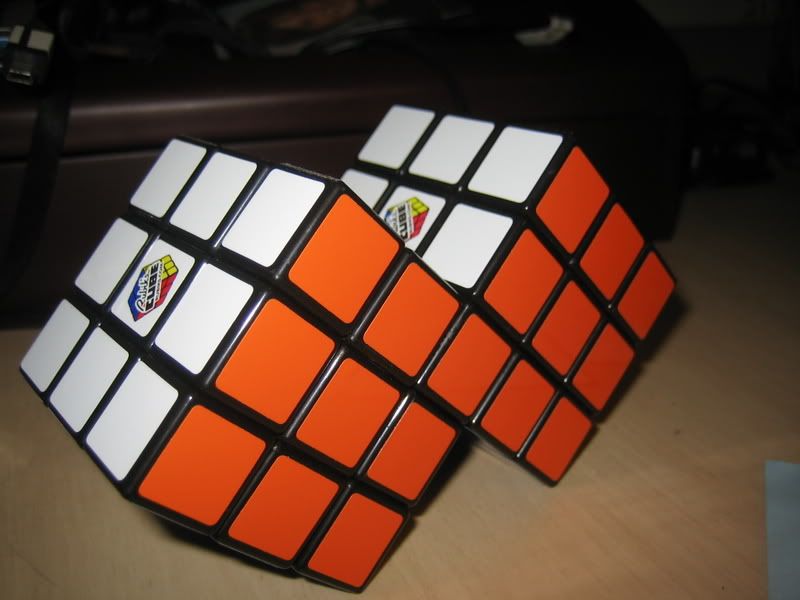
In the siamese cube scramble, u turns are there. On a siamese cube, u is impossible.

:fp
 
I love the new timer size option, however i just did a session of 25 solves, and it became very difficult to look at my times in the right box, it there a way to put a comma between them or a - or something? it would be more "eye friendly." Other than this its great, it very well may be my new timer.

You're right - I added a comma between times. I originally had just a space because it was easier to deal with the times that way, but the comma's a bit more standard.

In the siamese cube scramble, u turns are there. On a siamese cube, u is impossible.

:fp

facepalm at yourself? lol it's ok, we all make mistakes. plus its still kinda in a beta version thats what its for :) lol (ug I've been oddly optimistic recently. don't really know why)
 
Surely on a siamese cube a u turn is fine? it's only joined to another cube by a corner.
eg,
rhombiminx006-1.jpg

picture taken from thread : http://www.speedsolving.com/forum/showthread.php?t=12250
 
A little bit of history: http://twistypuzzles.com/forum/viewtopic.php?f=1&t=11577

The original Siamese Cube had a 1x1x3 block joining the two cubes. This puzzle was in fact marketed - as the Rubik's Mate, also known as the Siamese Cube. But my point is that this is the name Siamese Cube (when you're using it to refer to a specific type of puzzle) ought to mean the 1x1x3 block one.

Anyway, although the Siamese Cube is pretty easy to make, it isn't the easiest puzzle... the 1x2x3 block one is definitely easier, and I think that's why a lot of cubing beginners have latched onto that as their first mod, and started to call it "the" Siamese Cube. But it's not; it might be a type of Siamese Cube, and one that's popular right now, but the original, canonical Siamese Cube is the one with a 1x1x3 block. I was facepalming at how KevinK has no clue what a Siamese Cube is. (Think I'm being pedantic? Imagine coming back to the cubing community in two years and seeing people referring to the Rubik's Revolution as the "Rubik's Cube" (and the normal cube as just the "3x3x3").)

Well, I added two more Siamese Cube scrambles, so now nobody will be confused. They're labeled as to what type of block joins the pieces.
 
ok and Yeah i have actually used one of the 1x1x3 siamese cubes, but that was the only time i had seen one or heard of one that was not with the 1x2x3 so I wasn't sure which one was the technical "siamese cube" It's probbably a good idea to have separate scrambles for them though.
 
Thanks for the clarification and update. Because I suck at mods, the only one that I've done was the fake siamese cube, learned from Thrawst's video. I have, however, heard that Thrawst's siamese cube tutorial doesn't teach how to solve a real siamese cube, but I can't remember from where I heard that.
On a side note, who has ever referred to the Rubik's Revolution as the Rubik's Cube? I think that I could have saved money by flushing $20 down the toilet instead of spending on that piece of crap.
 
Cool. Finally a timer that stops when pressing the space bar.

I notice if the timer is running, and I press the spacebar to stop it and I hold it for longer than a second or so, when I release, it starts the timer again. This isn't a big deal though.

Nice job on it.

cubetimer.com?
 
Well I only need one good timer (unless there's a community of comparing times), and it's CCT. But no offense to you, because that's a great timing program. Lots of puzzles and sub-divisions for puzzles. I like it. =)
 

That's really weird. It happens to me too on Internet Explorer, and the really bizarre thing is that I can fix it by increasing the timer size (until it increases the height of the stats window). When I decrease the size back to normal, though, the session mean still stays there. The times weren't updating, either.

I did find a way to fix this problem (it should work for you now). I think what's going on is that Internet Explorer initially thinks each of those boxes is filled up to a certain point with text, and so if you update the box (so that it now has more stuff than before) IE doesn't realize it has to display the text that goes beyond the previous place where the text ended. It only realizes that needs to happen when you physically change the size of the box. So, I added in some extra line breaks in the initial text that was in the time and stats boxes. That way IE will at least realize that they can potentially have a lot of text in them, and it should display all of it.

it works now
 
Back
Top