
Navigation
Install the app
How to install the app on iOS
Follow along with the video below to see how to install our site as a web app on your home screen.
Note: This feature may not be available in some browsers.
More options
Style variation
You are using an out of date browser. It may not display this or other websites correctly.
You should upgrade or use an alternative browser.
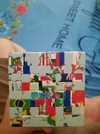
[Help Thread] Please help me with this world map 8x8 picture cube!!!
- Thread starter quan2206
- Start date
Solution
Since the reader can not see the effect of the move sequence showed by Jacck in post no. 9 above, I will try to make it more clear using Supercube.
In principle, the move sequence works the same on both the 8x8x8 and 7x7x7 cubes, so I will use a 7x7x7 simulator.
Hit the Play forward button to play the sequence. After the sequence is finished, see the effect and don't reset the simulator - hit the Play forward button again instead. Repeat for the third time to see how the 3 center pieces are being cycled.
One thing that might or might not be related: as outlined in this post, you can simulate your current cube state for 2x2x2 -...
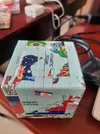
Help me, help me, how to turn up two red line pieces (or turn up four others).I don't know whether this is now clear to you: if you have identical pieces (and I see a lot of them on your pictures), they could be in the "wrong" positions even if it looks good. Get them in the correct position (though you will see no difference) should avoid "the special".
Otherwise I see only post 35 or a wrong assembly of the cube to get wings-problems (what I think you call "the special") when centers are solved right.
Maybe I oversee something, so please post a picture if the special appears again
Attachments
Upvote
0
quan2206, I think we need to go back a little bit at this point.
Take this simulator:
You can see it has some unique centers as well as some identical centers. Play the move sequence.
As you can see, it messed up 4 black center pieces. Go ahead and try to fix them - the simulator is interactive.
It also messed up some edges - go ahead and pair them up again.
If you have done all of that, what can you now see?
If you can't do all of that, where did you get stuck at?
Last edited:
Upvote
0
I’m not quite sure what you mean; I’ve already solved almost everything. The only remaining issue is the specific case I mentioned in post #40, which I asked you about. I don't know how to solve it.quan2206, I think we need to go back a little bit at this point.
Take this simulator:
You can see it has some unique centers as well as some identical centers. Play the move sequence.
As you can see, it messed up 4 black center pieces. Go ahead and try to fix them - the simulator is interactive.
It also messed up some edges - go ahead and pair them up again.
If you have done all of that, what can you now see?
If you can't do all of that, where did you get stuck at?
Last edited:
Upvote
0
I’m not quite sure what you mean; I’ve already solved almost everything. The only remaining issue is the specific case I mentioned in post #40, which I asked you about. I don't know how to solve it.
I meant put your physical cube aside for a moment and try to do what I said on the simulator above.
It may seem unrelated at first sight but I will slowly show you how it actually relates to your special case in post no. 40.
Upvote
0
I don't know, so the problem is my solving?I meant put your physical cube aside for a moment and try to do what I said on the simulator above.
It may seem unrelated at first sight but I will slowly show you how it actually relates to your special case in post no. 40.
I run the simulator, and I still don't know what you mean, I have tried apply to my cube and it still get to wrong result
Last edited:
Upvote
0
Let's start with this one:
After the 9th move, can you solve 4 unsolved black center pieces by dragging the layers on the simulator?
Play the move sequence.
As you can see, it messed up 4 black center pieces. Go ahead and try to fix them - the simulator is interactive.
After the 9th move, can you solve 4 unsolved black center pieces by dragging the layers on the simulator?
Upvote
0
Sorry, I don't know how to do it, when the center is broken, I always have to solve entire again.Let's start with this one:
After the 9th move, can you solve 4 unsolved black center pieces by dragging the layers on the simulator?
If solve 4 black pieces after 9th move, I will run next nine moves, so they are solved
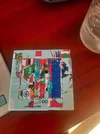
But, it not the same with my physical cube, entire two cyan lines of the cube are reversed
Attachments
Last edited:
Upvote
0
Sorry, I don't know how to do it, when the center is broken, I always have to solve entire again.
If solve 4 black pieces after 9th move, I will run next nine moves, so they are solved
Ok, in that case I highly recommend you to go back to this post and to try to understand the meaning of the moves on that simulator.
Once you understand why that move sequence works, go back and try to apply the solving principle on 4 black center pieces on the simulator in post no. 42.
Sorry for a feeling like it's a lot of work to do but that's just my best advice I can currently give you.
Upvote
0
Yes, from your formula, i have completely fixed the center(four black pieces), now what I have to do next?Ok, in that case I highly recommend you to go back to this post and to try to understand the meaning of the moves on that simulator.
Once you understand why that move sequence works, go back and try to apply the solving principle on 4 black center pieces on the simulator in post no. 42.
Sorry for a feeling like it's a lot of work to do but that's just my best advice I can currently give you.
Upvote
0
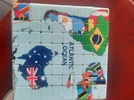
Hi, I have done with edge, and I come to this, do you know how to switch position of 2 red line corner?Ok, in that case I highly recommend you to go back to this post and to try to understand the meaning of the moves on that simulator.
Once you understand why that move sequence works, go back and try to apply the solving principle on 4 black center pieces on the simulator in post no. 42.
Sorry for a feeling like it's a lot of work to do but that's just my best advice I can currently give you.
Attachments
Upvote
0
Yes, from your formula, i have completely fixed the center(four black pieces)
That´s great! Can you show us how did you manage to do that by creating a simulator and showing us the move sequence you used? If that´s not an option for you, could you tell the exact moves you used for fixing those 4 black center pieces?
now what I have to do next?
Continue with this one:
It also messed up some edges - go ahead and pair them up again.
If you have done all of that, what can you now see? I.e. what state you got.
Upvote
0
I have come to the issue at post 50, can you help me?That´s great! Can you show us how did you manage to do that by creating a simulator and showing us the move sequence you used? If that´s not an option for you, could you tell the exact moves you used for fixing those 4 black center pieces?
Continue with this one:
Upvote
0
@quan2206 : Please do not start new threads with this topic. Your questions here and the answers could be helpful for other cubers who try a picturecube and it would be easier for them to find all in one thread.
And I think that I am sure: As I suggested in post #23, the best to start a picturecube should be with corners. It wasn't clear to me, how important that is, but it is very important on your world map cube. The reason is that you have many center-pieces that look the same (grey) and you can't see whether they are really in the correct place. You wouldn't have that problem on a real supercube where all pieces are absolut clear where they fit.
For the moment the only explanation (or the cube was badly assembled) I have for your corner-problem is, that you have mixed up a pair of centerpieces of each type/set. If you start "wrong" I think this can happen quite easily.
What I would do to fix it is shown below. I start with two corners in front, you should get to this state if you do B’ F’ D2 F U F’ D2 F U’ B on the cube shown in post#50.
I filled in some xx' just to show, where a new step begins. You don't have to do them.
And to follow the center-pieces on top they have different colors.
It starts with an U to get 3 unplaced corners, then solve this corners, moves wings to end up with the pll-parity, then solves the pll-parity, then cycles a 1x3-bar of the centers and finally 3 centers in the middle.
After that there are left 4 pairs of each centerpiece-type and you will have to solve them with another pair on the cube with identical pieces. There should be a post here where this is explained.
Note: I did this on a 6x6x6 (seems like an 8x8x8 doesn't work). It should be clear when you need to move more slices on the 8x8x8 - and you need to add some cycles for the fixing of the centers. You should start with a 1x5-bar (you should get the idea with my 1x3-bar). And I guess you will end up with 9 unsolved center-piece-pairs.
This all sounds horrible, so:
Maybe I am totally wrong and then I would be glad to know the better answer.
Good luck!
Upvote
1
Maybe I am totally wrong and then I would be glad to know the better answer.
Either you are over-thinking it or I am over-simplifying it because what I believe quan2206 actually wanted (but failed) to show was this case:
I am sure you (Jacck) know how it originated and how to solve it.
Upvote
0
How to solve it, I still don't understand Jacck methodEither you are over-thinking it or I am over-simplifying it because what I believe quan2206 actually wanted (but failed) to show was this case:
I am sure you (Jacck) know how it originated and how to solve it.
Upvote
0
Either you are over-thinking it or I am over-simplifying it because what I believe quan2206 actually wanted (but failed) to show was this case:
I am sure you (Jacck) know how it originated and how to solve it.
Your problem starts with the top-face centers 90° counter-clockwise. But his picture shows that the wings and the centers already match. We don't see the rest of his cube so I thought, that he had managed to solve the entire cube - except these two corners.
Only @quan2206 can tell how the rest of the cube looks like.
Your problem I would solve with a T-perm three times (this standard T-perm moves the centers counter-clockwise so I need three times- or try to exe it backwards once) and the PLL-parity-fixing we already know here (with the clockwise moving of all center-pieces):
Upvote
0
How to solve it, I still don't understand Jacck method
I am willing to slowly explain how it all works (by the way, Jacck just did in his post no. 53), but I need to see you are cooperating with me first.
It might not be important for you, but it is crucial for me because when you are cooperating, I know exactly what problem we need to focus on. Otherwise it's just waisting everyone's time.
Until then, I am no longer interested in further discussion. If you changed your mind and wanted to cooperate with me, answering my questions in post no. 42 is a good start.
Upvote
0
You should tell me which point you don't understand, there are quite a lot ...How to solve it, I still don't understand Jacck method
And I found something likely better: try to fix the centers on the face, where "Word Map" is written. I think that here you have the most pieces that are totally grey.
And this is good, because if you have a problem with a only grey piece involved there must be another matching only grey piece somewhere else on the cube and you can fix this probelm by a 3-cycle-commutator (and don't have to double-swap as I said in post#53).
How to get there?
First way: before you start the things in post#53, solve your bad corners while make two corners bad on the "World Map"-face.
Second way: Go through the post#53 until the wings are fixed (moves 1-79, all center-pieces are in clockwise position).
Then I assume that the "World Map" face is on the other side to the southside of the atlantic ocean (where your cube is in post#50): do a T-perm on the south atlantic, move all centers from down to top, then, with the center of the "World Map" face on top, add 3 T-perms.
Upvote
0
Sorry! It seems I have problems on this site: the post #57 from bcube wasn't shown to me and I can see my newest post#58 only when I'm online ...
Upvote
0
Similar threads
- Question
[Help Thread]
Help me with this world map picture cube 8x8 please!!!
- Replies
- 1
- Views
- 151
- Replies
- 6
- Views
- 314

- Replies
- 12
- Views
- 1,655


- Replies
- 47
- Views
- 4,202
