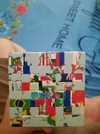
Welcome — and good work getting this far, the last centers are the fiddly bit on a picture cube.
The key thing is you can't just swap those two pairs directly — a two-piece swap isn't possible, so you need to cycle three center pieces instead.
Try this: hold the cube with one of those centers on top and the other on the front. Turn an inner layer (the layer just in from the face) to bring a yellow piece from the front center up to the top, turn the top once to put that piece where it belongs, then turn the inner layer back and turn the top back. That moves three center pieces in a cycle. Repeat it with a different setup turn on top first if needed, and the last four should fall into place without breaking the centers you've already finished.
Two things that trip people up on a picture cube like this: match the actual map detail, not just the color — a yellow piece can be in the right color center but the wrong spot in the picture — and check the center pieces are the right way round, since the map lines need to line up.
If you try that cycle and a piece still ends up in the wrong center, tell us which colors are where and we can walk through the setup from there.