

Dan the Beginner
Premium Member
Moyu AI Cube – First Impressions
Note that I am a Beginner and I am still learning the basics, after solving the cube the first time 4 months ago. I have a dozen or so cubes, including the smart GoCube, Moyu Weilong 2021, Tornado V2, Tengyun M and RSM 2020. I prefer cube settings that are more stable. I buy all my cubes with my own money and I do not have any relationship with any company making, selling, teaching or otherwise deal in cubes. I believe that user forums are most valuable when members can share freely, to help each other.
***WARNING*** for anyone else who is buying one - Don't charge the cube right away. Also, don't use water or alcohol based lubricants, and don't over do it or drop directly onto the core. Read this first, and also read the instruction first. Make sure you always put the cube in the charger with the Yellow face on the left and White on the right, and only use the holes on those centre caps for charging. NOTE - Left and Right sides here are determined by positioning the charger so that the two LEDs are in front, near you, based on the diagram in the instruction sheet. This is not ideal IMO, as most people would put the charging cable at the back on their tables, and hence may have their left and right wrong. I painted the top of the two charging sticks (clamps) Yellow and White respectively to avoid problems. All the centre caps on the cube have the same holes and that suggest that they can all be used for charging. However, the instruction sheet mentions, but only in a later section, that it is important to put the Yellow and White faces on the “left and right” sides respectively. So, I try not to use the other sides for charging, until there is more clarification. It's hard to find more information however, as explained below.
Another point which is not clearly explained is the potential damage that may be done if you use the “D” switch. Don't use it unless it is necessary to wake the cube up from deep sleep. Ghost Cuber made a nice Youtube video to explain this, and his suggestion to tape down that switch is a good idea. Ghost Cuber has talked to Moyu. It is apparently harmful to the battery when the D switch is used and it is meant to be used only when the cube is dead. So, is the charger in this mode like a defribillator? Shock!

Ghost Cuber's video is here. It has nice explanations and inside info:
Moyu should have highlighted this in the instructions, if true, and hopefully design some safety catch to prevent accidental activation in future. To wake up the cube, it should be fine normally to just do this - turn a cube layer a full circle, to get the attention from the App and get the cube detected by the App's Bluetooth scanner.
Until there is more information, and perhaps more instructions from those brave ones who experiment with this cube, just take care with the charging and power options. In addition, as described below, be prepared to work things out yourself and experiment with software that is clearly rushed, if you want to buy now. I know, there are people who enjoy working things out and fixing problems, in which case, this should be a fun puzzle for you. Pun intended.
Impressions:
1. This smartcube looks just like Moyu Weilong 2021 and Tornado V2, but there are differences. It is the same size, 55mm, and at 81g is only 2g or at most 3g heavier than the Weilong 2021 (78g). The Tornado V2 is 54.5mm and even lighter at 72g. See photo. This smartcube is still light compared to some un-smart cubes. That is impressive, as it includes all the extra electronics and battery.
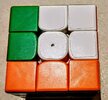
2. Then I realised that they have saved weight by not including the magnet adjustment system in the Weilong 2021. Fortunately, to me, the magnet strength seems just fine, although I would prefer it to be slightly stronger. More on this later.
3. I think there are other subtle differences, e.g. the material or the finish (which is not as smooth or even). I can see from reflections off the surface of the cube pieces faint cross marks and occasionally dimples which I did not see on the Weilong 2021 or on the Tornado V2. There is no problem at all in use however. This photo shows the faint cross marks and dimples on some surfaces. From left to right, Tornado V2, Moyu AI Cube, Moyu Weilong 2021.
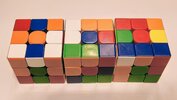
4. The good news is that it still feels very similar to the Weilong 2021 when touched or turned. There is very little difference when I used it in solves, as noted by many reviewers just about the same. So, it is true that this is a smartcube that performs like a normal high performance cube. In fact, I believe it is the best smartcube at this time, except for a reservation regarding the App. When not connected to an App and used for normal solving, it is similar to my other two favourite 50mm cubes, just a little heavier, noisier. This smartcube is not as quiet as the Weilong 2021, which is itself not as quiet as the quietest (Tornado V2). It in fact sounds clicky and sharp.
5. I am bad in finger tricks, but there is something I would like to point out, and that is - I still prefer how the Tornado V2 turns, compared to both these two Moyu cubes. Not talking about corner cutting here and I know there is a limit in the Tornado, but just how I feel as a beginner. I found that it is easier to flick the Tornado in the M move using the tip of the finger. I also found that I can get the layer being turned to stop accurately, i.e. flush with the other layers, more often. This may or may not have to do with the finer adjustments that the Tornado allows in magnet strength, and possibly also the stronger magnet settings possible. As mentioned before, I set the magnet strength to the strongest one on the Moyu Weilong 2021, as that helps my M moves. That setting also allows me to use of a slightly looser tension. YMMV.
6. I think it should be possible to change the magnet strength, for those who prefer stronger magnets, since the construction of the pieces and the way the magnets are located in them are as in the RS3M 2020.
7. You might have gathered from other reviews that the software is not perfect and that is an understatement. Even getting started is a trying experience. (Doesn't everyone understand Chinese??) You have to guess a lot to understand everything, but by being patient, one can work most things out.
8. The main problem is that, unlike the GoCube, it is not plug-and-play. To get started you need to download the App, and then in order to use it, you first need to register. OK, fine. To register, you need to either give a phone number or your email. The country code in the phone number field is however hard coded and cannot be changed. It is always +86 (China). So, I took the other option and entered my email address. It then asked me to enter the security code (apparently that code would be sent to me using the email address I entered). However, nothing was sent to me, after hours of repeated attempts. There is a number like “43s” that cycles from 60 to 0s, which I figure is meant to show a re-trial counter. It seems the App is trying to connect to a server somewhere to get it to send an activation code, but it just kept on re-trying. And days later, I still have not received anything from Moyu. (Yes, I checked my Junk Mail folder. Many times.) So, I ended up not being able to use the App.
9. Cubeast works! It detected my Moyu AI cube with no problem. The cube did not show up on the list of detected Bluetooth devices with any form of identity, not even just Moyu or something about a cube, but just some alphanumeric gibberish. I figured it must be the right device just because the signal strength was particularly strong, compared to others on the list of devices detected by Cubeast. The cube keeps its Bluetooth connection very well. It does not go to sleep or lose connection.
10. Cubeast however does not make use of the gyroscope inside the cube. Not only can you not see cube rotations, but Cubeast insists on showing the cube with white on top and green in front. (Update. I just discovered that there is actually a way to select your own colour scheme for Cubeast's display of the cube. )
The Moyu App would show all cube rotations and display the cube correctly, based on what I have seen on Youtube reviews or hands-on, but I still have to get past the front gate of its App. One of the reasons I chose GoCube before, besides the all-important software stability in its app, was the gyroscope and display of cube rotations.
11. I tried to look for a Moyu download from Play Store and by searching the web, but could not find anything. There is a website for MoyuStore with product information, but there is nothing like Support, Downloads, Update, Software or Firmware, etc anywhere. The cube came with some instructions and a QR code for downloading the App, and that's how I got the App. It seems what I have is a version meant for sale in China. Make sure you check that it is a product for your country, if you intend to buy one. There may be implications for safety and liability issues. Unlike the GoCube, which has certifications like FCC, CE, BC, this Moyu cube only has CE showing on the box. I hope the importers realise that smartcubes are different, as they have batteries, emissions and potential safety issues, and, that they will ensure products are approved for use here, so that there is no issue with insurance claims, etc if something goes terribly wrong. I also hope that cube makers realise that smartcubes are different. They need support, online support, updates, etc just like other such devices.
12. The battery life is fine. It will run for several hours (before Cubeast tells me it needs to be re-charged, by changing the battery icon on the top of the PC screen from green to yellow. When that happens, it stills has 30% left. ) It is very nice of Cubeast to support this cube (and all the others), and provide battery status information. It also provides statistics like STM and QTMs. Charging time is quick, less than 2 hours, but it was not a precise test result.
13. A set of spare centre caps with no holes are provided. I assume they are there for use in competitions, if the holes should cause any problems with regulations. (Update. Smartcubes are not allowed for WCA competitions.) I replaced the ones with holes with these spare caps, except the Yellow and White ones. The tool included for adjusting tension and tightness of spring works fine, just like on other Moyu cubes. Instructions or documents are as usual too small. For something smart and new, it would be nice if more detailed instructions/information can be available and the fonts and diagrams larger. An online place where they can be downloaded would be even more helpful. I wonder if that imfo or a link is provided inside the App, but I can't get past that registration.
14. The Yellow colour of the cube pieces is still the same fluorescent and light colour, which is a problem as they are hard to distinguish from White in dim household warm coloured light. When will cube makers realise there is a problem? I put stickers with a darker Yellow colour on and punched a hole through the sticker of the centre piece by pressing the electric contacts points on the clamps of the charger against the cube. That did not seem to hurt the cube. It still charges fine, and I can now use it in any lighting condition. See photo showing the Yellow stickers.

15. I dissassembled the cube, so that I can lubricate it properly. I found that there are holes in the clear plastic sphere, 8 of them. See photos.


Apparently the two parts of the sphere are held by 4 screws. The 8 elliptical holes are screw holes. So, water or alcohol etc may be able to get inside and cause problems for the electronics. It is probably best, even with silicone based lubes, to lubricate sparingly and only apply directly onto the grooves and other key parts of the pieces, instead of dropping the lube towards the core. I did not see any warning about water based lubes or anything about lubrication in the instructions.
16. As I prefer stronger magnets, I took the opportunity to add extra magnets. The original magnets look like the same as those in the Moyu RSM2020, which I found too weak. The lubrication and the stronger magnet strength have definitely improved this smartcube, but they also added extra weight. The cube now weighs 84.5g, which is still lighter than the stock standard RS3 M 2020 (also slightly weak in magnet strength).

17. With the customisation (Yellow sticker and extra magnets), the cube is IMO my best or the most useful cube at this time with all the smart features. It is still small, and the weight is still OK. It can corner cut as well as my best corner cutting cube, the RSM 2020, but is lighter. It now can do M turns or slices as well as my Tornado V2. I believe it has to do with the weight distribution of the pieces or the moment of inertia of the turning layer. It seems before the extra magnets, this smartcube may be too light in the outer pieces that turn vs the core centre. I believe the force from my finger is applied more directly and produce snappier turns on the Tornado and now also on this smartcube customised with added magnets. My theory is that the weight of those 8 extra magnets positioned in the outer edge pieces of the turning layer make a difference in turning force, or how the force of my finger flicks is transferred, while all the added 24 magents also help to stop and align it, without over shooting. I realise this may be just a personal preference (Beginner using Roux), but I feel M moves in particular are clearly improved, and I do a lot of M'. The big difference with my other two favourite cubes is that it is smart. I can now record and check my solving times, TPS, number of turns, and block building step times, etc easily, using Cubeast. The slippery GoCube was not ideal as I could not turn very well with it. The only reservation left is the noise. It is not a quiet cube, though still a little quieter than the RS3M 2020.
18. I now have the flexibility to drill with the regular Moyu Weilong 2021 or the Tornado V2, when I am in a quiet place, and then switch to this smartcube without any problem when I want to use its smart features, as they are all fairly similar. This smartcube's extra features are definitely worth the money in my opinion. Just look at how much other smart devices are sold for, like Bluetooth headsets, smart speakers, door bells etc. Just be prepared to spend time learning and working things out with this one at this time. I was more than a little frustrated the first few days due to the App which I cannot use and also the minimal documentation or help/support with this cube. I am now much happier after finding Cubeast, and after customising it. It's no doubt a very really useful cube, but you have to be patient and be ready to work things out. There will no doubt be online video and tutorials later to supplement the limited information provided with the cube.
In summary, I think this shows there is a clear future for smartcubes, and it has shown how small, light, and playable they can be. Future smartcubes will no doubt be even better, more user friendly and reliable in their software. With this Moyu AI Cube, just use Cubeast, or another independent software. I had another try and managed to register, after receiving an activation code, but their software is clearly not ready and may take a long time to fix.
I thought my experience should be useful to others considering the cube. If there are others who have bought one, please share your experience and tips, especially if you know where a more recent and international version of Moyu's App can be downloaded.
UPdate. Just to clarify. The holes in the plastic core have screws in them. So, any fluid still has to get past the threads of those screws to get inside.
UPDATE - 31 August, 2021.
I have another thread on what I did to add magnet strength adjustment to this smartcube. It's a simple mod and the results are great. Check it out here:
 www.speedsolving.com
Note that I am a Beginner and I am still learning the basics, after solving the cube the first time 4 months ago. I have a dozen or so cubes, including the smart GoCube, Moyu Weilong 2021, Tornado V2, Tengyun M and RSM 2020. I prefer cube settings that are more stable. I buy all my cubes with my own money and I do not have any relationship with any company making, selling, teaching or otherwise deal in cubes. I believe that user forums are most valuable when members can share freely, to help each other.
***WARNING*** for anyone else who is buying one - Don't charge the cube right away. Also, don't use water or alcohol based lubricants, and don't over do it or drop directly onto the core. Read this first, and also read the instruction first. Make sure you always put the cube in the charger with the Yellow face on the left and White on the right, and only use the holes on those centre caps for charging. NOTE - Left and Right sides here are determined by positioning the charger so that the two LEDs are in front, near you, based on the diagram in the instruction sheet. This is not ideal IMO, as most people would put the charging cable at the back on their tables, and hence may have their left and right wrong. I painted the top of the two charging sticks (clamps) Yellow and White respectively to avoid problems. All the centre caps on the cube have the same holes and that suggest that they can all be used for charging. However, the instruction sheet mentions, but only in a later section, that it is important to put the Yellow and White faces on the “left and right” sides respectively. So, I try not to use the other sides for charging, until there is more clarification. It's hard to find more information however, as explained below.
Another point which is not clearly explained is the potential damage that may be done if you use the “D” switch. Don't use it unless it is necessary to wake the cube up from deep sleep. Ghost Cuber made a nice Youtube video to explain this, and his suggestion to tape down that switch is a good idea. Ghost Cuber has talked to Moyu. It is apparently harmful to the battery when the D switch is used and it is meant to be used only when the cube is dead. So, is the charger in this mode like a defribillator? Shock!
Ghost Cuber's video is here. It has nice explanations and inside info:
Moyu should have highlighted this in the instructions, if true, and hopefully design some safety catch to prevent accidental activation in future. To wake up the cube, it should be fine normally to just do this - turn a cube layer a full circle, to get the attention from the App and get the cube detected by the App's Bluetooth scanner.
Until there is more information, and perhaps more instructions from those brave ones who experiment with this cube, just take care with the charging and power options. In addition, as described below, be prepared to work things out yourself and experiment with software that is clearly rushed, if you want to buy now. I know, there are people who enjoy working things out and fixing problems, in which case, this should be a fun puzzle for you. Pun intended.
Impressions:
1. This smartcube looks just like Moyu Weilong 2021 and Tornado V2, but there are differences. It is the same size, 55mm, and at 81g is only 2g or at most 3g heavier than the Weilong 2021 (78g). The Tornado V2 is 54.5mm and even lighter at 72g. See photo. This smartcube is still light compared to some un-smart cubes. That is impressive, as it includes all the extra electronics and battery.
2. Then I realised that they have saved weight by not including the magnet adjustment system in the Weilong 2021. Fortunately, to me, the magnet strength seems just fine, although I would prefer it to be slightly stronger. More on this later.
3. I think there are other subtle differences, e.g. the material or the finish (which is not as smooth or even). I can see from reflections off the surface of the cube pieces faint cross marks and occasionally dimples which I did not see on the Weilong 2021 or on the Tornado V2. There is no problem at all in use however. This photo shows the faint cross marks and dimples on some surfaces. From left to right, Tornado V2, Moyu AI Cube, Moyu Weilong 2021.
4. The good news is that it still feels very similar to the Weilong 2021 when touched or turned. There is very little difference when I used it in solves, as noted by many reviewers just about the same. So, it is true that this is a smartcube that performs like a normal high performance cube. In fact, I believe it is the best smartcube at this time, except for a reservation regarding the App. When not connected to an App and used for normal solving, it is similar to my other two favourite 50mm cubes, just a little heavier, noisier. This smartcube is not as quiet as the Weilong 2021, which is itself not as quiet as the quietest (Tornado V2). It in fact sounds clicky and sharp.
5. I am bad in finger tricks, but there is something I would like to point out, and that is - I still prefer how the Tornado V2 turns, compared to both these two Moyu cubes. Not talking about corner cutting here and I know there is a limit in the Tornado, but just how I feel as a beginner. I found that it is easier to flick the Tornado in the M move using the tip of the finger. I also found that I can get the layer being turned to stop accurately, i.e. flush with the other layers, more often. This may or may not have to do with the finer adjustments that the Tornado allows in magnet strength, and possibly also the stronger magnet settings possible. As mentioned before, I set the magnet strength to the strongest one on the Moyu Weilong 2021, as that helps my M moves. That setting also allows me to use of a slightly looser tension. YMMV.
6. I think it should be possible to change the magnet strength, for those who prefer stronger magnets, since the construction of the pieces and the way the magnets are located in them are as in the RS3M 2020.
7. You might have gathered from other reviews that the software is not perfect and that is an understatement. Even getting started is a trying experience. (Doesn't everyone understand Chinese??) You have to guess a lot to understand everything, but by being patient, one can work most things out.
8. The main problem is that, unlike the GoCube, it is not plug-and-play. To get started you need to download the App, and then in order to use it, you first need to register. OK, fine. To register, you need to either give a phone number or your email. The country code in the phone number field is however hard coded and cannot be changed. It is always +86 (China). So, I took the other option and entered my email address. It then asked me to enter the security code (apparently that code would be sent to me using the email address I entered). However, nothing was sent to me, after hours of repeated attempts. There is a number like “43s” that cycles from 60 to 0s, which I figure is meant to show a re-trial counter. It seems the App is trying to connect to a server somewhere to get it to send an activation code, but it just kept on re-trying. And days later, I still have not received anything from Moyu. (Yes, I checked my Junk Mail folder. Many times.) So, I ended up not being able to use the App.
9. Cubeast works! It detected my Moyu AI cube with no problem. The cube did not show up on the list of detected Bluetooth devices with any form of identity, not even just Moyu or something about a cube, but just some alphanumeric gibberish. I figured it must be the right device just because the signal strength was particularly strong, compared to others on the list of devices detected by Cubeast. The cube keeps its Bluetooth connection very well. It does not go to sleep or lose connection.
10. Cubeast however does not make use of the gyroscope inside the cube. Not only can you not see cube rotations, but Cubeast insists on showing the cube with white on top and green in front. (Update. I just discovered that there is actually a way to select your own colour scheme for Cubeast's display of the cube. )
The Moyu App would show all cube rotations and display the cube correctly, based on what I have seen on Youtube reviews or hands-on, but I still have to get past the front gate of its App. One of the reasons I chose GoCube before, besides the all-important software stability in its app, was the gyroscope and display of cube rotations.
11. I tried to look for a Moyu download from Play Store and by searching the web, but could not find anything. There is a website for MoyuStore with product information, but there is nothing like Support, Downloads, Update, Software or Firmware, etc anywhere. The cube came with some instructions and a QR code for downloading the App, and that's how I got the App. It seems what I have is a version meant for sale in China. Make sure you check that it is a product for your country, if you intend to buy one. There may be implications for safety and liability issues. Unlike the GoCube, which has certifications like FCC, CE, BC, this Moyu cube only has CE showing on the box. I hope the importers realise that smartcubes are different, as they have batteries, emissions and potential safety issues, and, that they will ensure products are approved for use here, so that there is no issue with insurance claims, etc if something goes terribly wrong. I also hope that cube makers realise that smartcubes are different. They need support, online support, updates, etc just like other such devices.
12. The battery life is fine. It will run for several hours (before Cubeast tells me it needs to be re-charged, by changing the battery icon on the top of the PC screen from green to yellow. When that happens, it stills has 30% left. ) It is very nice of Cubeast to support this cube (and all the others), and provide battery status information. It also provides statistics like STM and QTMs. Charging time is quick, less than 2 hours, but it was not a precise test result.
13. A set of spare centre caps with no holes are provided. I assume they are there for use in competitions, if the holes should cause any problems with regulations. (Update. Smartcubes are not allowed for WCA competitions.) I replaced the ones with holes with these spare caps, except the Yellow and White ones. The tool included for adjusting tension and tightness of spring works fine, just like on other Moyu cubes. Instructions or documents are as usual too small. For something smart and new, it would be nice if more detailed instructions/information can be available and the fonts and diagrams larger. An online place where they can be downloaded would be even more helpful. I wonder if that imfo or a link is provided inside the App, but I can't get past that registration.
14. The Yellow colour of the cube pieces is still the same fluorescent and light colour, which is a problem as they are hard to distinguish from White in dim household warm coloured light. When will cube makers realise there is a problem? I put stickers with a darker Yellow colour on and punched a hole through the sticker of the centre piece by pressing the electric contacts points on the clamps of the charger against the cube. That did not seem to hurt the cube. It still charges fine, and I can now use it in any lighting condition. See photo showing the Yellow stickers.
15. I dissassembled the cube, so that I can lubricate it properly. I found that there are holes in the clear plastic sphere, 8 of them. See photos.
Apparently the two parts of the sphere are held by 4 screws. The 8 elliptical holes are screw holes. So, water or alcohol etc may be able to get inside and cause problems for the electronics. It is probably best, even with silicone based lubes, to lubricate sparingly and only apply directly onto the grooves and other key parts of the pieces, instead of dropping the lube towards the core. I did not see any warning about water based lubes or anything about lubrication in the instructions.
16. As I prefer stronger magnets, I took the opportunity to add extra magnets. The original magnets look like the same as those in the Moyu RSM2020, which I found too weak. The lubrication and the stronger magnet strength have definitely improved this smartcube, but they also added extra weight. The cube now weighs 84.5g, which is still lighter than the stock standard RS3 M 2020 (also slightly weak in magnet strength).
17. With the customisation (Yellow sticker and extra magnets), the cube is IMO my best or the most useful cube at this time with all the smart features. It is still small, and the weight is still OK. It can corner cut as well as my best corner cutting cube, the RSM 2020, but is lighter. It now can do M turns or slices as well as my Tornado V2. I believe it has to do with the weight distribution of the pieces or the moment of inertia of the turning layer. It seems before the extra magnets, this smartcube may be too light in the outer pieces that turn vs the core centre. I believe the force from my finger is applied more directly and produce snappier turns on the Tornado and now also on this smartcube customised with added magnets. My theory is that the weight of those 8 extra magnets positioned in the outer edge pieces of the turning layer make a difference in turning force, or how the force of my finger flicks is transferred, while all the added 24 magents also help to stop and align it, without over shooting. I realise this may be just a personal preference (Beginner using Roux), but I feel M moves in particular are clearly improved, and I do a lot of M'. The big difference with my other two favourite cubes is that it is smart. I can now record and check my solving times, TPS, number of turns, and block building step times, etc easily, using Cubeast. The slippery GoCube was not ideal as I could not turn very well with it. The only reservation left is the noise. It is not a quiet cube, though still a little quieter than the RS3M 2020.
18. I now have the flexibility to drill with the regular Moyu Weilong 2021 or the Tornado V2, when I am in a quiet place, and then switch to this smartcube without any problem when I want to use its smart features, as they are all fairly similar. This smartcube's extra features are definitely worth the money in my opinion. Just look at how much other smart devices are sold for, like Bluetooth headsets, smart speakers, door bells etc. Just be prepared to spend time learning and working things out with this one at this time. I was more than a little frustrated the first few days due to the App which I cannot use and also the minimal documentation or help/support with this cube. I am now much happier after finding Cubeast, and after customising it. It's no doubt a very really useful cube, but you have to be patient and be ready to work things out. There will no doubt be online video and tutorials later to supplement the limited information provided with the cube.
In summary, I think this shows there is a clear future for smartcubes, and it has shown how small, light, and playable they can be. Future smartcubes will no doubt be even better, more user friendly and reliable in their software. With this Moyu AI Cube, just use Cubeast, or another independent software. I had another try and managed to register, after receiving an activation code, but their software is clearly not ready and may take a long time to fix.
I thought my experience should be useful to others considering the cube. If there are others who have bought one, please share your experience and tips, especially if you know where a more recent and international version of Moyu's App can be downloaded.
UPdate. Just to clarify. The holes in the plastic core have screws in them. So, any fluid still has to get past the threads of those screws to get inside.
UPDATE - 31 August, 2021.
I have another thread on what I did to add magnet strength adjustment to this smartcube. It's a simple mod and the results are great. Check it out here:
The Best Smartcube?! Moyu Weilong 2021 AI Cube with Magnet Adjustment (DSM)
The Moyu AI Cube does not have a magnet strength adjustment system, but the Moyu Weilong WRM 2021 does. The sizes and colours of the two cubes are practically speaking identical. So I swapped their pieces and got this. I did not swap the centre caps. Does it work? Yes, everything including...
www.speedsolving.com
Last edited:


