StackMat Timer Issues

penapox

Member
Joined
Mar 27, 2017
Messages
2
Location
Canada
So I have this Gen2 StackMat that I want to use with my cubes, but the thing is, as soon as I turn it on, the red light turns on, and shortly after the green one as well, as if I was pressing my hands on it, even though I'm not. It doesn't turn off, and I have no way to start the timer since it thinks my hands are already on there.

I've tried taking the battery out and putting it back in/etc, and I JUST bought the battery new.

Any help?
 
Completely new battery not just taking out and putting in the same one.
 
I've not seen inside a gen2, but if it's the same as a gen1, the touchpad sensitivity adjusters may both need re-adjusting. If they're off one way, you'll never get it to recognise your hand, if adjusted the other way, they will permanently see your hand as there, when it's not.

But try the battery first, before breaking out the screwdrivers.
 
I'm pretty sure it's the pads. For some reason, when I took the back plate off, both the lights turned off, but they wouldn't turn back on. After some tinkering, I discovered on a particular area, if the screws were too tight, the lights would stay on, but if they were too loose, they would stay off. It wasn't fixed, though. For some reason the pads need an INCREDIBLE amount of force to activate. Also, the right pad always acts like there's a hand on it; I can start the timer by only using the left pad. How do I re-adjust the little sensitivity things?
 
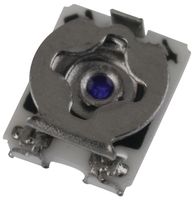
Tricky one, I'm just going to assume it's like a gen1... the two trimmers/preset pots are on the top side of the electronics circuit board, and will be accessible through two small holes in the stackmat's case. In the factory, they set them up without the front-panel label in place, then the label is applied, covering the holes. You should be able to work out where the holes are, (eg by partly-removing the circuit-board inside and having a look). Then cut a matching hole in the label, eg. with a craft knife. Then the trimmers can be turned with a small flat-blade screwdriver. They're fragile, be careful. They look something like this, about 5mm in size:

4979109.jpg


Carefully adjust them so you need to place several fingers firmly on the pads, you don't want them so sensitive they go off when one finger is just near.

The holes on the front panel can be covered with spare cube stickers etc.

Addendum: The pads don't measure force, they use your hand as a capacitor, basically your hand carries a small electrical signal from one part of the touchpad to another. They're actually interdigitated fingers:
generic-sensor-geometry.png
 
Last edited:
Back
Top