Software: kubesolver - easy algorithm generator for 3x3x3

Thank you for that wonderfull program.

I ran in to some things

init_full_cube
F2 L2 F' D2 L2 F' R2 B2 D2 L2 U2 L' D L B2 R' D' U' R F2
solve_two_phase
the in.txt with or with out the: init_full_cube"

i get
INFO: KubeSolver 1.0.5 (C) Jakub Straszewski 2020
INFO: Setting max number of output sequences to 1000000.

L F2 D2 L2 R' B2 U' F2 L B'
U' R2 D' B2 D R2 D' L2 F2 U2 B2 U' F2 D
the out.txt i get a break in the solution as you can see at B'and U' (2 lines)

when i try an only corners
init_empty_cube
add_corners_orientation
add_corners_permutation
F2 L2 F' D2 L2 F' R2 B2 D2 L2 U2 L' D L B2 R' D' U' R F2
solve

the output error i get:
INFO: KubeSolver 1.0.5 (C) Jakub Straszewski 2020
INFO: Setting max number of output sequences to 1.

ERROR: can't add more than 6 corners permutation due to implementation detail

when i change the in.txt like this:
init_empty_cube
add_corner DBL
add_corner DBR
add_corner DFR
add_corner DFL
add_corner UBL
add_corner UBR
add_corner UFR
add_corner UFL
F2 L2 F' D2 L2 F' R2 B2 D2 L2 U2 L' D L B2 R' D' U' R F2
solve

i get a correct output with no errors:
INFO: KubeSolver 1.0.5 (C) Jakub Straszewski 2020
INFO: Setting max number of output sequences to 1.

INFO: Searching 1 move solutions...
INFO: Searching 2 move solutions...
INFO: Searching 3 move solutions...
INFO: Searching 4 move solutions...
INFO: Searching 5 move solutions...
INFO: Searching 6 move solutions...
INFO: Searching 7 move solutions...
INFO: Searching 8 move solutions...
INFO: Searching 9 move solutions...
F' L' D B2 R D' L D2 R'
 
Thanks for trying out my program. Much appreciated.

the out.txt i get a break in the solution as you can see at B'and U' (2 lines)
Yes, I will remove the break in the next version. However making an efficient two phase solver is not on my todo. https://github.com/cs0x7f/min2phase is much better for that. I might eventually add min2phase solver as a dependency to kubesolver.
ERROR: can't add more than 6 corners permutation due to implementation detail
The proper way to add all corners is add_corners.

add_corners_orientation and add_corners_permutation should never be used together (I might add an error message indicating that). You should first specify corners that you want to solve exactly (e.g. 4 bottom layer corners) and add_corners_xxx indicates that all other corners must be either permuted or all must be oriented.

add_corners_orientation should be used e.g. for solving OLL. and add_corners_permutation for solving CP stage of beginner petrus.
 
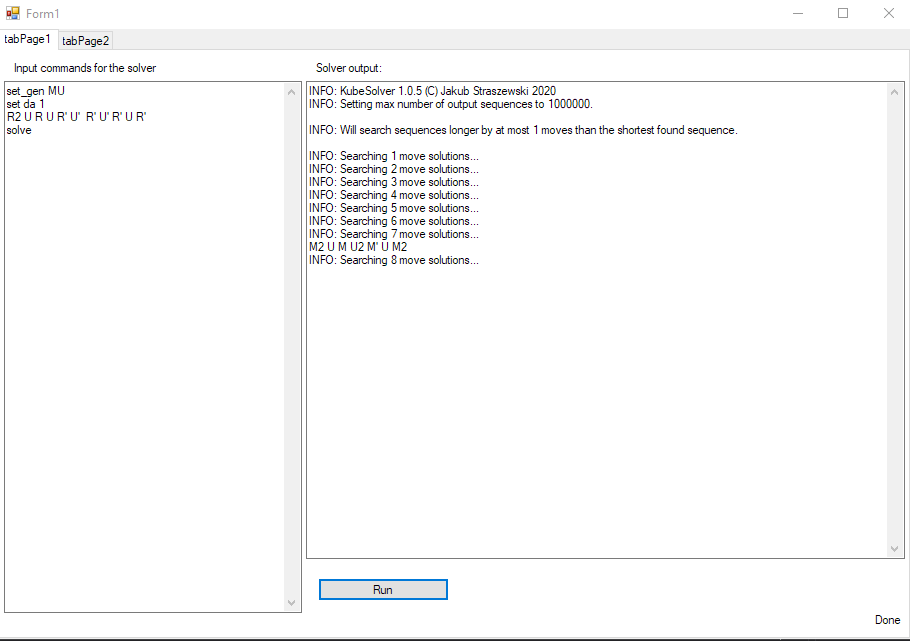
trying to made a UI for kubesolver. not perfect yet but when it is i will share it. compile it for windows i can not complie it for mac yet i have to figger that how to do that.
 

Attachments

  • addon kubesolver.PNG
    addon kubesolver.PNG
    75.3 KB · Views: 17
Last edited by a moderator:
Based on the picture of a GUI I have two comments:
1) it's missing the -da setting which is (how many more moves than optimal should be searched -da 0 stops search at the depth of the first found sequence)
2) the command init_to_current_state cannot be used in such a simple manner, the idea is that you have to setup some moves first, call init_to_current_state and then setup some moves again.
It can be used e.g. to do e.g. "last slot + force Pi ZBLL alg"

and you would do it by:
init and add f2l, and last layer orientation.
< moves to setup the pi case OLL.>
init_to_current_state
<reverse moves to setup the pi case OLL>
<scramble>
solve
 
Could you also include the --silent and -n commands especially the -n I use that one quite often when I don't know how many moves the algs will be
 
1. I will add the "da" setting
2. i shall see what i can do with that option :)
Based on the picture of a GUI I have two comments:
1) it's missing the -da setting which is (how many more moves than optimal should be searched -da 0 stops search at the depth of the first found sequence)
2) the command init_to_current_state cannot be used in such a simple manner, the idea is that you have to setup some moves first, call init_to_current_state and then setup some moves again.
It can be used e.g. to do e.g. "last slot + force Pi ZBLL alg"

and you would do it by:
init and add f2l, and last layer orientation.
< moves to setup the pi case OLL.>
init_to_current_state
<reverse moves to setup the pi case OLL>
<scramble>
solve

The -n setting is aleady in there the --silent setting never used it. i just find out what is does :) will be added
Could you also include the --silent and -n commands especially the -n I use that one quite often when I don't know how many moves the algs will be
 
@AlexanderO I will probably also add some GUI to my program at some point but it will probably be a simple wrapper over the command line program execution.
37a390e802658ceecdf68d65b812c88e.png

I might also add some tools like the two python tools that are in the repo already (cross finder, training scramble generator etc.) But I will try to not duplicate your features if you intend on developing your GUI more.
 
I might also add some tools like the two python tools that are in the repo already (cross finder, training scramble generator etc.) But I will try to not duplicate your features if you intend on developing your GUI more.

If many are going to use it i will be developing it more i guess every thing is possible.

i have send you a copy of the file to check it out it looks like this now
 

Attachments

  • addon kubesolver v1l.PNG
    addon kubesolver v1l.PNG
    59.8 KB · Views: 10
Hey, I've been willing to try this.
I cloned the repository in my alg_gen folder (windows 10), however I'm having some trouble running the makefile, that I've put in the spoiler.

C:\Users\Yash M Mehta\Desktop\alg_gen\kubesolver>mingw32-make
mkdir -p obj_win
cube3.c
cube3r.c
cube_initialization.c
In file included from src/c/solver_cube_compression.c:7:
src/c/solver_cube_compression.h:8:5: error: unknown type name '__uint128_t'
8 | __uint128_t packed;
| ^~~~~~~~~~~
src/c/solver_cube_compression.h:19:44: error: unknown type name '__uint128_t'; did you mean '__uintptr_t'?
19 | void unpack_ce(cube *c, int8_t *last_move, __uint128_t compressed);
| ^~~~~~~~~~~
| __uintptr_t
src/c/solver_cube_compression.h:20:1: error: unknown type name '__uint128_t'; did you mean '__uintptr_t'?
20 | __uint128_t pack_ce (cube *c, int8_t last_move);
| ^~~~~~~~~~~
| __uintptr_t
src/c/solver_cube_compression.h:22:25: error: unknown type name '__uint128_t'; did you mean '__uintptr_t'?
22 | int8_t unpack_last_move(__uint128_t compressed);
| ^~~~~~~~~~~
| __uintptr_t
src/c/solver_cube_compression.c:39:25: error: unknown type name '__uint128_t'; did you mean '__uintptr_t'?
39 | int8_t unpack_last_move(__uint128_t compressed) {
| ^~~~~~~~~~~
| __uintptr_t
src/c/solver_cube_compression.c:43:44: error: unknown type name '__uint128_t'; did you mean '__uintptr_t'?
43 | void unpack_ce(cube *c, int8_t *last_move, __uint128_t compressed) {
| ^~~~~~~~~~~
| __uintptr_t
src/c/solver_cube_compression.c:75:1: error: unknown type name '__uint128_t'; did you mean '__uintptr_t'?
75 | __uint128_t pack_ce (cube *c, int8_t last_move) {
| ^~~~~~~~~~~
| __uintptr_t
src/c/solver_cube_compression.c: In function 'pack_ce':
src/c/solver_cube_compression.c:79:5: error: unknown type name '__uint128_t'; did you mean '__uintptr_t'?
79 | __uint128_t retVal = last_move;
| ^~~~~~~~~~~
| __uintptr_t
src/c/solver_cube_compression.c:84:21: error: '__uint128_t' undeclared (first use in this function); did you mean '__uintptr_t'?
84 | retVal |= ((__uint128_t)(corners)) << shift; shift += 3;
| ^~~~~~~~~~~
| __uintptr_t
src/c/solver_cube_compression.c:84:21: note: each undeclared identifier is reported only once for each function it appears in
src/c/solver_cube_compression.c: In function 'check_packing':
src/c/solver_cube_compression.c:102:5: error: unknown type name '__uint128_t'; did you mean '__uintptr_t'?
102 | __uint128_t packed = pack_ce(&c, last_move);
| ^~~~~~~~~~~
| __uintptr_t
src/c/solver_cube_compression.c:103:5: warning: implicit declaration of function 'unpack_ce'; did you mean 'pack_ce'? [-Wimplicit-function-declaration]
103 | unpack_ce(&other_c, &unpacked_last_move, packed);
| ^~~~~~~~~
| pack_ce
src/c/solver_cube_compression.c: In function 'compare_packed_cubes_only_cube_state':
src/c/solver_cube_compression.c:123:5: error: unknown type name '__uint128_t'; did you mean '__uintptr_t'?
123 | __uint128_t p1 = ((solver_cube_packed *)s1)->packed >> 8;
| ^~~~~~~~~~~
| __uintptr_t
src/c/solver_cube_compression.c:124:5: error: unknown type name '__uint128_t'; did you mean '__uintptr_t'?
124 | __uint128_t p2 = ((solver_cube_packed *)s2)->packed >> 8;
| ^~~~~~~~~~~
| __uintptr_t
src/c/solver_cube_compression.c: In function 'compare_packed_cubes_full':
src/c/solver_cube_compression.c:136:5: error: unknown type name '__uint128_t'; did you mean '__uintptr_t'?
136 | __uint128_t p1 = ((solver_cube_packed *)s1)->packed;
| ^~~~~~~~~~~
| __uintptr_t
src/c/solver_cube_compression.c:137:5: error: unknown type name '__uint128_t'; did you mean '__uintptr_t'?
137 | __uint128_t p2 = ((solver_cube_packed *)s2)->packed;
| ^~~~~~~~~~~
| __uintptr_t
makefile:121: recipe for target 'obj_win/solver_cube_compression_d.o' failed
mingw32-make: *** [obj_win/solver_cube_compression_d.o] Error 1


How should I fix this?
 
error: unknown type name '__uint128_t'; did you mean '__uintptr_t'?
If you're not / don't want to get familiar with the art of building and compiling you can just download the executables from kubesolver.com.

If you do want to then the issue you have is caused by the fact that your gcc doesn't have __uint128_t type.. I've succesfully compiled the project with several MinGW-W64 gcc. What is your compiler?
 
If you're not / don't want to get familiar with the art of building and compiling you can just download the executables from kubesolver.com.

If you do want to then the issue you have is caused by the fact that your gcc doesn't have __uint128_t type.. I've succesfully compiled the project with several MinGW-W64 gcc. What is your compiler?
I use mingw-32 afaik.
I’ll install mingw-w64 and try again, then let you know.
 
Back
Top