Multiplayer 15 puzzle sim

15puzzle1.png

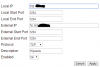
Does this look like proper port forwarding? My friends can't connect. The IPs are all right.
 
v22.0
Complete rewrite
BLD mode does not exist (yet, I will probably re-add it though)
Leaderboards are gone (until I can fix them, but I might not do, I don't think people really cared about them)
Keyboard+macros control scheme - do shift+move to repeat a move a bunch of times, handshifts are controlled by 3/4/7/8 and it shifts in/out by gridsize (use an NxN grid colour scheme)
Multiplayer looks nicer, settings are sent across the server
Time/movecount/TPS is shown for each user on multiplayer
Solver - activate with alt+S, wait for it to load (it might take a while for some puzzles - ~30 minutes for 15 puzzle), then do ctrl+S to solve the current state
PBs are saved in a csv instead of a bunch of txts, and the full solve data is stored too (time/movecount/tps/scramble/reconstruction/date+time for each solve)
A lot more colour schemes
Setting to change the base of the numbers
Different "display types" - PBs saved for each one
Different scramblers
Animations can be twice as long as before
Increased size limit to 1000x1000 because why not
Big puzzles will work on multiplayer (tested with a 300x300)
Reconstructions are more compact (will show "R20" instead of "RRRRRRRRRRRRRRRRRRRR")
Stats window is different - solve data is shown in a table. If you are doing a marathon/relay, double click a row to see the full solve data
CTRL+P to render an image of the puzzle (also works on multiplayer, just click on the puzzle first)
If control scheme is set to Keyboard+macros and you don't use any macros in a solve, a popup will ask if you want to change to Keyboard control scheme
Probably more stuff too
 
The settings menu is so big it can't fit on my screen, so I can't change anything past move piece/move blank, and it I drag the window up I can see the change controls button but can't click it, so I'm stuck with arrow keys. Not that problematic as I usually use IJKL anyway (E: actually that is a problem because my arrow keys are tiny and it's not easy to use them), but I don't know if there's anything past that... please could you make the window wider and shorter (or something that would fit all the settings on a smaller screen)?
 
Last edited:
I think there is an issue with the adjacent 2 cycle scrambler. As soon as the puzzle is a scrambled the timer starts, speaking of which a "no inspection" mode might be a good idea.
 
v23.0 (client)
BLD mode
Standard deviation shown for averages
Updated settings window
Added option to use clicking/hovering for mouse controls
Puzzle window/stats grid can be resized (click+drag just above the time/moves/tps labels)
Chat box on multiplayer can be resized
New colour schemes - main scheme and subscheme
Added a blue "15" icon
Fixed bug where leaderboard button would reappear after exiting fullscreen
Fixed bug where maximize -> fullscreen -> exit fullscreen would resize the puzzle weirdly

v7 (server)
Fixed a crash bug
Added a red "15" icon
Updated to work with v23.0
 
With the new version I can't change the main color scheme. I want to have L2L Rainbow as my main colour scheme but the scheme is always being all the tiles red. How can I change it? Is it a bug or something?
 
Back
Top