

qwr
Legend
As I was too lazy to make a video on it, here are written first impressions.
Externals: As far as I know, I got the GAN i3 v2 which has slightly different charging holes. I still don't know what the difference between v2 and v1 is.
v2 (left): note the charging holes in the center cap (they only accept prongs on the yellow side)
v1: note the charging holes in the corners (I think these center caps look better, but no big difference)
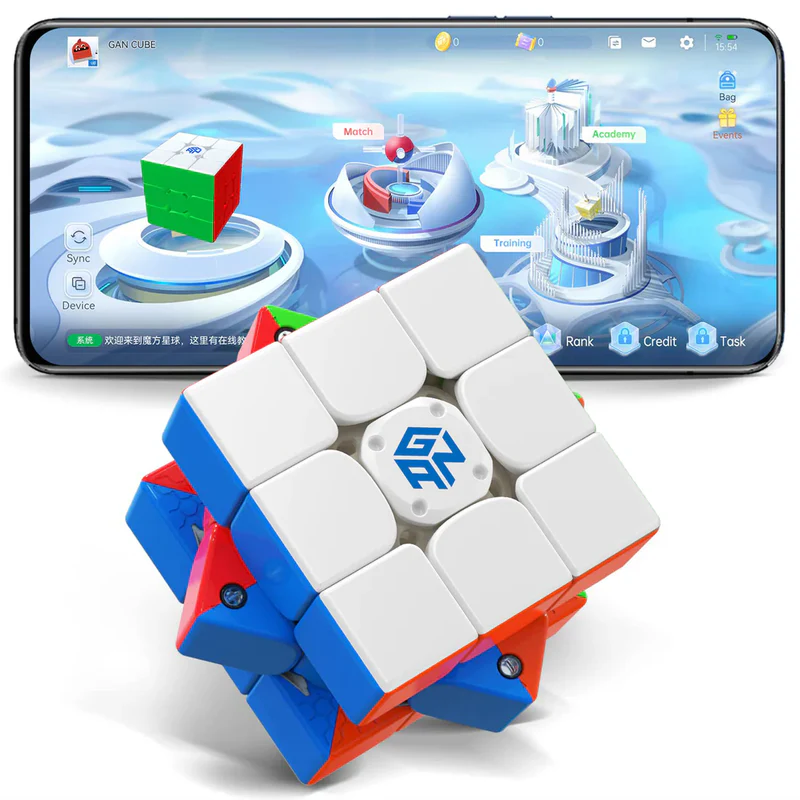
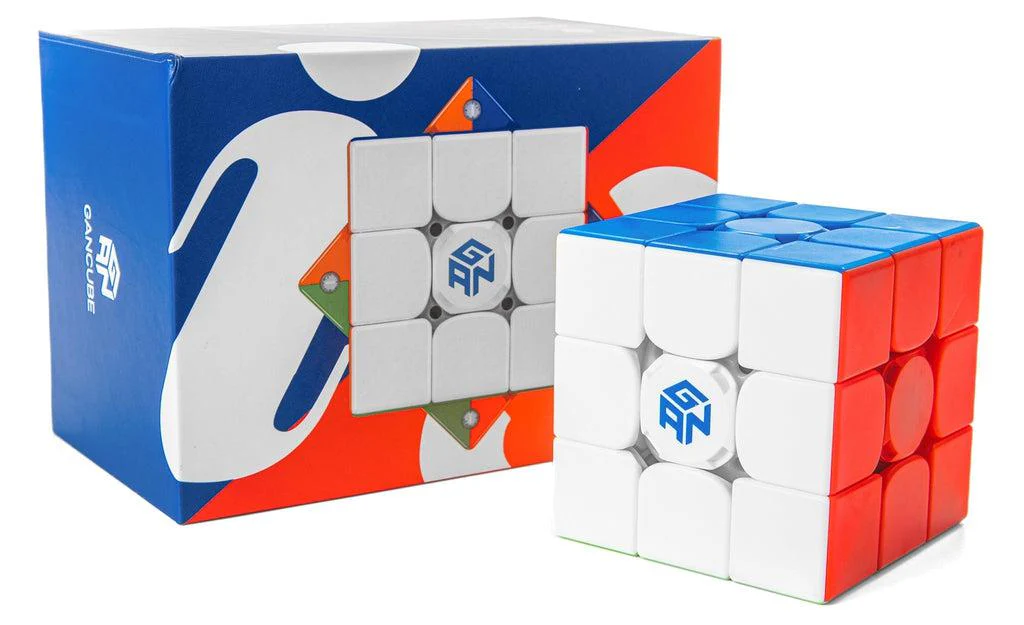
The surface is very matte, but GAN cubes polish over time. The cube feels moderately dense, but is actually not that heavy at around 88 g. This is comparable to older cubes like the Weilong GTS2 M and the RS3M 2020.
The turning is quite good and there is the classic "dry smoothness" plastic-on-plastic feel of recent GAN cubes (iirc like a GAN 12 I tried a long time ago).
The internal pieces are clearly squashed to accommodate the large ball core, with big flat edge torpedoes and a huge corner base. The fact that it turns so well without feeling too blocky is impressive engineering.
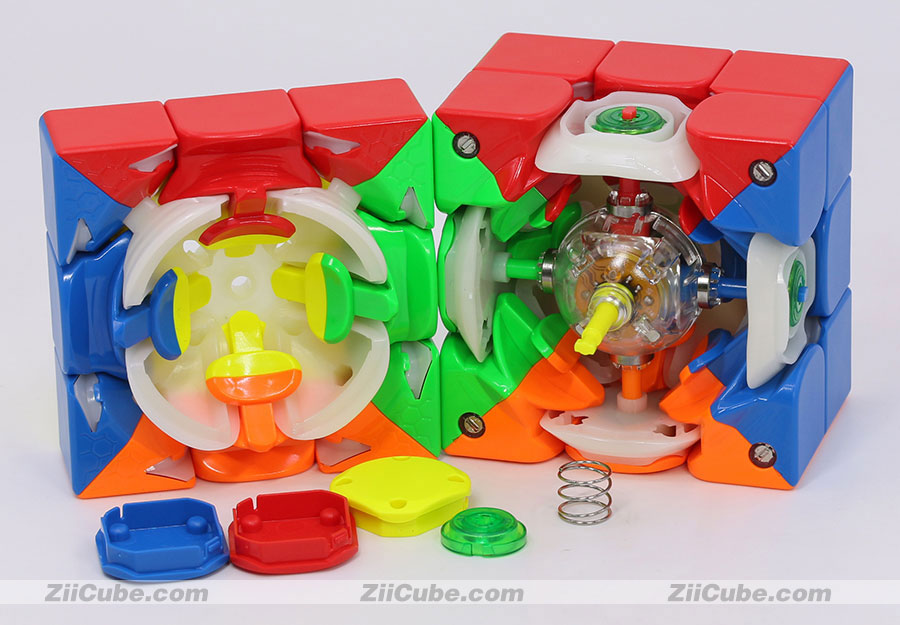
(Ziicube takes excellent product photos)
One magnet I think on the orange-white edge was making a clicking sound when turning. The magnet strength goes from 1 through 7, with 1 being the magnet holder is flush (strongest magnet). The default is 3. Adjusting it to 1 or 5 seems to make the clicking unnoticeable for some reason. You can actually turn it past 7, but as the manual notes this risks damaging the mechanism.
App: I Bluetooth paired the cube (which sadly requires location permissions - this drains phone battery) and signed up for an account with no problem. It is pretty easy to use. I really like the solve records, which shows the moves for your solve, TPS, and where you are spending time in the solves (for me it's 50% of time in F2L). I tried out the race mode and it works as expected. Unfortunately, the app is quite bad at recognizing cube rotations correctly. It gives the reconstruction with white on top and doesn't show any cube rotations, so shows tons of DBL moves that should be UFR moves. I feel like there must be somewhere in the app to at least reconstruct with cross on bottom but I haven't found it yet. There's also a bunch of bloatware like various skins and effects and a mobile-game-esque shop with coins. Maybe that appeals to little kids.
In conclusion, this is a good product with hardware that has matured to being very usable. The frustrating thing is that the app is decent, but could be so much better if they just hired one or two competent software developers (which are much cheaper in China) to do some tweaks. In fact, a lot of software is like this. Unfortunately with it being proprietary, I wouldn't count on the developers listening to feedback and improving it.
Externals: As far as I know, I got the GAN i3 v2 which has slightly different charging holes. I still don't know what the difference between v2 and v1 is.
v2 (left): note the charging holes in the center cap (they only accept prongs on the yellow side)
v1: note the charging holes in the corners (I think these center caps look better, but no big difference)
The surface is very matte, but GAN cubes polish over time. The cube feels moderately dense, but is actually not that heavy at around 88 g. This is comparable to older cubes like the Weilong GTS2 M and the RS3M 2020.
The turning is quite good and there is the classic "dry smoothness" plastic-on-plastic feel of recent GAN cubes (iirc like a GAN 12 I tried a long time ago).
The internal pieces are clearly squashed to accommodate the large ball core, with big flat edge torpedoes and a huge corner base. The fact that it turns so well without feeling too blocky is impressive engineering.
(Ziicube takes excellent product photos)
One magnet I think on the orange-white edge was making a clicking sound when turning. The magnet strength goes from 1 through 7, with 1 being the magnet holder is flush (strongest magnet). The default is 3. Adjusting it to 1 or 5 seems to make the clicking unnoticeable for some reason. You can actually turn it past 7, but as the manual notes this risks damaging the mechanism.
App: I Bluetooth paired the cube (which sadly requires location permissions - this drains phone battery) and signed up for an account with no problem. It is pretty easy to use. I really like the solve records, which shows the moves for your solve, TPS, and where you are spending time in the solves (for me it's 50% of time in F2L). I tried out the race mode and it works as expected. Unfortunately, the app is quite bad at recognizing cube rotations correctly. It gives the reconstruction with white on top and doesn't show any cube rotations, so shows tons of DBL moves that should be UFR moves. I feel like there must be somewhere in the app to at least reconstruct with cross on bottom but I haven't found it yet. There's also a bunch of bloatware like various skins and effects and a mobile-game-esque shop with coins. Maybe that appeals to little kids.
In conclusion, this is a good product with hardware that has matured to being very usable. The frustrating thing is that the app is decent, but could be so much better if they just hired one or two competent software developers (which are much cheaper in China) to do some tweaks. In fact, a lot of software is like this. Unfortunately with it being proprietary, I wouldn't count on the developers listening to feedback and improving it.


