
Navigation
Install the app
How to install the app on iOS
Follow along with the video below to see how to install our site as a web app on your home screen.
Note: This feature may not be available in some browsers.
More options
Style variation
You are using an out of date browser. It may not display this or other websites correctly.
You should upgrade or use an alternative browser.
You should upgrade or use an alternative browser.
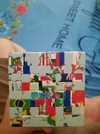
[Help Thread] Please help me with this world map 8x8 picture cube!!!
- Thread starter quan2206
- Start date
cubemastery321
Regular
- Joined
- Oct 30, 2026
- Messages
- 26
Welcome — and good work getting this far, the last centers are the fiddly bit on a picture cube.
The key thing is you can't just swap those two pairs directly — a two-piece swap isn't possible, so you need to cycle three center pieces instead.
Try this: hold the cube with one of those centers on top and the other on the front. Turn an inner layer (the layer just in from the face) to bring a yellow piece from the front center up to the top, turn the top once to put that piece where it belongs, then turn the inner layer back and turn the top back. That moves three center pieces in a cycle. Repeat it with a different setup turn on top first if needed, and the last four should fall into place without breaking the centers you've already finished.
Two things that trip people up on a picture cube like this: match the actual map detail, not just the color — a yellow piece can be in the right color center but the wrong spot in the picture — and check the center pieces are the right way round, since the map lines need to line up.
If you try that cycle and a piece still ends up in the wrong center, tell us which colors are where and we can walk through the setup from there.
The key thing is you can't just swap those two pairs directly — a two-piece swap isn't possible, so you need to cycle three center pieces instead.
Try this: hold the cube with one of those centers on top and the other on the front. Turn an inner layer (the layer just in from the face) to bring a yellow piece from the front center up to the top, turn the top once to put that piece where it belongs, then turn the inner layer back and turn the top back. That moves three center pieces in a cycle. Repeat it with a different setup turn on top first if needed, and the last four should fall into place without breaking the centers you've already finished.
Two things that trip people up on a picture cube like this: match the actual map detail, not just the color — a yellow piece can be in the right color center but the wrong spot in the picture — and check the center pieces are the right way round, since the map lines need to line up.
If you try that cycle and a piece still ends up in the wrong center, tell us which colors are where and we can walk through the setup from there.
Upvote
1
Can you instruct me with video or formula, I haven't figure your method yet? I usually learn by Youtube video, so this time without it, this cube make me so confused. Sorry my English is not very good.Welcome — and good work getting this far, the last centers are the fiddly bit on a picture cube.
The key thing is you can't just swap those two pairs directly — a two-piece swap isn't possible, so you need to cycle three center pieces instead.
Try this: hold the cube with one of those centers on top and the other on the front. Turn an inner layer (the layer just in from the face) to bring a yellow piece from the front center up to the top, turn the top once to put that piece where it belongs, then turn the inner layer back and turn the top back. That moves three center pieces in a cycle. Repeat it with a different setup turn on top first if needed, and the last four should fall into place without breaking the centers you've already finished.
Two things that trip people up on a picture cube like this: match the actual map detail, not just the color — a yellow piece can be in the right color center but the wrong spot in the picture — and check the center pieces are the right way round, since the map lines need to line up.
If you try that cycle and a piece still ends up in the wrong center, tell us which colors are where and we can walk through the setup from there.
Upvote
1
Are you talk about Commutator method? If it is it, I have tried many time, it still wrong like the picture I have posted, the one of this pair lied on other pair, and the one of other pair lied on this pair.Welcome — and good work getting this far, the last centers are the fiddly bit on a picture cube.
The key thing is you can't just swap those two pairs directly — a two-piece swap isn't possible, so you need to cycle three center pieces instead.
Try this: hold the cube with one of those centers on top and the other on the front. Turn an inner layer (the layer just in from the face) to bring a yellow piece from the front center up to the top, turn the top once to put that piece where it belongs, then turn the inner layer back and turn the top back. That moves three center pieces in a cycle. Repeat it with a different setup turn on top first if needed, and the last four should fall into place without breaking the centers you've already finished.
Two things that trip people up on a picture cube like this: match the actual map detail, not just the color — a yellow piece can be in the right color center but the wrong spot in the picture — and check the center pieces are the right way round, since the map lines need to line up.
If you try that cycle and a piece still ends up in the wrong center, tell us which colors are where and we can walk through the setup from there.
Upvote
1

Cubing_Grandson
Regular
I didnt know there are 8x8 versions of this, I've only seen the 2x2 globe and 3x3/4x4 world mapPlease help me, i don't know how to pair these four blocks, yellow to yellow, cyan to cyan, I'm have stucked hear for 2 week, this is the last step to make center.
Upvote
0
Jacck
Veteran
I may be wrong but if you want to swap yellow with yellow and blue with blue, then it is impossible.
Explanation 1: if you would disassemble the cube you would see that the two yellow ones are not the same shape, they are mirrowed - and therefore won't fit in the other's place. Or a blindcuber would say: they don't belong to the same oblique-set.
Explanation 2: it is impossible to move one yellow "on" the other with a F-turn.
I don't know how the rest of your cube looks like (are there pictures, too?). The best thing I could get with twizzle was to swap a yellow one with the diaginal blue one (they are built with the same shape and could be moved "on" each other with an F2). But I could only do that by swapping two centers on the white face, too (if there is no picture there, if all centers are white, you won't see that).
To make it more clear the first part is to get four different colored centers on front.
So if you ask me: your problem with the cube must be something else ...
Explanation 1: if you would disassemble the cube you would see that the two yellow ones are not the same shape, they are mirrowed - and therefore won't fit in the other's place. Or a blindcuber would say: they don't belong to the same oblique-set.
Explanation 2: it is impossible to move one yellow "on" the other with a F-turn.
I don't know how the rest of your cube looks like (are there pictures, too?). The best thing I could get with twizzle was to swap a yellow one with the diaginal blue one (they are built with the same shape and could be moved "on" each other with an F2). But I could only do that by swapping two centers on the white face, too (if there is no picture there, if all centers are white, you won't see that).
To make it more clear the first part is to get four different colored centers on front.
So if you ask me: your problem with the cube must be something else ...
Upvote
2
Upvote
0
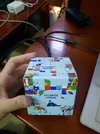
I have passed that problem, and now, I am stuck at this, I don't know how to switch position of these two piece (red line and yellow line), Every time try the commutators formula, it's always wrongI may be wrong but if you want to swap yellow with yellow and blue with blue, then it is impossible.
Explanation 1: if you would disassemble the cube you would see that the two yellow ones are not the same shape, they are mirrowed - and therefore won't fit in the other's place. Or a blindcuber would say: they don't belong to the same oblique-set.
Explanation 2: it is impossible to move one yellow "on" the other with a F-turn.
I don't know how the rest of your cube looks like (are there pictures, too?). The best thing I could get with twizzle was to swap a yellow one with the diaginal blue one (they are built with the same shape and could be moved "on" each other with an F2). But I could only do that by swapping two centers on the white face, too (if there is no picture there, if all centers are white, you won't see that).
To make it more clear the first part is to get four different colored centers on front.
So if you ask me: your problem with the cube must be something else ...
Attachments
Upvote
0
Jacck
Veteran
(We already know now that you can't switch only two pieces.)
If I'm right, then the piece three places behind the yellow one looks exactly the same as the yellow one itsself (only grey and no picture on them). So we can cycle this one, the red one and the yellow one together:
You could take the diagonal piece of the yellow, too. Then use an U2 instead of the U and U'.
If the yellow one has a bit of picture, then you could switch yellow and red while switching the 2 pictureless ones in the back (similar like I did in the last post). If you have problems with that, then post it.
If I'm right, then the piece three places behind the yellow one looks exactly the same as the yellow one itsself (only grey and no picture on them). So we can cycle this one, the red one and the yellow one together:
You could take the diagonal piece of the yellow, too. Then use an U2 instead of the U and U'.
If the yellow one has a bit of picture, then you could switch yellow and red while switching the 2 pictureless ones in the back (similar like I did in the last post). If you have problems with that, then post it.
Upvote
1
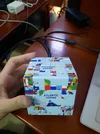
I am try to solve it and then, it come to this, how to switch position of the red line and cyan line(We already know now that you can't switch only two pieces.)
If I'm right, then the piece three places behind the yellow one looks exactly the same as the yellow one itsself (only grey and no picture on them). So we can cycle this one, the red one and the yellow one together:
You could take the diagonal piece of the yellow, too. Then use an U2 instead of the U and U'.
If the yellow one has a bit of picture, then you could switch yellow and red while switching the 2 pictureless ones in the back (similar like I did in the last post). If you have problems with that, then post it.
Attachments

Upvote
0
Similar threads
- Question
[Help Thread]
Help me with this world map picture cube 8x8 please!!!
- Replies
- 1
- Views
- 58
- Replies
- 6
- Views
- 265

- Replies
- 12
- Views
- 1,592


- Replies
- 47
- Views
- 3,996
