Picture Cube simulator [2025-12-12 Updates]

  • Thread starter Thread starter Deleted member 36445
  • Start date Start date
D

Deleted member 36445

Guest
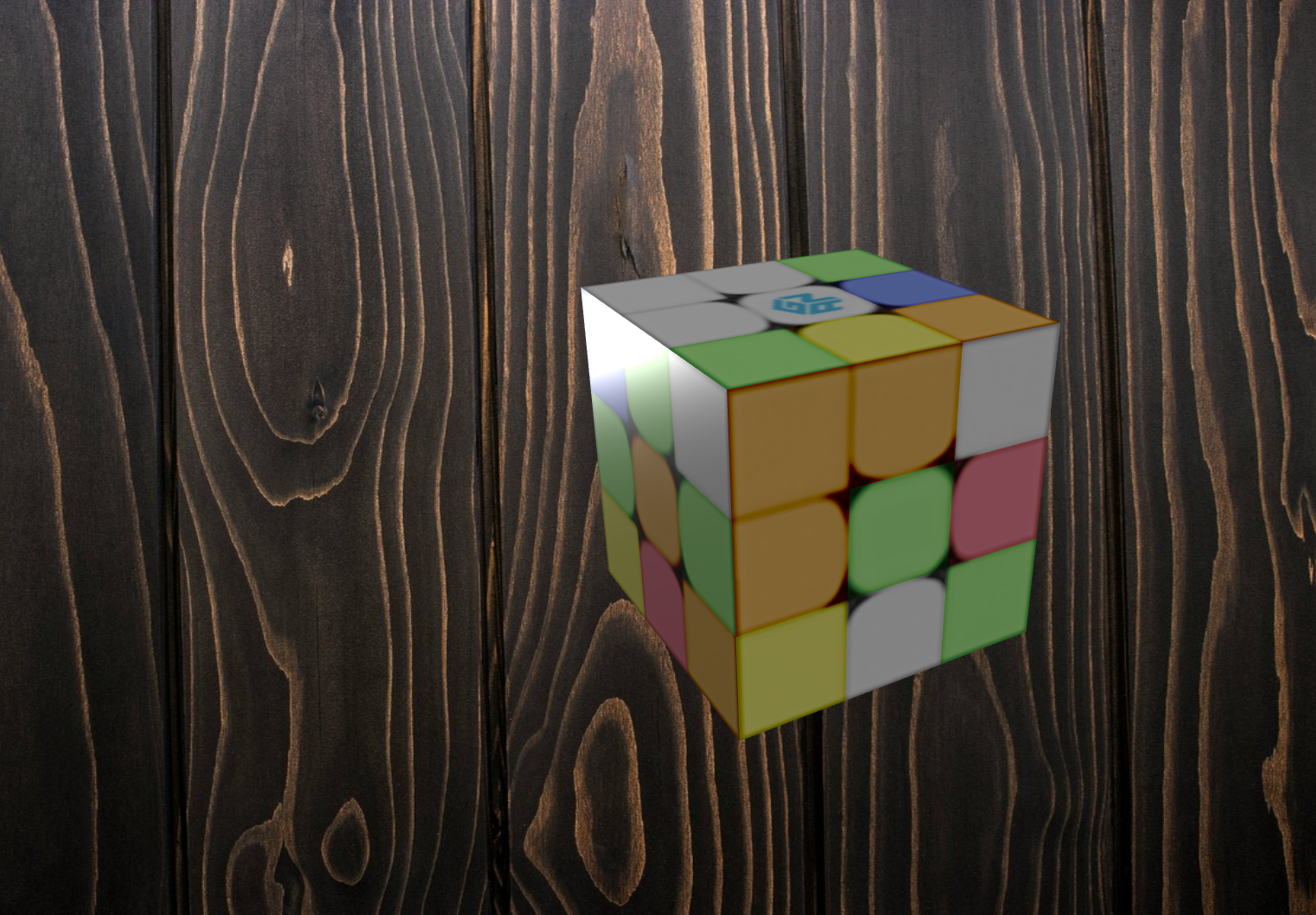
Picture Cube Simulator
-> Create your own sticker mods with the Textures Editor, you can even create "impossible cubes" to annoy your friends
-> 12 handcrafted textures already included
-> Head tracking with video camera for cube movement with beautiful background paralax effect
-> Giiker cube bluetooth cube support (more bluetooth cubes planned in the future)
-> Full solve history with "branching" feature allow for exploration of different solutions
-> Extremely performant (600k movements per seconds are possible)
-> In development, more cool things are planned, stay tuned!!


👉 https://filipeteixeira.com.br/new/picturecube/

1765546133918.png


1765141951119.png


1765142082163.png


1765142189944.png


1765142298456.png


1765142502398.png


Latest update:


----------------------------------------

github repo:

 
Last edited by a moderator:
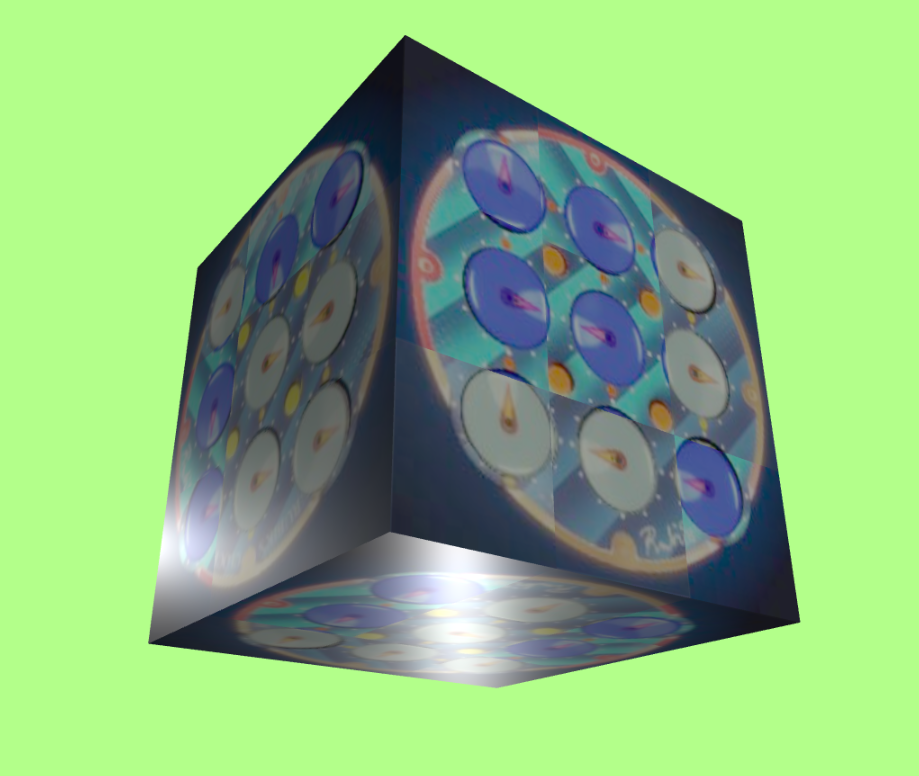
MONA LISA CUBE


1764209653584.png


JSON:
{
  "mode": "face_textures",
  "textures": {
    "U": {
      "backgroundImage": "url('https://upload.wikimedia.org/wikipedia/commons/6/6a/Mona_Lisa.jpg')",
      "backgroundSize": "300% 300%"
    },
    "F": {
      "backgroundImage": "url('https://upload.wikimedia.org/wikipedia/commons/6/6a/Mona_Lisa.jpg')",
      "backgroundSize": "300% 300%"
    },
    "R": {
      "backgroundImage": "url('https://upload.wikimedia.org/wikipedia/commons/6/6a/Mona_Lisa.jpg')",
      "backgroundSize": "300% 300%"
    },
    "L": {
      "backgroundImage": "url('https://upload.wikimedia.org/wikipedia/commons/6/6a/Mona_Lisa.jpg')",
      "backgroundSize": "300% 300%"
    },
    "B": {
      "backgroundImage": "url('https://upload.wikimedia.org/wikipedia/commons/6/6a/Mona_Lisa.jpg')",
      "backgroundSize": "300% 300%"
    },
    "D": {
      "backgroundImage": "url('https://upload.wikimedia.org/wikipedia/commons/6/6a/Mona_Lisa.jpg')",
      "backgroundSize": "300% 300%"
    }
  }
}
 
pretty cool, but could you edit the site so you can just upload photos from your computer files? my brain too small for json
yes it is planned but I can't promise to do it so soon. you can use Chatgpt to generate for you. the "instructions" are pretty explanatory
 
MOYU CUBE

1764241287632.png


JSON:
{
  "mode": "face_textures",
  "textures": {
    "U": {"background": "#ffffff"},
    "U_center": {
      "backgroundImage": "url('https://www.thecubicle.com/cdn/shop/collections/mfr_moyu_1200x1200.png?v=1685986838')",
      "backgroundSize": "100%",
      "backgroundRepeat": "no-repeat",
      "backgroundPosition": "center"
    },
    "D": {"background": "#ffd500"},
    "F": {"background": "#0045ad"},
    "B": {"background": "#009b48"},
    "L": {"background": "#ff5800"},
    "R": {"background": "#c41e3a"}
  }
}
 
MOYU CUBE SKIN
Combination of radial gradients and transparent svg

1764262337197.png

1764262347466.png


1764262359496.png

1764262369939.png


PYTHON CODE USED TO GENERATE THE JSON

Python:
# Map the face keys (for the JSON) to their respective colors (hex codes)
face_colors = {
    "U": "#ffffff", # White
    "L": "#ff5800", # Orange
    "F": "#009b48", # Green
    "R": "#c41e3a", # Red
    "B": "#0045ad", # Blue
    "D": "#ffd500", # Yellow
}

# Create the formatted backgrounds using the base string
bg_base = "radial-gradient({color} 90%, black 95%)"
backgrounds = {face: bg_base.format(color=color) for face, color in face_colors.items()}

# Use an f-string (multiline text) to build the JSON, embedding the backgrounds directly
json_texture_faces = f"""
{{
  "mode": "face_textures",
  "textures": {{
    "U": {{"background": "{backgrounds["U"]}"}},
    "L": {{"background": "{backgrounds["L"]}"}},
    "F": {{"background": "{backgrounds["F"]}"}},
    "R": {{"background": "{backgrounds["R"]}"}},
    "B": {{"background": "{backgrounds["B"]}"}},
    "D": {{"background": "{backgrounds["D"]}"}},
    "U_center": {{
      "background": "url('https://filipeteixeira.com.br/rubiksim/moyulogo.svg'), {backgrounds["U"]}",
      "backgroundSize": "100%",
      "backgroundRepeat": "no-repeat",
      "backgroundPosition": "center"
    }}
  }}
}}
"""

print(json_texture_faces)

THE JSON OUTPUT

JSON:
{
  "mode": "face_textures",
  "textures": {
    "U": {"background": "radial-gradient(#ffffff 90%, black 95%)"},
    "L": {"background": "radial-gradient(#ff5800 90%, black 95%)"},
    "F": {"background": "radial-gradient(#009b48 90%, black 95%)"},
    "R": {"background": "radial-gradient(#c41e3a 90%, black 95%)"},
    "B": {"background": "radial-gradient(#0045ad 90%, black 95%)"},
    "D": {"background": "radial-gradient(#ffd500 90%, black 95%)"},
    "U_center": {
      "background": "url('https://filipeteixeira.com.br/rubiksim/moyulogo.svg'), radial-gradient(#ffffff 90%, black 95%)",
      "backgroundSize": "100%",
      "backgroundRepeat": "no-repeat",
      "backgroundPosition": "center"
    }
  }
}
 
I'm trying to make a better texture for a supercube but I'm missing something. Maybe my implementation for the sim need some work to be more logical for css shorthands. Spritesheet funcionality is kinda messy at the moment.

Python:
SIZE = 150

def makeSide(F,U,R,D,L,n=50):
      return f"""<div style='width:{SIZE}px;height:{SIZE}px;background:linear-gradient({F}, {F}) center / {n}% {n}% no-repeat,
      conic-gradient(from 45deg at 50% 50%,
          {R} 0deg,
          {R} 90deg,    
          {D} 90deg,
          {D} 180deg,  
          {L} 180deg,
          {L} 270deg,  
          {U} 270deg,
          {U} 360deg
        ) center / 100% 100% no-repeat;'></div><br/>
      """

face_colors = {
    "U": "#ffffff", # White
    "L": "#ff5800", # Orange
    "F": "#009b48", # Green
    "R": "#c41e3a", # Red
    "B": "#0045ad", # Blue
    "D": "#ffd500", # Yellow
}

W = face_colors["U"]
O = face_colors["L"]
G = face_colors["F"]
R = face_colors["R"]
B = face_colors["B"]
Y = face_colors["D"]

n = 66

FU = makeSide(W,B,R,G,O,n)
FL = makeSide(O,W,G,Y,B,n)
FF = makeSide(G,W,R,Y,O,n)
FR = makeSide(R,W,B,Y,G,n)
FB = makeSide(B,W,O,Y,R,n)
FD = makeSide(Y,G,R,B,O,n)

print(F'''
<table>
      <tr><td></td><td>{FU}</td><td colspan=2></td></tr>
      <tr><td>{FL}</td><td>{FF}</td><td>{FR}</td><td>{FB}</td></tr>
      <tr><td></td><td>{FD}</td><td colspan=2></td></tr>
    </table>
''')


1764290617303.png
 
I wanted a design more similar to the pochmann supercube but I can't do it at the moment.......


1764290910829.png


1764290929055.png


JSON:
{
  "mode": "face_textures",
  "textures": {
    "U": {
      "background": "linear-gradient(#ffffff, #ffffff) center / 66% 66% no-repeat, conic-gradient(from 45deg at 50% 50%, #c41e3a 0deg, #c41e3a 90deg, #009b48 90deg, #009b48 180deg, #ff5800 180deg, #ff5800 270deg, #0045ad 270deg, #0045ad 360deg) center / 100% 100% no-repeat"
    },
    "L": {
      "background": "linear-gradient(#ff5800, #ff5800) center / 66% 66% no-repeat, conic-gradient(from 45deg at 50% 50%, #009b48 0deg, #009b48 90deg, #ffd500 90deg, #ffd500 180deg, #0045ad 180deg, #0045ad 270deg, #ffffff 270deg, #ffffff 360deg) center / 100% 100% no-repeat"
    },
    "F": {
      "background": "linear-gradient(#009b48, #009b48) center / 66% 66% no-repeat, conic-gradient(from 45deg at 50% 50%, #c41e3a 0deg, #c41e3a 90deg, #ffd500 90deg, #ffd500 180deg, #ff5800 180deg, #ff5800 270deg, #ffffff 270deg, #ffffff 360deg) center / 100% 100% no-repeat"
    },
    "R": {
      "background": "linear-gradient(#c41e3a, #c41e3a) center / 66% 66% no-repeat, conic-gradient(from 45deg at 50% 50%, #0045ad 0deg, #0045ad 90deg, #ffd500 90deg, #ffd500 180deg, #009b48 180deg, #009b48 270deg, #ffffff 270deg, #ffffff 360deg) center / 100% 100% no-repeat"
    },
    "B": {
      "background": "linear-gradient(#0045ad, #0045ad) center / 66% 66% no-repeat, conic-gradient(from 45deg at 50% 50%, #ff5800 0deg, #ff5800 90deg, #ffd500 90deg, #ffd500 180deg, #c41e3a 180deg, #c41e3a 270deg, #ffffff 270deg, #ffffff 360deg) center / 100% 100% no-repeat"
    },
    "D": {
      "background": "linear-gradient(#ffd500, #ffd500) center / 66% 66% no-repeat, conic-gradient(from 45deg at 50% 50%, #c41e3a 0deg, #c41e3a 90deg, #0045ad 90deg, #0045ad 180deg, #ff5800 180deg, #ff5800 270deg, #009b48 270deg, #009b48 360deg) center / 100% 100% no-repeat"
    }
  }
}
 
SVG SAVES THE DAY
1764293868171.png

1764293918938.png

1764293982969.png

JSON:
{
  "mode": "face_textures",
  "textures": {
    "U": {
      "backgroundImage": "url('data:image/svg+xml;base64,PHN2ZyB3aWR0aD0iMTUwIiBoZWlnaHQ9IjE1MCIgeG1sbnM9Imh0dHA6Ly93d3cudzMub3JnLzIwMDAvc3ZnIj4KICA8ZGVmcz4KICAgIDxyYWRpYWxHcmFkaWVudCBpZD0iY29uaWNHcmFkIj4KICAgICAgPHN0b3Agb2Zmc2V0PSIwJSIgc3RvcC1jb2xvcj0iI2M0MWUzYSIvPgogICAgICA8c3RvcCBvZmZzZXQ9IjI1JSIgc3RvcC1jb2xvcj0iIzAwOWI0OCIvPgogICAgICA8c3RvcCBvZmZzZXQ9IjUwJSIgc3RvcC1jb2xvcj0iI2ZmNTgwMCIvPgogICAgICA8c3RvcCBvZmZzZXQ9Ijc1JSIgc3RvcC1jb2xvcj0iIzAwNDVhZCIvPgogICAgICA8c3RvcCBvZmZzZXQ9IjEwMCUiIHN0b3AtY29sb3I9IiNjNDFlM2EiLz4KICAgIDwvcmFkaWFsR3JhZGllbnQ+CiAgPC9kZWZzPgogIDxnIHRyYW5zZm9ybT0icm90YXRlKDAgNzUgNzUpIj4KICAgIDxwYXRoIGQ9Ik0gNzUgNzUgTCAxNTAgMCBMIDE1MCAxNTAgWiIgZmlsbD0iI2M0MWUzYSIvPgogICAgPHBhdGggZD0iTSA3NSA3NSBMIDE1MCAxNTAgTCAwIDE1MCBaIiBmaWxsPSIjMDA5YjQ4Ii8+CiAgICA8cGF0aCBkPSJNIDc1IDc1IEwgMCAxNTAgTCAwIDAgWiIgZmlsbD0iI2ZmNTgwMCIvPgogICAgPHBhdGggZD0iTSA3NSA3NSBMIDAgMCBMIDE1MCAwIFoiIGZpbGw9IiMwMDQ1YWQiLz4KICA8L2c+CiAgPHJlY3QgeD0iMjUiIHk9IjI1IiB3aWR0aD0iMTAwIiBoZWlnaHQ9IjEwMCIgZmlsbD0iI2ZmZmZmZiIvPgo8L3N2Zz4=')",
      "backgroundSize": "300% 300%"
    },
    "U_center": {
      "background": "url('data:image/svg+xml;base64,PHN2ZyB3aWR0aD0iMTUwIiBoZWlnaHQ9IjE1MCIgeG1sbnM9Imh0dHA6Ly93d3cudzMub3JnLzIwMDAvc3ZnIj4KICA8ZGVmcz4KICAgIDxyYWRpYWxHcmFkaWVudCBpZD0iY29uaWNHcmFkIj4KICAgICAgPHN0b3Agb2Zmc2V0PSIwJSIgc3RvcC1jb2xvcj0iI2M0MWUzYSIvPgogICAgICA8c3RvcCBvZmZzZXQ9IjI1JSIgc3RvcC1jb2xvcj0iIzAwOWI0OCIvPgogICAgICA8c3RvcCBvZmZzZXQ9IjUwJSIgc3RvcC1jb2xvcj0iI2ZmNTgwMCIvPgogICAgICA8c3RvcCBvZmZzZXQ9Ijc1JSIgc3RvcC1jb2xvcj0iIzAwNDVhZCIvPgogICAgICA8c3RvcCBvZmZzZXQ9IjEwMCUiIHN0b3AtY29sb3I9IiNjNDFlM2EiLz4KICAgIDwvcmFkaWFsR3JhZGllbnQ+CiAgPC9kZWZzPgogIDxnIHRyYW5zZm9ybT0icm90YXRlKDAgNzUgNzUpIj4KICAgIDxwYXRoIGQ9Ik0gNzUgNzUgTCAxNTAgMCBMIDE1MCAxNTAgWiIgZmlsbD0iI2M0MWUzYSIvPgogICAgPHBhdGggZD0iTSA3NSA3NSBMIDE1MCAxNTAgTCAwIDE1MCBaIiBmaWxsPSIjMDA5YjQ4Ii8+CiAgICA8cGF0aCBkPSJNIDc1IDc1IEwgMCAxNTAgTCAwIDAgWiIgZmlsbD0iI2ZmNTgwMCIvPgogICAgPHBhdGggZD0iTSA3NSA3NSBMIDAgMCBMIDE1MCAwIFoiIGZpbGw9IiMwMDQ1YWQiLz4KICA8L2c+CiAgPHJlY3QgeD0iMjUiIHk9IjI1IiB3aWR0aD0iMTAwIiBoZWlnaHQ9IjEwMCIgZmlsbD0iI2ZmZmZmZiIvPgo8L3N2Zz4=')",
      "backgroundSize": "100% 100%"
    },
    "L": {
      "backgroundImage": "url('data:image/svg+xml;base64,PHN2ZyB3aWR0aD0iMTUwIiBoZWlnaHQ9IjE1MCIgeG1sbnM9Imh0dHA6Ly93d3cudzMub3JnLzIwMDAvc3ZnIj4KICA8ZyB0cmFuc2Zvcm09InJvdGF0ZSgwIDc1IDc1KSI+CiAgICA8cGF0aCBkPSJNIDc1IDc1IEwgMTUwIDAgTCAxNTAgMTUwIFoiIGZpbGw9IiMwMDliNDgiLz4KICAgIDxwYXRoIGQ9Ik0gNzUgNzUgTCAxNTAgMTUwIEwgMCAxNTAgWiIgZmlsbD0iI2ZmZDUwMCIvPgogICAgPHBhdGggZD0iTSA3NSA3NSBMIDAgMTUwIEwgMCAwIFoiIGZpbGw9IiMwMDQ1YWQiLz4KICAgIDxwYXRoIGQ9Ik0gNzUgNzUgTCAwIDAgTCAxNTAgMCBaIiBmaWxsPSIjZmZmZmZmIi8+CiAgPC9nPgogIDxyZWN0IHg9IjI1IiB5PSIyNSIgd2lkdGg9IjEwMCIgaGVpZ2h0PSIxMDAiIGZpbGw9IiNmZjU4MDAiLz4KPC9zdmc+')",
      "backgroundSize": "300% 300%"
    },
    "L_center": {
      "background": "url('data:image/svg+xml;base64,PHN2ZyB3aWR0aD0iMTUwIiBoZWlnaHQ9IjE1MCIgeG1sbnM9Imh0dHA6Ly93d3cudzMub3JnLzIwMDAvc3ZnIj4KICA8ZyB0cmFuc2Zvcm09InJvdGF0ZSgwIDc1IDc1KSI+CiAgICA8cGF0aCBkPSJNIDc1IDc1IEwgMTUwIDAgTCAxNTAgMTUwIFoiIGZpbGw9IiMwMDliNDgiLz4KICAgIDxwYXRoIGQ9Ik0gNzUgNzUgTCAxNTAgMTUwIEwgMCAxNTAgWiIgZmlsbD0iI2ZmZDUwMCIvPgogICAgPHBhdGggZD0iTSA3NSA3NSBMIDAgMTUwIEwgMCAwIFoiIGZpbGw9IiMwMDQ1YWQiLz4KICAgIDxwYXRoIGQ9Ik0gNzUgNzUgTCAwIDAgTCAxNTAgMCBaIiBmaWxsPSIjZmZmZmZmIi8+CiAgPC9nPgogIDxyZWN0IHg9IjI1IiB5PSIyNSIgd2lkdGg9IjEwMCIgaGVpZ2h0PSIxMDAiIGZpbGw9IiNmZjU4MDAiLz4KPC9zdmc+')",
      "backgroundSize": "100% 100%"
    },
    "F": {
      "backgroundImage": "url('data:image/svg+xml;base64,PHN2ZyB3aWR0aD0iMTUwIiBoZWlnaHQ9IjE1MCIgeG1sbnM9Imh0dHA6Ly93d3cudzMub3JnLzIwMDAvc3ZnIj4KICA8ZyB0cmFuc2Zvcm09InJvdGF0ZSgwIDc1IDc1KSI+CiAgICA8cGF0aCBkPSJNIDc1IDc1IEwgMTUwIDAgTCAxNTAgMTUwIFoiIGZpbGw9IiNjNDFlM2EiLz4KICAgIDxwYXRoIGQ9Ik0gNzUgNzUgTCAxNTAgMTUwIEwgMCAxNTAgWiIgZmlsbD0iI2ZmZDUwMCIvPgogICAgPHBhdGggZD0iTSA3NSA3NSBMIDAgMTUwIEwgMCAwIFoiIGZpbGw9IiNmZjU4MDAiLz4KICAgIDxwYXRoIGQ9Ik0gNzUgNzUgTCAwIDAgTCAxNTAgMCBaIiBmaWxsPSIjZmZmZmZmIi8+CiAgPC9nPgogIDxyZWN0IHg9IjI1IiB5PSIyNSIgd2lkdGg9IjEwMCIgaGVpZ2h0PSIxMDAiIGZpbGw9IiMwMDliNDgiLz4KPC9zdmc+')",
      "backgroundSize": "300% 300%"
    },
    "F_center": {
      "background": "url('data:image/svg+xml;base64,PHN2ZyB3aWR0aD0iMTUwIiBoZWlnaHQ9IjE1MCIgeG1sbnM9Imh0dHA6Ly93d3cudzMub3JnLzIwMDAvc3ZnIj4KICA8ZyB0cmFuc2Zvcm09InJvdGF0ZSgwIDc1IDc1KSI+CiAgICA8cGF0aCBkPSJNIDc1IDc1IEwgMTUwIDAgTCAxNTAgMTUwIFoiIGZpbGw9IiNjNDFlM2EiLz4KICAgIDxwYXRoIGQ9Ik0gNzUgNzUgTCAxNTAgMTUwIEwgMCAxNTAgWiIgZmlsbD0iI2ZmZDUwMCIvPgogICAgPHBhdGggZD0iTSA3NSA3NSBMIDAgMTUwIEwgMCAwIFoiIGZpbGw9IiNmZjU4MDAiLz4KICAgIDxwYXRoIGQ9Ik0gNzUgNzUgTCAwIDAgTCAxNTAgMCBaIiBmaWxsPSIjZmZmZmZmIi8+CiAgPC9nPgogIDxyZWN0IHg9IjI1IiB5PSIyNSIgd2lkdGg9IjEwMCIgaGVpZ2h0PSIxMDAiIGZpbGw9IiMwMDliNDgiLz4KPC9zdmc+')",
      "backgroundSize": "100% 100%"
    },
    "R": {
      "backgroundImage": "url('data:image/svg+xml;base64,PHN2ZyB3aWR0aD0iMTUwIiBoZWlnaHQ9IjE1MCIgeG1sbnM9Imh0dHA6Ly93d3cudzMub3JnLzIwMDAvc3ZnIj4KICA8ZyB0cmFuc2Zvcm09InJvdGF0ZSgwIDc1IDc1KSI+CiAgICA8cGF0aCBkPSJNIDc1IDc1IEwgMTUwIDAgTCAxNTAgMTUwIFoiIGZpbGw9IiMwMDQ1YWQiLz4KICAgIDxwYXRoIGQ9Ik0gNzUgNzUgTCAxNTAgMTUwIEwgMCAxNTAgWiIgZmlsbD0iI2ZmZDUwMCIvPgogICAgPHBhdGggZD0iTSA3NSA3NSBMIDAgMTUwIEwgMCAwIFoiIGZpbGw9IiMwMDliNDgiLz4KICAgIDxwYXRoIGQ9Ik0gNzUgNzUgTCAwIDAgTCAxNTAgMCBaIiBmaWxsPSIjZmZmZmZmIi8+CiAgPC9nPgogIDxyZWN0IHg9IjI1IiB5PSIyNSIgd2lkdGg9IjEwMCIgaGVpZ2h0PSIxMDAiIGZpbGw9IiNjNDFlM2EiLz4KPC9zdmc+')",
      "backgroundSize": "300% 300%"
    },
    "R_center": {
      "background": "url('data:image/svg+xml;base64,PHN2ZyB3aWR0aD0iMTUwIiBoZWlnaHQ9IjE1MCIgeG1sbnM9Imh0dHA6Ly93d3cudzMub3JnLzIwMDAvc3ZnIj4KICA8ZyB0cmFuc2Zvcm09InJvdGF0ZSgwIDc1IDc1KSI+CiAgICA8cGF0aCBkPSJNIDc1IDc1IEwgMTUwIDAgTCAxNTAgMTUwIFoiIGZpbGw9IiMwMDQ1YWQiLz4KICAgIDxwYXRoIGQ9Ik0gNzUgNzUgTCAxNTAgMTUwIEwgMCAxNTAgWiIgZmlsbD0iI2ZmZDUwMCIvPgogICAgPHBhdGggZD0iTSA3NSA3NSBMIDAgMTUwIEwgMCAwIFoiIGZpbGw9IiMwMDliNDgiLz4KICAgIDxwYXRoIGQ9Ik0gNzUgNzUgTCAwIDAgTCAxNTAgMCBaIiBmaWxsPSIjZmZmZmZmIi8+CiAgPC9nPgogIDxyZWN0IHg9IjI1IiB5PSIyNSIgd2lkdGg9IjEwMCIgaGVpZ2h0PSIxMDAiIGZpbGw9IiNjNDFlM2EiLz4KPC9zdmc+')",
      "backgroundSize": "100% 100%"
    },
    "B": {
      "backgroundImage": "url('data:image/svg+xml;base64,PHN2ZyB3aWR0aD0iMTUwIiBoZWlnaHQ9IjE1MCIgeG1sbnM9Imh0dHA6Ly93d3cudzMub3JnLzIwMDAvc3ZnIj4KICA8ZyB0cmFuc2Zvcm09InJvdGF0ZSgwIDc1IDc1KSI+CiAgICA8cGF0aCBkPSJNIDc1IDc1IEwgMTUwIDAgTCAxNTAgMTUwIFoiIGZpbGw9IiNmZjU4MDAiLz4KICAgIDxwYXRoIGQ9Ik0gNzUgNzUgTCAxNTAgMTUwIEwgMCAxNTAgWiIgZmlsbD0iI2ZmZDUwMCIvPgogICAgPHBhdGggZD0iTSA3NSA3NSBMIDAgMTUwIEwgMCAwIFoiIGZpbGw9IiNjNDFlM2EiLz4KICAgIDxwYXRoIGQ9Ik0gNzUgNzUgTCAwIDAgTCAxNTAgMCBaIiBmaWxsPSIjZmZmZmZmIi8+CiAgPC9nPgogIDxyZWN0IHg9IjI1IiB5PSIyNSIgd2lkdGg9IjEwMCIgaGVpZ2h0PSIxMDAiIGZpbGw9IiMwMDQ1YWQiLz4KPC9zdmc+')",
      "backgroundSize": "300% 300%"
    },
    "B_center": {
      "background": "url('data:image/svg+xml;base64,PHN2ZyB3aWR0aD0iMTUwIiBoZWlnaHQ9IjE1MCIgeG1sbnM9Imh0dHA6Ly93d3cudzMub3JnLzIwMDAvc3ZnIj4KICA8ZyB0cmFuc2Zvcm09InJvdGF0ZSgwIDc1IDc1KSI+CiAgICA8cGF0aCBkPSJNIDc1IDc1IEwgMTUwIDAgTCAxNTAgMTUwIFoiIGZpbGw9IiNmZjU4MDAiLz4KICAgIDxwYXRoIGQ9Ik0gNzUgNzUgTCAxNTAgMTUwIEwgMCAxNTAgWiIgZmlsbD0iI2ZmZDUwMCIvPgogICAgPHBhdGggZD0iTSA3NSA3NSBMIDAgMTUwIEwgMCAwIFoiIGZpbGw9IiNjNDFlM2EiLz4KICAgIDxwYXRoIGQ9Ik0gNzUgNzUgTCAwIDAgTCAxNTAgMCBaIiBmaWxsPSIjZmZmZmZmIi8+CiAgPC9nPgogIDxyZWN0IHg9IjI1IiB5PSIyNSIgd2lkdGg9IjEwMCIgaGVpZ2h0PSIxMDAiIGZpbGw9IiMwMDQ1YWQiLz4KPC9zdmc+')",
      "backgroundSize": "100% 100%"
    },
    "D": {
      "backgroundImage": "url('data:image/svg+xml;base64,PHN2ZyB3aWR0aD0iMTUwIiBoZWlnaHQ9IjE1MCIgeG1sbnM9Imh0dHA6Ly93d3cudzMub3JnLzIwMDAvc3ZnIj4KICA8ZyB0cmFuc2Zvcm09InJvdGF0ZSgwIDc1IDc1KSI+CiAgICA8cGF0aCBkPSJNIDc1IDc1IEwgMTUwIDAgTCAxNTAgMTUwIFoiIGZpbGw9IiNjNDFlM2EiLz4KICAgIDxwYXRoIGQ9Ik0gNzUgNzUgTCAxNTAgMTUwIEwgMCAxNTAgWiIgZmlsbD0iIzAwNDVhZCIvPgogICAgPHBhdGggZD0iTSA3NSA3NSBMIDAgMTUwIEwgMCAwIFoiIGZpbGw9IiNmZjU4MDAiLz4KICAgIDxwYXRoIGQ9Ik0gNzUgNzUgTCAwIDAgTCAxNTAgMCBaIiBmaWxsPSIjMDA5YjQ4Ii8+CiAgPC9nPgogIDxyZWN0IHg9IjI1IiB5PSIyNSIgd2lkdGg9IjEwMCIgaGVpZ2h0PSIxMDAiIGZpbGw9IiNmZmQ1MDAiLz4KPC9zdmc+')",
      "backgroundSize": "300% 300%"
    },
    "D_center": {
      "background": "url('data:image/svg+xml;base64,PHN2ZyB3aWR0aD0iMTUwIiBoZWlnaHQ9IjE1MCIgeG1sbnM9Imh0dHA6Ly93d3cudzMub3JnLzIwMDAvc3ZnIj4KICA8ZyB0cmFuc2Zvcm09InJvdGF0ZSgwIDc1IDc1KSI+CiAgICA8cGF0aCBkPSJNIDc1IDc1IEwgMTUwIDAgTCAxNTAgMTUwIFoiIGZpbGw9IiNjNDFlM2EiLz4KICAgIDxwYXRoIGQ9Ik0gNzUgNzUgTCAxNTAgMTUwIEwgMCAxNTAgWiIgZmlsbD0iIzAwNDVhZCIvPgogICAgPHBhdGggZD0iTSA3NSA3NSBMIDAgMTUwIEwgMCAwIFoiIGZpbGw9IiNmZjU4MDAiLz4KICAgIDxwYXRoIGQ9Ik0gNzUgNzUgTCAwIDAgTCAxNTAgMCBaIiBmaWxsPSIjMDA5YjQ4Ii8+CiAgPC9nPgogIDxyZWN0IHg9IjI1IiB5PSIyNSIgd2lkdGg9IjEwMCIgaGVpZ2h0PSIxMDAiIGZpbGw9IiNmZmQ1MDAiLz4KPC9zdmc+')",
      "backgroundSize": "100% 100%"
    }
  }
}
 
[UPDATE: 2025-11-28] Major responsiveness update - now works perfectly on mobile!

Just pushed a huge update focused on making the app work great on all devices. The last few days I've been working non-stop on responsiveness and it's finally working smoothly.


check it out!!
😎👉 https://filipeteixeira.com.br/new/picturecube/


What's new:

  • Mobile-friendly interface that adapts to any screen size
  • Touch controls work perfectly on phones and tablets
  • Better layout that doesn't break on smaller screens
  • All the cube manipulation features now work on mobile
The app has come a long way from the basic cube simulator it started as. Now it supports:

  • Custom picture textures (like the Mona Lisa cube examples)
  • Full move algorithm support
  • Multiple viewing modes (2D net, 3D orthographic, 3D perspective)
  • Supercube functionality with proper sticker orientations
  • Brand customization (like the MoYu cube skin)
Everything is stable and ready to use. No more desktop-only limitations - you can create and solve picture cubes right from your phone!

Try it out and let me know what you think. The responsiveness work was a major undertaking but totally worth it for the mobile experience.

1764333860190.png
 
This simulator is very good and suitable for my iPhone.

One question:
Is it possible this simulator can manage and show Master Yoda’s cube (Red-White-color 3x3 cube with 6 star marks)?
 
They want you to make a cube with their profile picture as the sides on each cube.

Thought id say this since why not
Yes I get it.
But I have other priorities right now, you can look at the documentation that explains how the texture system work to try to make your own textures.
Using images for each face should be extremely simple.

Next textures I'll try to make will be already existant sticker patterns like maze cube, sudoku cube, shepherd cube, calendar cube, etc. But I'll keep in mind the user customization experience to understand how the final user would aproach creating their textures using CSS (that has extremely fast times to load in comparison to images) or SVG
I want to make the app portable, fast and performant
 
Last edited by a moderator:
Recent changes:

  • Added copy/paste feature - You can now copy cube data to clipboard
  • Better popup windows - Cleaner way to view cube information
  • Faster loading - Fixed a bug that allowed to load the examples instantly
  • Remembers your settings - Saves your view mode and textures between visits
  • Loading spinner - Shows when textures are loading
Basically made the app more user-friendly and faster.

You see/save cube state in ASCII/art like this:

Code:
----STICKERS----

                U
             0  1  2
             3  4  5
             6  7  8

    L           F          R           B
 9 10 11    18 19 20    27 28 29    36 37 38
12 13 14    21 22 23    30 31 32    39 40 41
15 16 17    24 25 26    33 34 35    42 43 44

               D
            45 46 47
            48 49 50
            51 52 53

----ROTATIONS----

          U
        0 0 0
        0 0 0
        0 0 0

  L       F       R       B
0 0 0   0 0 0   0 0 0   0 0 0
0 0 0   0 0 0   0 0 0   0 0 0
0 0 0   0 0 0   0 0 0   0 0 0

          D
        0 0 0
        0 0 0
        0 0 0
 
It would be amazing to have @thecustomcuber trying to make some designs in this thing


by the way you can use this tool to avoid having to upload images somewhere


it works with css. try to use optimized, low-size image files.
 
L2 F2 D2 U2 R2 B2 D F2 U' B2 D B F2 D2 U2 L' F L2 D' R2 U

1764348336461.png


Code:
----STICKERS----

                U
            11 16 47
            37  4 46
            24  5 53

    L           F          R           B
 6  1 17    45 28 42    35 25 33    26 48 18
14 13 34    50 22 43    52 31 12    41 40 21
36 39  9    38 10 27    20 19 44    15 30  2

               D
             0  3  8
            32 49  7
            29 23 51

----ROTATIONS----

          U
        3 2 0
        3 0 1
        0 1 0

  L       F       R       B
1 0 3   0 0 2   2 2 2   2 1 1
2 3 3   2 3 3   1 0 2   2 1 2
3 3 2   2 2 2   2 2 0   0 3 1

          D
        0 1 3
        2 1 3
        2 1 3
 
1764348435561.png


Code:
----STICKERS----

                U
             6  3  0
             7  4  1
             8  5  2

    L           F          R           B
18 19 20    27 28 29    36 37 38     9 10 11
12 13 14    21 22 23    30 31 32    39 40 41
15 16 17    24 25 26    33 34 35    42 43 44

               D
            45 46 47
            48 49 50
            51 52 53

----ROTATIONS----

          U
        1 1 1
        1 1 1
        1 1 1

  L       F       R       B
0 0 0   0 0 0   0 0 0   0 0 0
0 0 0   0 0 0   0 0 0   0 0 0
0 0 0   0 0 0   0 0 0   0 0 0

          D
        0 0 0
        0 0 0
        0 0 0
 
Back
Top