3x3 Special cube for Master Yoda (Zebra cube)

Tito_H

Veteran
Joined
May 23, 2024
Messages
257
Location
Japan
Master Yoda came to visit me on his zebra. After we talked a while, I asked him, "By the way, how was the Darths added cube of the other day?"

He replied, "Annoying that cube was because Darths would sandwich EPs without me noticing and increase the number of stars. Also, for some reason, I started to get the illusion of a mocking face whenever they increased the number of stars, and I started hearing voices saying, 'Serves you right,' so mad I got 💢 and destroy it I did 👊" He continued, "Can you come up with another 2-color cube to kill time?"

I regretted not putting the heroic figures of the Jedi on the cube instead of Darths' faces, but it was too late. "I'm not an inventor, so I don't come up with new ideas that quickly," I thought to myself, and started practicing completing F2L without looking at the cube.

After a while, I noticed the zebra. At that time, I thought that since zebras 🦓 are two colors, I might be able to make a cube similar to it, so I started sketching. I then completed by my mobile phone the simulated ‘Zebra cube‘ shown below.
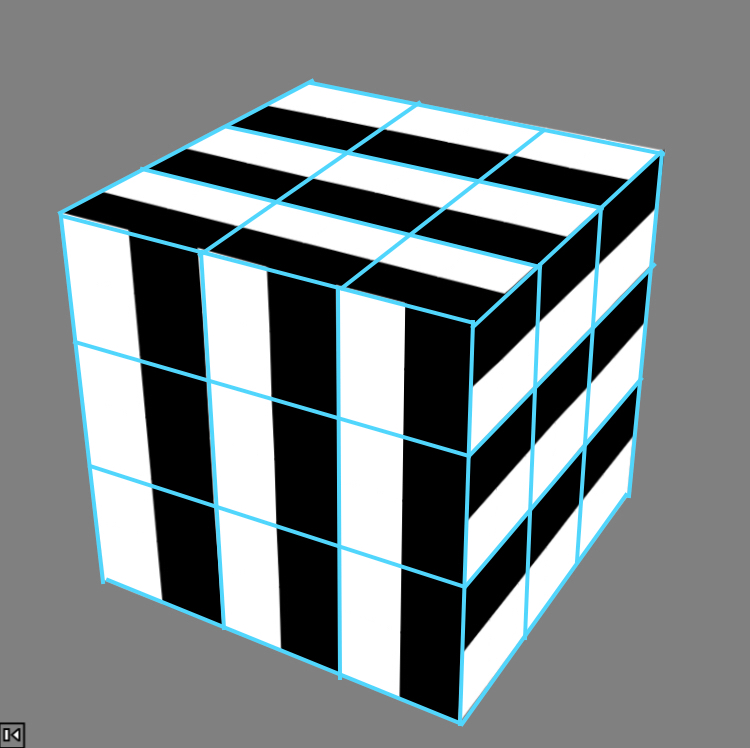
Image.jpeg


(Simulation just for turning around)


As I showed him my phone screen, I said, "One thing to note: a 3x3 simulation doesn't properly represent the patterns on each piece, so for convenience I used a 6x6 design. But this Zebra cube is a 3x3, so when you actually make it..."

He snatched my phone away and disappeared…

I found cubes in the web where each piece has its own face painted black or white, but I couldn't find one where the same face is painted both black and white. I'm sure this cube already exists, but if anyone knows, please let me know the URL.
 
Last edited:
He snatched my phone away and disappeared…

Guess what. He suddenly appeared in front me and showed me his secret and mysterious solution (I am not a star trek/wars fan so I have no idea whether he has some secrets or is mysterious in any way).


He said that next time he comes to visit you he will bring you the Zebra cube.
 
Last edited:
Has Master Yoda appeared before you too!
I wonder what is his secret and mysterious solution…

First of all, what surprised me was that the simulation you attached is 6x6, but two adjacent face & slice rotate at the same time, making it behave like a 3x3 simulation. I tried copying and pasting the code into AnimCubeJS, but only one column rotated. When I set the 'scale option' in the Cube Settings to 1, the parameter 'wca=1' was added to the HTML code, and two columns rotated successfully.

Secondly, what surprised me was that there was already a pattern called 'Zebra cube' (which was expected), but it was different from the pattern on my Zebra cube (which was unexpected).

Walter Randelshofer's (with black and white diagonally across the face) is the Zebra cube, so maybe I should change mine to 'Stripes cube'.

Thank you, bcube, for the info.
 
Last edited:
First of all, what surprised me was that the simulation you attached is 6x6, but two adjacent face & slice rotate at the same time, making it behave like a 3x3 simulation.

I made it look like a 3x3x3 because you said it is a 3x3x3 :). If you said it is a 2x2x2 cube, I would make it look like a 2x2x2.

I tried copying and pasting the code into AnimCubeJS, but only one column rotated.

I guess AnimCubeJS is more powerful than you think :-). Press the "Show move character sets for cube sizes other than 3x3x3" dropdown button in the move parameter section to see the 6x6x6 move set.

When I set the 'scale option' in the Cube Settings to 1, the parameter 'wca=1' was added to the HTML code

I don't think that was the case because the scale and wca parameters are independent of each other (what you are describing would be a bug). While copying your simulator from your post no. 1 I also noticed that some of your settings were redundant because the moderation team preconfigured these settings already for simulators here on speedsolving.com (as mentioned in this post).

Walter Randelshofer's (with black and white diagonally across the face) is the Zebra cube, so maybe I should change mine to 'Stripes cube'.

The closest pattern I found on Werner's page was this (I scanned through 6x6x6 patterns quickly so maybe there is your pattern already included in there).
 
I made it look like a 3x3x3 because you said it is a 3x3x3 :). If you said it is a 2x2x2 cube, I would make it look like a 2x2x2.
You have just given me an idea to make 2x2x2 & 1x1x1 Stripes cubes!

I guess AnimCubeJS is more powerful than you think :-). Press the "Show move character sets for cube sizes other than 3x3x3" dropdown button in the move parameter section to see the 6x6x6 move set.
You bet!
Thanks.

I don't think that was the case because the scale and wca parameters are independent of each other (what you are describing would be a bug). While copying your simulator from your post no. 1 I also noticed that some of your settings were redundant because the moderation team preconfigured these settings already for simulators here on speedsolving.com (as mentioned in this post).
You are right. Today I tried the parameter 'scale: 1' indicated scale=1 in HTML, not 'wca=1'. I think my iPhone7 (not 17) was functioning bad yesterday.

The closest pattern I found on Werner's page was this (I scanned through 6x6x6 patterns quickly so maybe there is your pattern already included in there).
I accessed the page, but there was not an image of the pattern. I think that is also caused by my old iPhone.
It would be appreciated if you could attach some screen copies of that pattern, for my reference.
 
Today I tried the parameter 'scale: 1' indicated scale=1 in HTML, not 'wca=1'. I think my iPhone7 (not 17) was functioning bad yesterday.

Sure, blame the phone ;-)

I think what happened is that you mixed up two notations. The default AnimCubeJS notation doesn´t support the letter w on the 6x6x6 cube, so if you set the move parameter to Lw, the w letter is ignored, hence why you saw the L move animated (it is a little bit more complicated, I don´t want to go into details because they are not important in this case). An excerpt from the move parameter section: "If you switch from this default AnimCubeJS notation to the wca notation, you can append a 'w' letter right after an outer layer turn letter and before basic modifiers ''' and '2'." So why is AnimCubeJS notation kept as default? For backward compatibility reasons. Why speedsolving.com forum has preconfigured the wca=1 setting? To make it easier for the simulator creators so that they don´t need to switch to the WCA notation themselves - because let´s face it, no one is using the AnimCubeJS notation on cube like 6x6x6.

I accessed the page, but there was not an image of the pattern. I think that is also caused by my old iPhone.

This is what I see on my laptop:

werner.png


I am not going to guess what seems to be the problem on your end, but I think this accessibility comparison could be interesting for you/other readers.
 
Last edited:
Sure, blame the phone ;-)

I think what happened is that you mixed up two notations. The default AnimCubeJS notation doesn´t support the letter w on the 6x6x6 cube, so if you set the move parameter to Lw, the w letter is ignored, hence why you saw the L move animated (it is a little bit more complicated, I don´t want to go into details because they are not important in this case). An excerpt from the move parameter section: "If you switch from this default AnimCubeJS notation to the wca notation, you can append a 'w' letter right after an outer layer turn letter and before basic modifiers ''' and '2'." So why is AnimCubeJS notation kept as default? For backward compatibility reasons. Why speedsolving.com forum has preconfigured the wca=1 setting? To make it easier for the simulator creators so that they don´t need to switch to the WCA notation themselves - because let´s face it, no one is using the AnimCubeJS notation on cube like 6x6x6.
Thanks for your background information.

This is what I see on my laptop:

View attachment 45647

Thanks.
Based on the screen copies, it seems to me that there are following crucial differences.
1. That: 6x6 cube. Mine: 3x3 cube.
2. That: 6 colors. Mine: 2 colors.
3. That: pattern. Mine: design.
(So, that can be solved to the initial 'one face one color' state, but mine can not.)

I am not going to guess what seems to be the problem on your end, but I think this accessibility comparison could be interesting for you/other readers.
Thanks.
I will read that to understand the root cause.
 
Under the same concept, I designed a 2x2x2 model of 'Stripes cube'.

(Image)
1767546093206.png


(Stripes cube, 2x2x2)
 
Back
Top