
TK 421
Veteran
the timer app is opening, but the window is not showing.
but Expose uncovered this
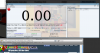
wut button? should i press
but Expose uncovered this
wut button? should i press

Follow along with the video below to see how to install our site as a web app on your home screen.
Note: This feature may not be available in some browsers.


The position for the window can be changed in your profile properties file. This happened to me when I used dual screen and moved the cct window around. Either edit your profile properties file or delete your profile.

Click use keyboard timer.
You should post on the Java forums, or get another java file and test it out. My money is on the fact that it's a Java issue, not a CCT issue.


