User:Dave3457/sandbox/Gallery of VisualCube
From Speedsolving.com Wiki
< User:Dave3457 | sandbox
-

http://cube.crider.co.uk/visualcube.jpg Create the default image of a 3x3x3 cube. The default size is 128px X 128px. -
![[1]Here is the cube rotated zero degrees on any axis](/wiki/images/thumb/e/ea/VisualCube_3_r_x0.png/120px-VisualCube_3_r_x0.png)
[1] Here is the cube rotated zero degrees on any axis -

...&r=x20 We use the parameter r in combination with the value x to rotate the cube 20o on the x-axis. -

...&r=x-20 You can use negative angles. -
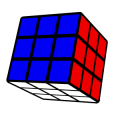
...&r=x20y30 You can rotate it on multiple axises. -
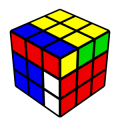
...&alg=RU Using the parameter alg, you can apply an algorithm to the cube. -
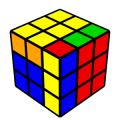
...&case=RU Using the parameter case causes the cube to be arranged so that the algorithm will solve the cube. It applies the inverse of the algorithm. -

...&fd=uuuuuuuuurrrrrrrrrfffffffffdddddddddlllllllllbbbbbbbbb Using the parameter fd you can define each facelet of the cube individually. -
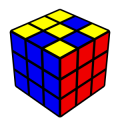
...&fd=ufuuufufurrrrrrrrrfffffffffdddddddddlllllllllbbbbbbbbb By replacing some of the "u"s with "f"s we have defined some of the facelets on the upper side to be front facelets. -

...&fd=ttttttttttttttttttttttttttt Virtually speaking, the cube has a "base" who's default color is black. It is the black base which one is seeing in the gaps between the facelets. -
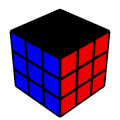
...&fd=tttttttttrrrrrrrrrfffffffffdddddddddlllllllllbbbbbbbbb Using the value t we have made all of the facelets on the top of the cube transparent, exposing the black base underneath them. -

...&fd=ttt... ...bbb&co=0 Using the parameter co we have set the cube opacity" equal to 0 thus making the base completely transparent. -
![...&fd=ttt... ...&bg=A0A0A0Using the parameter bg we have given the image a grey background corresponding to the RGB 6-digit Hex color code [A0A0A0]. Now we can see the white facelets on the bottom,](/wiki/images/thumb/5/59/VisualCube_3_fd_tttttttttr..co_0_bg_A0A0A0.png/120px-VisualCube_3_fd_tttttttttr..co_0_bg_A0A0A0.png)
...&fd=ttt... ...&bg=A0A0A0 Using the parameter bg we have given the image a grey background corresponding to the RGB 6-digit Hex color code [A0A0A0]. Now we can see the white facelets on the bottom, -

...&fo=50 Using the parameter fo we have set the "face opacity" equal to 50 thus making the facelet's opacity only 50%. (Wiki software bug, refer to link for image. Refer to image for bug details) -
![...&fc=ndlswyrobgmptUsing the parameter fc we have colored the first few facelets a variety of specific colors. n=black (noir), d=dark grey, l=light grey, s=silver, w=white, y=yellow, r=red, o=orange, b=blue, g=green, m=magenta, p=pink, t=transparent, a RGB 6-digit Hex color code [27d9ed]](/wiki/images/thumb/9/9c/VisualCube_3_fc_ndlswyrobgmpt.png/120px-VisualCube_3_fc_ndlswyrobgmpt.png)
...&fc=ndlswyrobgmpt Using the parameter fc we have colored the first few facelets a variety of specific colors. n=black (noir), d=dark grey, l=light grey, s=silver, w=white, y=yellow, r=red, o=orange, b=blue, g=green, m=magenta, p=pink, t=transparent, a RGB 6-digit Hex color code [27d9ed] -

...&sch=white,red,green,yellow,orange,blue Using sch we have change the color scheme. -
![...&sch=white,red,060,yellow,orange,blueWe have made the green darker using the RGB 3-digit Hex color code [060]](/wiki/images/thumb/4/47/VisualCube_3_sch_white.red.060.yellow.orange.blue.png/120px-VisualCube_3_sch_white.red.060.yellow.orange.blue.png)
...&sch=white,red,060,yellow,orange,blue We have made the green darker using the RGB 3-digit Hex color code [060] -

...&&dist=1.5 Using dis we have changed the distance from the default value of 5 to 2. -

...&arw=U2U6,F1F3,F7R2 Using the parameter arw we have added an arrow, specifying the beginning and ending facelets. -
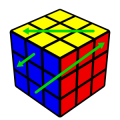
...&ac=green By using ac we have changed the default arrow color to green. -

...&arw=U2U6-s7,F1F3-pink,F7R2R5 We have scaled one arrow, changed the color of another and cause another to curve by specifying a third facelet. -

...&pzl=2 By using pzl we have change the dimensions of the puzzle. -
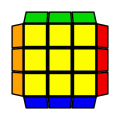
...&&view=plan By setting the parameter view to the value plan we can look directly down on the upper face while still seeing the side facelets of the upper layer. -

...&view=plan&alg=RER2E2RU2R'E2R2E'R'U2 We added an algorithm. -

...&stage=ell By setting the stage parameter to the value ell we can mask the cube so as to highlight the relevant pieces associated with the "edge of last layer" method. (Several others pre-existing mask arrangements also exist.) -

...&stage=ell-z We have rotated the pattern on the z-axis. Notice that we have not rotated the cube.

![[1]Here is the cube rotated zero degrees on any axis](/wiki/index.php/File:VisualCube_3_r_x0.png)


![...&fd=ttt... ...&bg=A0A0A0Using the parameter bg we have given the image a grey background corresponding to the RGB 6-digit Hex color code [A0A0A0]. Now we can see the white facelets on the bottom,](/wiki/index.php/File:VisualCube_3_fd_tttttttttr..co_0_bg_A0A0A0.png)

![...&fc=ndlswyrobgmptUsing the parameter fc we have colored the first few facelets a variety of specific colors. n=black (noir), d=dark grey, l=light grey, s=silver, w=white, y=yellow, r=red, o=orange, b=blue, g=green, m=magenta, p=pink, t=transparent, a RGB 6-digit Hex color code [27d9ed]](/wiki/index.php/File:VisualCube_3_fc_ndlswyrobgmpt.png)

![...&sch=white,red,060,yellow,orange,blueWe have made the green darker using the RGB 3-digit Hex color code [060]](/wiki/index.php/File:VisualCube_3_sch_white.red.060.yellow.orange.blue.png)


For a table listing all of the allowed parameters and values go to Cirder's webpage.